
Need help applying this to your account?
Contact support and we will keep this article attached to your request.
Referral links remain the primary sharing path in Referral Factory because they are easy to click and preserve attribution automatically. Referral codes are the secondary path for situations where a code is easier to capture later.
For the broader definition, examples, and strategy behind codes, read what a referral code is and when to use one.
If you are planning the customer-facing program around links, codes, rewards, and promotion, use the refer a friend program guide alongside this setup article.
A referral code is a referrer-specific identifier. It can be shared verbally, printed on a card, entered into a form, recorded by a sales rep, captured at checkout, or sent through your own system.
When to use referral codes
Use referral codes when the referred person may not click a link before converting.
- In-person, phone, or sales-assisted referrals
- Printed cards, flyers, event material, or direct mail
- Checkout, booking, quote, or signup forms with a referral-code field
- Offline businesses that upload converted customers later
- Custom products that send the code through API or webhooks when a purchase happens
How to distribute codes
Referrers can receive their referral link first, and if codes are enabled for your campaign, they can also receive a referral code.
You can show referral codes in the referrer-facing experience you use, such as the Branded Referrer Portal, Website Widget, On-Click Pop Up, or campaign emails. Depending on the experience, you can show the referral link only, the referral code only, or both.
For more detail about the portal builder, see How to create and use a branded referral portal. For website setup, see the Website Widget setup guide.
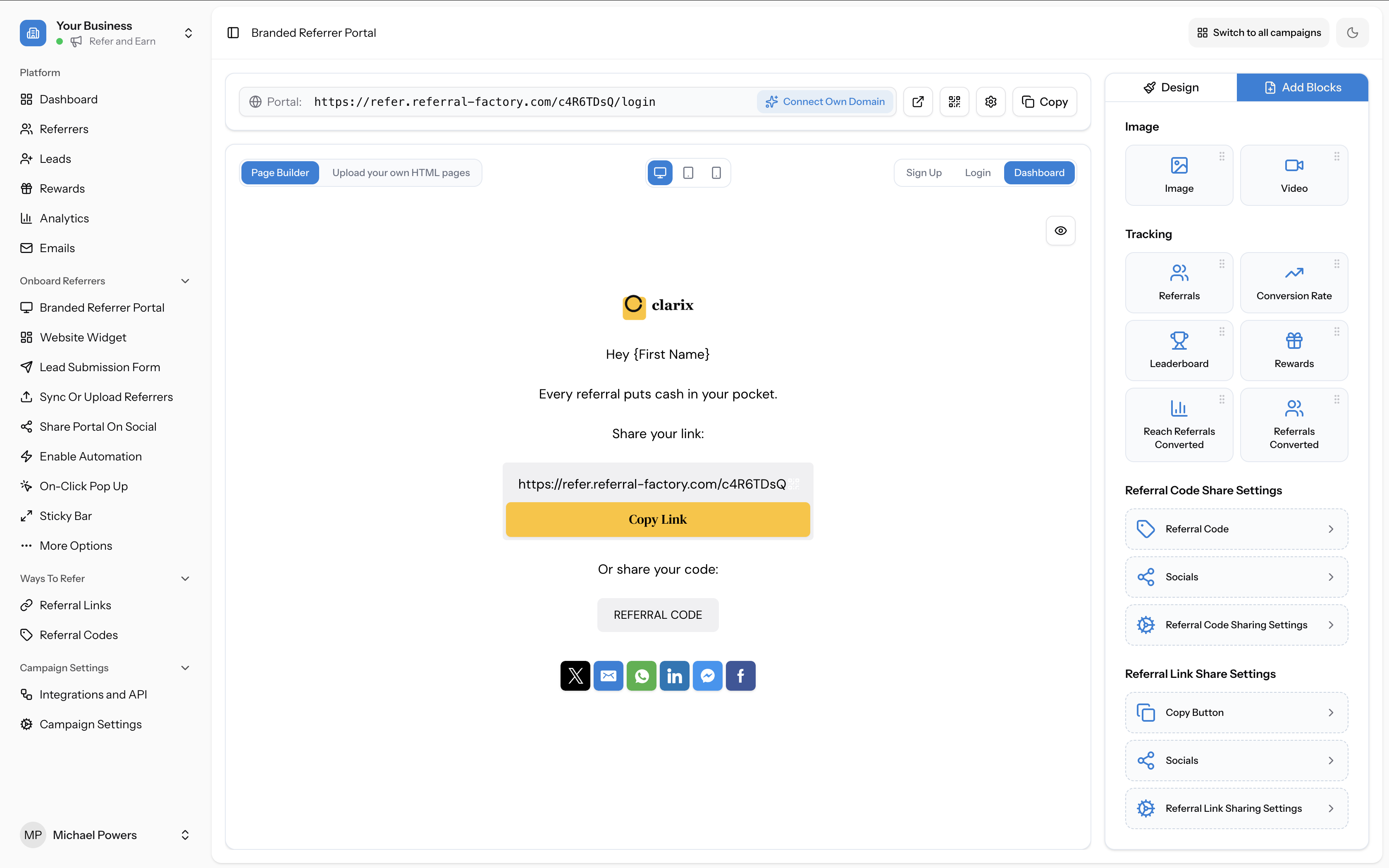
Step 1
Go to Onboard Referrers -> Branded Referrer Portal.
Step 2
Open the Dashboard page.
Step 3
Click Add Blocks.
Step 4
Under Referral Code Share Settings, add or configure the Referral Code block.
Step 5
Add Socials if you want referrers to share their referral code through social sharing buttons.
Step 6
Click Save Changes.
How referral codes are generated
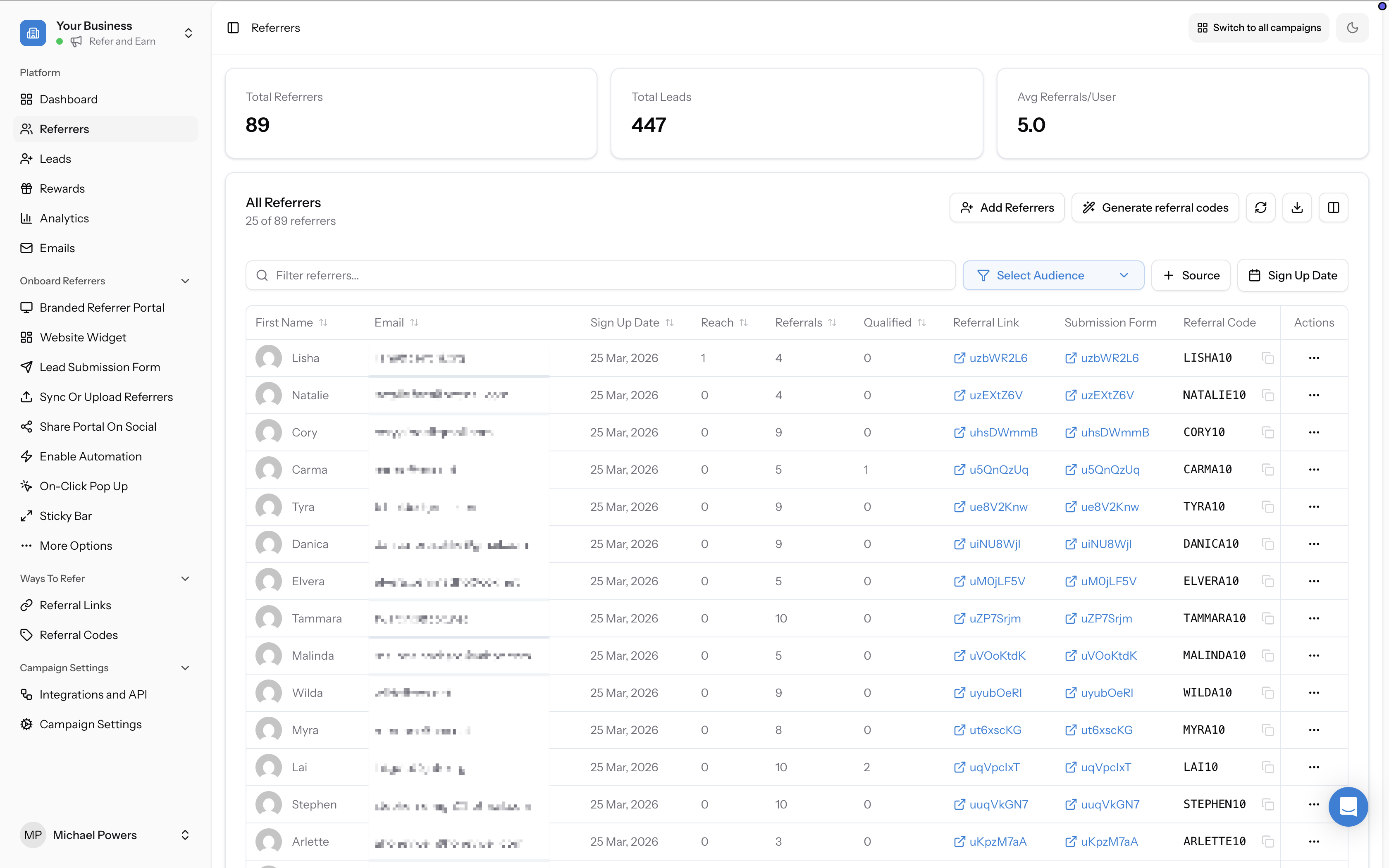
Referral Factory can generate referral codes manually or automatically.
Referral codes are generated automatically when they need to be shown to a referrer in a Referral Factory experience, such as the Branded Referrer Portal, Website Widget, On-Click Pop Up, or an email that includes the referrer's referral code. This means you do not need to regularly return to the Referrers page and click Generate referral codes for referrers who will see their code through one of those configured experiences.
Use manual generation when you need the code before the referrer sees it in Referral Factory, such as when you are sharing the code with a referrer in person or sending it manually.
When you add a referrer manually from the Referrers page, Referral Factory only creates their referral code during that flow if Generate referral code is turned on. If you leave it turned off, the referral code can still be generated later when it needs to be displayed in a configured referrer experience.
- For all existing referrers without a code: go to Referrers, click Generate referral codes, then confirm.
- For one existing referrer without a code: go to Referrers and click Generate in the Referral Code column for that referrer.
- For a new referrer: go to Referrers, click Add Referrers, complete the required fields, turn on Generate referral code, then click Add Referrer.
Using referral codes with Stripe
Some campaigns use referral codes at Stripe checkout. In this setup, the referral code can apply a Stripe coupon discount and also help Referral Factory attribute the lead to the correct referrer.
You do not need Stripe to use referral codes. Stripe is one way to use referral codes when you want code redemption to happen inside Stripe checkout. Referral codes can also be captured in other places, such as forms, sales workflows, uploads, API calls, or other integration workflows depending on your setup.
Before using referral codes with Stripe
Before you use referral codes with Stripe, make sure the campaign and referrer data are ready.
- Stripe must be connected to the campaign. See the Stripe connection guide.
- You must be working inside the correct campaign.
- To generate referral codes for existing referrers, those referrers must already be in the campaign. You can add referrers manually or sync referrers from Stripe.
Choose how Stripe should qualify Leads
If you use Stripe, decide whether a referral code redemption should qualify a lead immediately, or whether the lead should stay pending until they meet your Stripe purchase rules.
If Qualify when referral code is used is turned off, a referral code redemption can still create a lead in Referral Factory. The lead will stay pending until another qualification rule is met.
For example, you might give leads 10% off when they use a referrer's referral code, but only reward the referrer after the lead spends $20. In that case, leave Qualify when referral code is used turned off, turn on Qualify when custom rules are met, and configure your spend, time, and refund rules in Stripe settings.
For more detail about automatic Stripe qualification, see the Stripe automatic-qualification guide. If you are new to qualification, see the qualification overview.
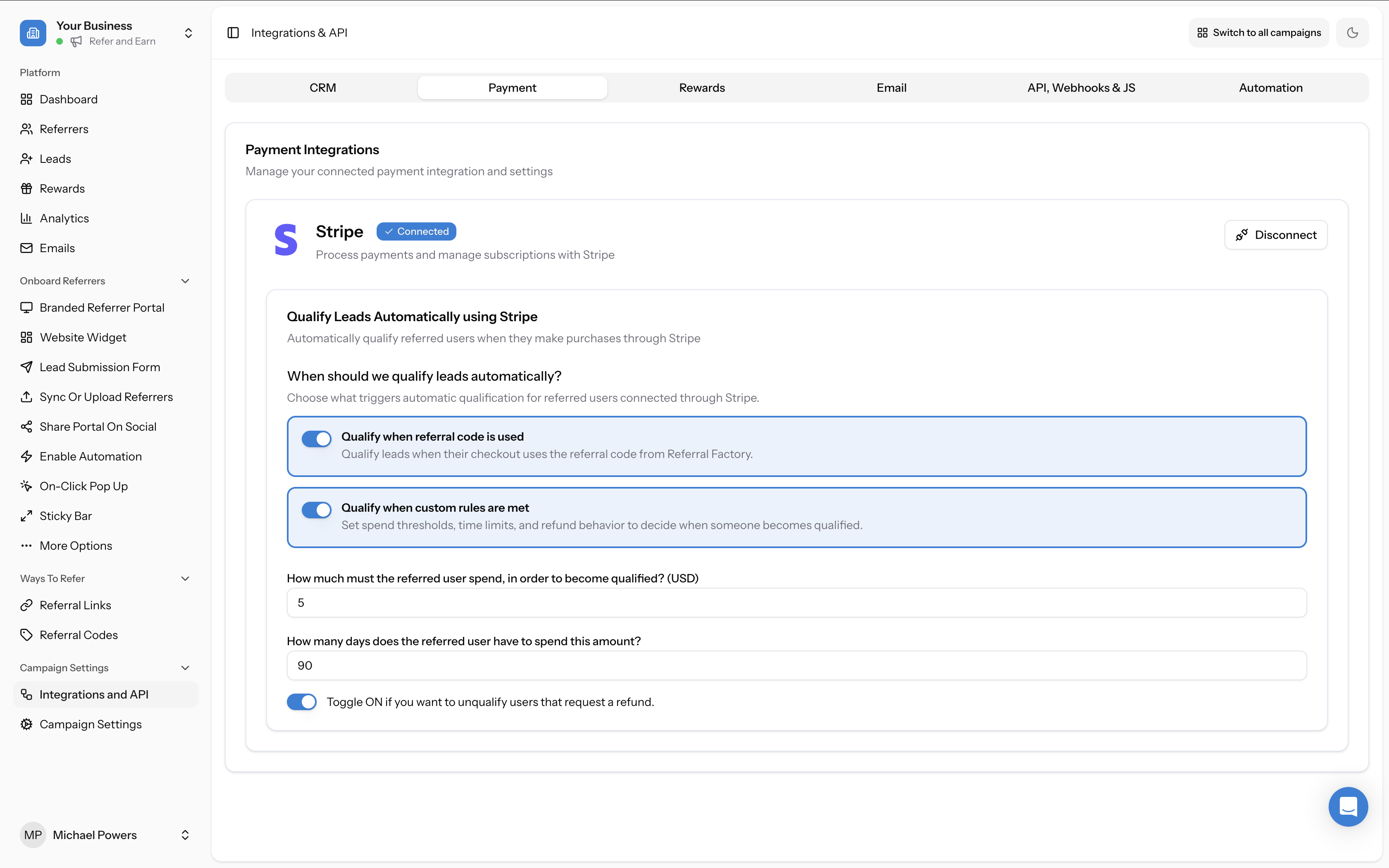
Step 1
Go to Campaign Settings -> Integrations and API.
Step 2
Select the Payment tab.
Step 3
Under Stripe, turn on Qualify when referral code is used if you want leads to be qualified as soon as they use a generated referral code.
Create the Campaign Coupon in Stripe
If your referral codes should work at Stripe checkout, create the coupon that your generated referral codes will use.
Referral Factory creates the coupon inside your connected Stripe account. Each generated referral code is tied to this campaign coupon.
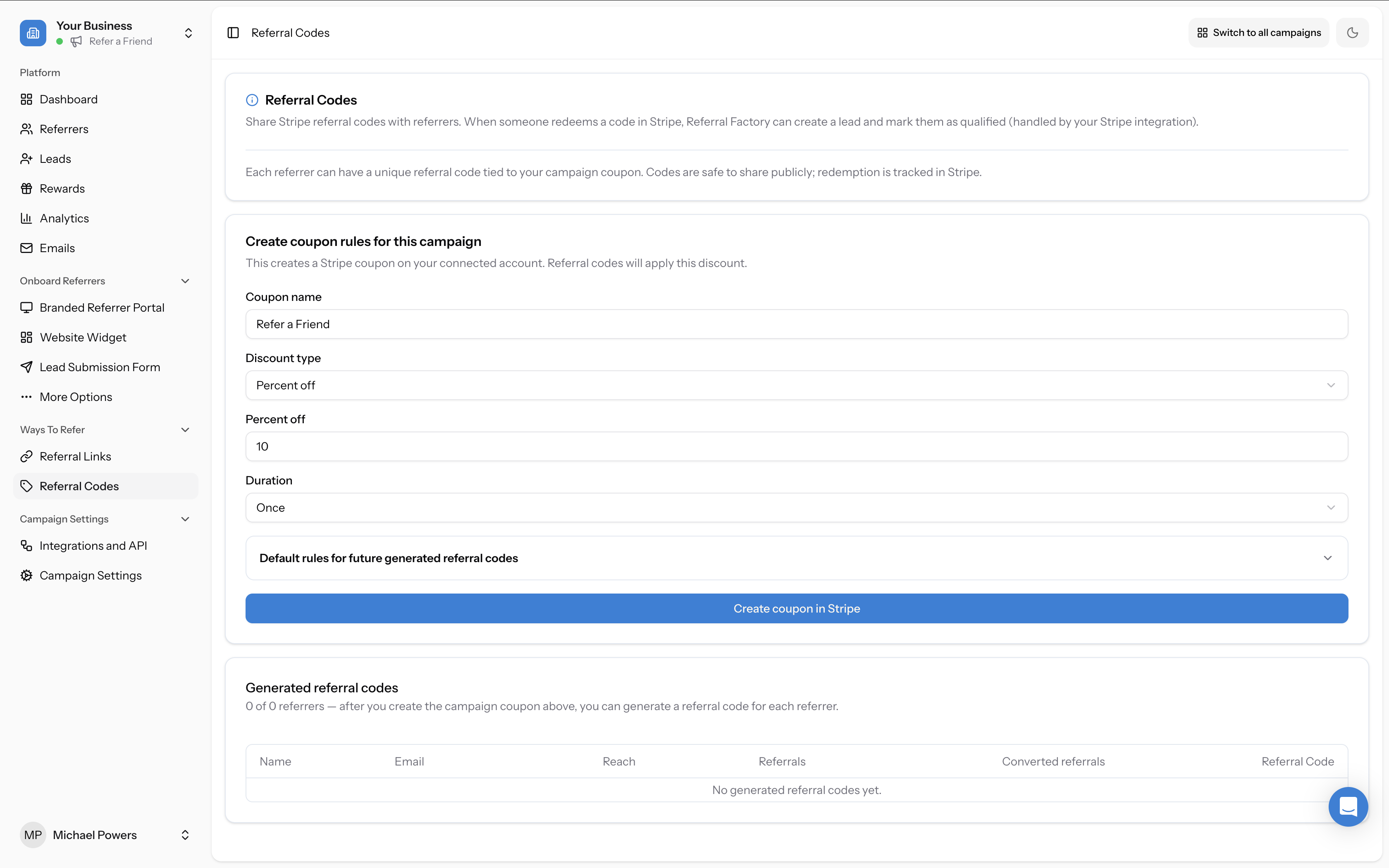
Step 1
Go to Ways To Refer -> Referral Codes.
Step 2
Under Create coupon rules for this campaign, enter a Coupon name.
Step 3
Select the Discount type.
Step 4
Enter the discount amount or percentage.
Step 5
Select the Duration.
Step 6
Click Create coupon in Stripe.
Set the default rules for Stripe referral codes
Before you click Create coupon in Stripe, you can expand Default rules for future generated referral codes.
After the campaign coupon has been created, you can update these defaults from the Campaign coupon details panel by clicking Update predefined rules. These predefined rules apply to future generated referral codes. They do not change the coupon discount or duration.
- Eligible for first-time order only: only new customers can qualify as referrals when they use a generated referral code.
- Limit redemption count: limit how many times each generated referral code can be used.
- Add expiration date: set an expiry date for generated referral codes.
- Require minimum order value: require a minimum order value before the referral code can be used.
Review referral code performance
Go to Ways To Refer -> Referral Codes to review your referral code setup and performance.
If you are using Stripe, click Show details in the Campaign coupon (Stripe ID) section to review the Stripe coupon ID, discount, duration, status, and predefined rules for generated referral codes.
- How many referrers have a referral code.
- How many leads came from referral codes.
- The generated referral codes for your referrers.
- The Stripe coupon details for the campaign, if you are using Stripe.
What happens next
When a lead uses a generated referral code, Referral Factory attributes the lead to the correct referrer.
If the referral code is redeemed in Stripe, Stripe applies the coupon discount. Referral Factory then adds the person as a lead in your campaign. If Qualify when referral code is used is enabled, Referral Factory also marks that lead as qualified.
If Qualify when referral code is used is turned off, the lead stays pending until another qualification rule is met, such as your custom Stripe rules. When the lead qualifies, any configured rewards can move forward according to your reward setup. See How to set up a reward.
Important notes
- Referral codes and referral links can both be used in the same campaign.
- Each referrer can have a unique referral code tied to the campaign.
- You only need to manually generate referral codes when you need to access or share them before the referrer sees them in a Referral Factory experience.
- Adding or syncing referrers does not automatically email them their referral code. To email referrers, use your campaign emails or automations. See How to use Referral Factory's built-in email tools to ask for referrals.
- If you use Stripe, Stripe must stay connected for checkout redemption and tracking to work.
- If you use Stripe, the discount can be an amount off, such as $10 off, or a percentage off, such as 10% off.
Troubleshooting: referral codes are not being generated for new Referrers
If you are adding a referrer manually from the Referrers page and want the referral code created immediately, check whether Generate referral code was turned on when the referrer was added.
If the referrer should receive their referral code through the Branded Referrer Portal, Website Widget, On-Click Pop Up, or an email, check that the Referral Code block or referral code content is included in that experience. Referral Factory generates the code automatically when it needs to be shown.
Troubleshooting: a referral code was used in Stripe, but the Lead was not instantly Qualified
Check the following:
If you are using custom purchase rules instead, check that the lead has met the spend, time, and refund rules you configured.
- Stripe is still connected.
- Qualify when referral code is used is enabled under Campaign Settings -> Integrations and API -> Payment -> Stripe.
- The code used at checkout was generated by Referral Factory for this campaign.
- The referral code meets the predefined Stripe rules, such as first-time order only, redemption limit, expiration date, or minimum order value.
Troubleshooting: I want to change the Stripe coupon discount or duration
The predefined rules can be updated after the coupon is created, but the coupon discount and duration are not edited from the predefined rules panel.
If you need help changing a live coupon setup, contact support@referral-factory.com and include the campaign name and the Stripe coupon ID.