
Need help applying this to your account?
Contact support and we will keep this article attached to your request.
Connecting Stripe to Referral Factory lets you automatically qualify referrals when a referred customer makes a payment. This is one of the most popular qualification methods for SaaS and e-commerce businesses.
Stripe is not required for referral codes. Use this guide when Stripe is where the purchase or code redemption happens. If your business captures referral codes somewhere else, qualify those referrals through upload, API, webhooks, or another integration.
Before you start
You need an active Stripe account. Connect it in Integrations and API → Payment tab.
Connecting Stripe
Click Connect on the Stripe tile. A modal will appear asking you to choose between Connect Live Mode and Connect Test Mode. Click Connect Stripe to proceed.
You will be redirected to Stripe's OAuth page. Log in and authorise Referral Factory to access your Stripe account. This is a standard OAuth connection — your Stripe credentials are never shared with Referral Factory.
Once connected, Stripe will show as Connected in the Payment tab.
If you use Stripe promo codes
Some campaigns use Stripe promo codes so the referred customer can enter a code directly in Stripe checkout. In that setup, Stripe handles the code redemption and Referral Factory uses that redemption as part of the attribution and qualification workflow.
When you configure generated codes, check the campaign coupon and rules before launch. Common rules include first-time order only, redemption limits, expiration dates, and minimum order value.
- Confirm the Stripe coupon is the one you want codes generated from
- Test one generated code in Stripe test mode before going live
- Check that the lead is created or qualified in Referral Factory after redemption
- Confirm rewards only trigger after the qualification rule is met
Setting your qualification rule
With Stripe connected, the Qualify Leads Automatically using Stripe section appears directly on the Payment tab. It reads: "Automatically qualify referred users when they make purchases through Stripe."
Configure the following:
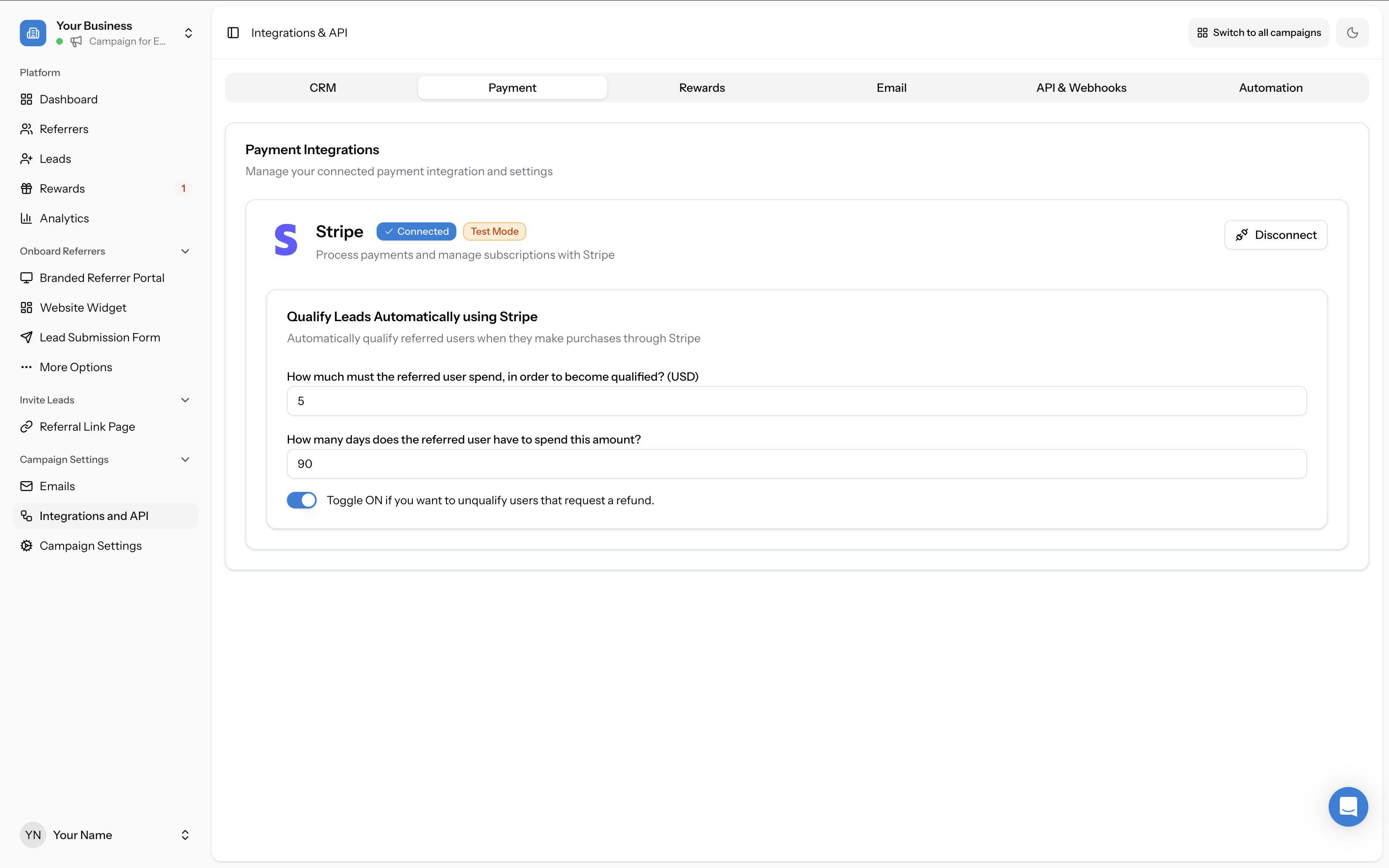
When a referred person makes a qualifying payment in Stripe, their lead status automatically changes from Pending to Qualified in Referral Factory, and any configured rewards are triggered.
- How much must the referred user spend, in order to become qualified? (USD) — Enter a minimum payment threshold (e.g. $5). The referred user's total spend must meet or exceed this amount to be qualified.
- How many days does the referred user have to spend this amount? — Enter a time window in days (e.g. 90). The payment must occur within this many days of the referral.
- Toggle ON if you want to unqualify users that request a refund — When enabled, if a qualified user later requests a refund in Stripe, their lead status is automatically changed back from Qualified to Pending.