
Need help applying this to your account?
Contact support and we will keep this article attached to your request.
Referral Factory can use Stripe to track qualifying payments and can also issue Stripe Credits as rewards, so the troubleshooting steps depend on which part of the workflow you are using.
A typical Stripe reward workflow looks like:
Lead becomes Qualified → Reward becomes Due → Stripe Credit is issued → Credit is applied to the recipient's Stripe customer balance
Stripe Credits are not cash payouts. They reduce what the recipient owes on future Stripe-billed invoices or subscriptions. The reward recipient must therefore be connected to an existing customer in your Stripe account.
If you are using Stripe for qualification instead, the workflow is:
Referred Lead makes a qualifying Stripe payment → Referral Factory detects the payment → Lead changes from Pending to Qualified → Any qualification-based rewards can be triggered.
Prerequisites and connection
Start by checking that Stripe is still connected.
Go to Campaign Settings → Integrations and API → Payment and confirm that Stripe shows as Connected.
Also check that:
You connected the correct Stripe account.
You are using Live Mode for real transactions or Test Mode for testing.
Your Stripe account has the necessary permissions.
The customer or payment you are testing exists in the same Stripe account you connected.
If the connection has been removed or authorization has changed, reconnect Stripe before testing again.
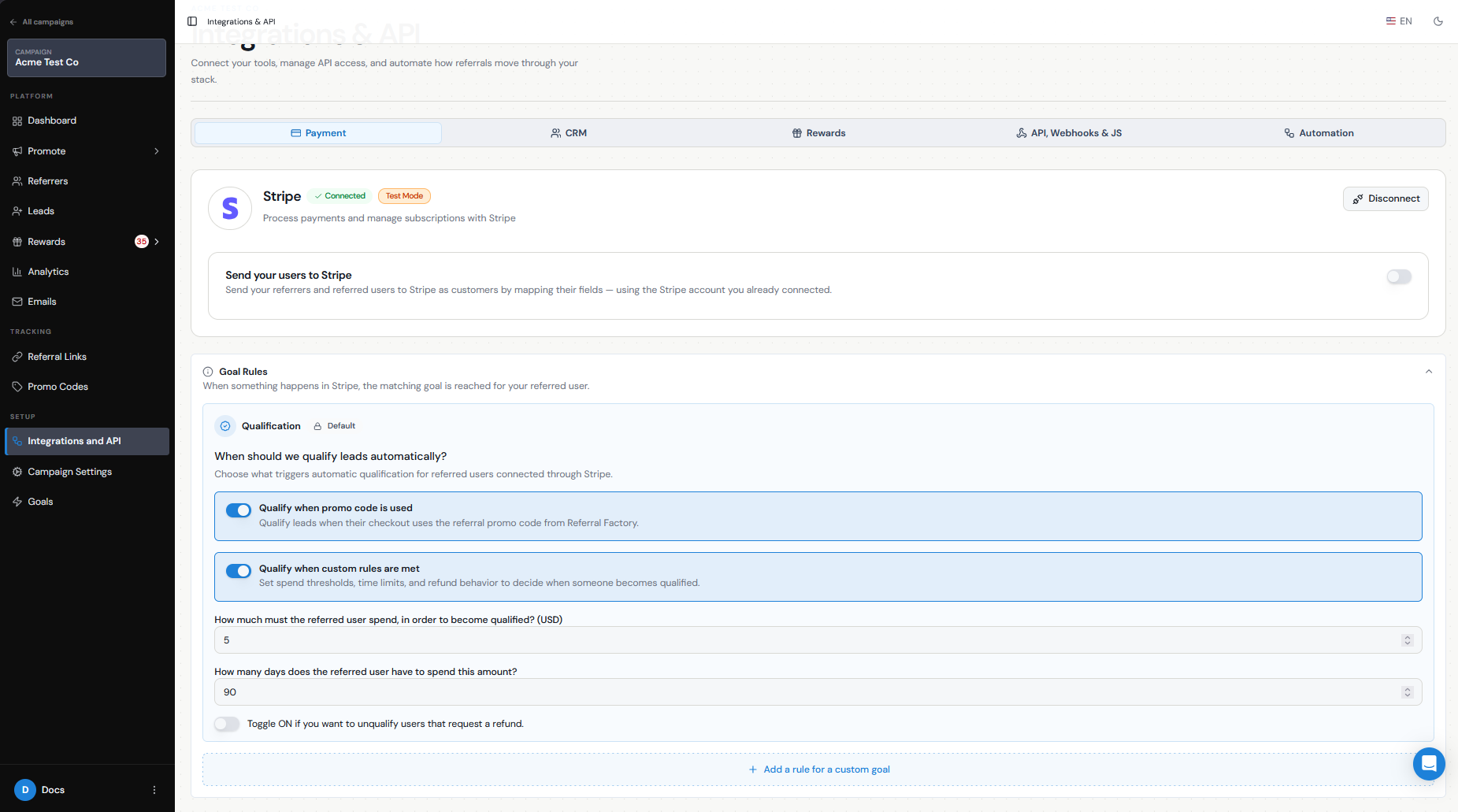
Setup
If you are using Stripe to automatically qualify Leads, confirm that your qualification settings are configured correctly, including:
The minimum amount the referred customer must spend.
The number of days they have to reach that amount.
Whether refunded customers should automatically be unqualified.
If you are using Stripe Credits as a reward, check that the reward is active, has the correct recipient and value, and uses Stripe Credits as the issuing method.
Trigger/recipient data
Make sure the person involved in the workflow can be matched correctly.
For qualification, the referred customer must already exist as a Lead in Referral Factory and then complete the qualifying payment in Stripe.
For a Stripe Credit reward, the reward recipient needs to be matched to an existing Stripe customer. If Referral Factory cannot find the customer automatically, you may need to sync them using their email address before the credit can be issued.
Also check that the email address in Referral Factory matches the correct customer in Stripe.
Automatic/manual delivery
Stripe rewards can be issued manually or automatically.
If Auto Issue Rewards is turned off, a successfully triggered reward will remain under Due Rewards until you issue it.
If Auto Issue is enabled, Referral Factory will attempt to issue the Stripe Credit automatically when the reward becomes due.
If you expected a reward to be sent automatically but it is still Due, check the reward's Auto Issue setting first.
If you issue manually and the recipient is not yet synced with Stripe, follow the prompt to find and sync the Stripe customer before completing the reward.
Status/errors
The reward status can help show where the issue is occurring.
No reward createdCheck whether the Lead actually became Qualified and whether the correct reward rule is active.
Reward is DueThe reward was triggered successfully but is still waiting to be issued.
Reward fails when issuedCheck the Stripe connection, recipient matching, currency, and reward configuration.
Lead remains Pending after paymentCheck the qualification amount, attribution window, Stripe account, and whether the payment belongs to the correct referred customer.
If your Stripe connection and settings look correct but the workflow still fails, contact our support team so we can investigate the specific transaction or reward.
Fees/region considerations
Stripe Credits are applied to the customer's Stripe balance rather than being sent as a cash payout.
The currencies and billing behavior available to you depend on your Stripe account and how you charge customers. Before launching, make sure the reward currency matches the setup you use in Stripe.
If you need to send an actual cash payout or gift card rather than account credit, consider a different issuing method such as PayPal or Tremendous.
Testing and troubleshooting
Test the complete workflow before using Stripe with live referrals.
Connect Stripe in Test Mode.
Create a test Referrer and referred Lead.
Use the same customer details in Stripe.
Complete the payment or qualification event you configured.
Confirm that the Lead becomes Qualified.
If a Stripe reward is configured, confirm that it appears under Due Rewards.
Issue the reward and confirm the correct Stripe customer receives the credit.
If you use automatic issuing, repeat the test with Auto Issue Rewards enabled.
Check Stripe to confirm the credit or transaction appears as expected.