
Need help applying this to your account?
Contact support and we will keep this article attached to your request.
Overview
If your team already uses HighLevel, Referral Factory can add a referral program around your existing contacts and opportunities. Referral Factory manages the referral experience and attribution, while HighLevel remains the place your team works with contacts, opportunities and follow-up.
Why use Referral Factory if I already use HighLevel?
You can keep HighLevel as your marketing and sales workspace and add Referral Factory for the parts HighLevel is not designed to manage: recruiting referrers, giving them a referral link and sharing experience, tracking who referred each lead, qualifying the referral and applying campaign reward rules.
What can I automate between Referral Factory and HighLevel?
You can turn existing HighLevel contacts into referrers, write their referral links back to HighLevel, send new referrers and leads to HighLevel as contacts or opportunities, and use HighLevel changes to qualify referrals. The contact-versus-opportunity choice for leads is the key decision in this integration.
How do existing HighLevel contacts become referrers?
You sync all contacts, or only the contacts with one tag, into your campaign as referrers. Each one gets a Referral Factory link and sharing option, and Referral Factory can write the link to a contact field in HighLevel. With an ongoing sync, new HighLevel contacts that match are added as referrers automatically when they are created or tagged.
What happens when someone makes a referral?
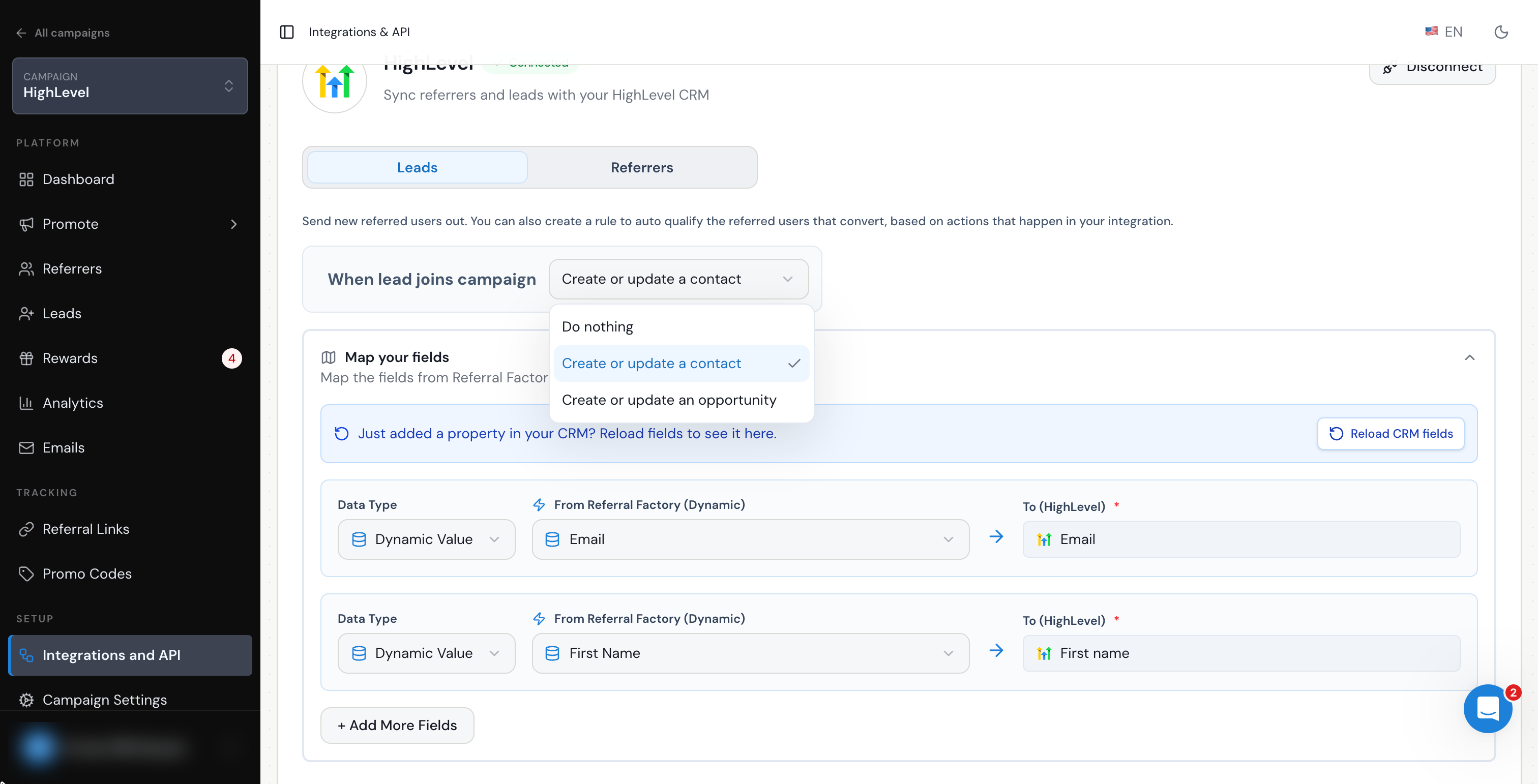
The referrer shares through Referral Factory. When the new lead joins the campaign, Referral Factory sends them to HighLevel as the record selected for the campaign: a contact, or an opportunity in the pipeline and stage you chose, together with its contact. Your team then follows its normal HighLevel process.
Why does the contact-versus-opportunity choice matter?
It decides how the referral can be qualified. If Referral Factory creates a contact for each lead, the referral can qualify when a contact field changes to a value you choose, such as a tag being added. If Referral Factory creates an opportunity, the referral can qualify when the opportunity reaches a stage you select. Choose the record that matches how your team marks a referral as a success.
What happens after Referral Factory qualifies the referral?
Referral Factory updates the referral status and applies the campaign rules. If your campaign rewards qualified referrals, the reward process can then begin. For commission rewards, Referral Factory can use the monetary value of the HighLevel opportunities linked to the referral.
What would the full automated journey look like with HighLevel?
An existing HighLevel contact becomes a referrer and receives a Referral Factory link, which is also written back to their contact. They share it, and Referral Factory sends the new lead to HighLevel as an opportunity with its contact. Your team works the opportunity in HighLevel, and when it reaches the selected stage, HighLevel tells Referral Factory, the referral is usually qualified within a few minutes, and the campaign reward process can begin.
What stays in HighLevel and what stays in Referral Factory?
HighLevel remains the place for contacts, tags, opportunities, pipelines and your workflows. Referral Factory remains the place for the campaign, referrer experience, attribution, qualification rule and rewards.
Which setup guides should I read next?
See the HighLevel referral-link sync guide, the HighLevel lead-sync guide, the HighLevel referrer-sync guide and the HighLevel automatic-qualification guide. Use the HighLevel troubleshooting guide if something does not work as expected.