
Need help applying this to your account?
Contact support and we will keep this article attached to your request.
Overview
Referral Factory can qualify a lead automatically when the related HighLevel record changes in the way you choose: the opportunity reaches one of the stages you select, or a contact field changes to a value you choose, such as a tag being added.
What does it mean to qualify a lead in Referral Factory?
A lead is qualified when they complete the action that counts as a successful referral for your campaign. For example, you might qualify the lead when their HighLevel opportunity reaches the stage your team uses for closed deals, or when your team tags the contact as a customer.
When the rule is met, the referral status changes to qualified in Referral Factory. Qualification and rewards are separate settings, so a reward is only triggered if your campaign has a reward rule that uses qualified referrals.
How does automatic qualification with HighLevel work?
When a lead is sent to HighLevel, Referral Factory remembers the contact or opportunity it created. HighLevel then tells Referral Factory whenever that contact or opportunity changes. If the change matches the rule you selected, Referral Factory marks the referral as qualified.
The rule is checked every time the record changes. If the opportunity later moves to a stage you did not select, or the contact field no longer has the value you chose, the referral goes back to not qualified. Select every stage or value that should count.
Which qualification methods can I use?
Open the Leads tab and expand Goal Rules. In the Qualification card, the options under Select the method you want to use to qualify depend on what the campaign sends to HighLevel:
- Create or update a contact: A contact field changes.
- Create or update an opportunity: The opportunity stage changes.
- Either option: Do not qualify my referrals, if you want to qualify referrals another way.
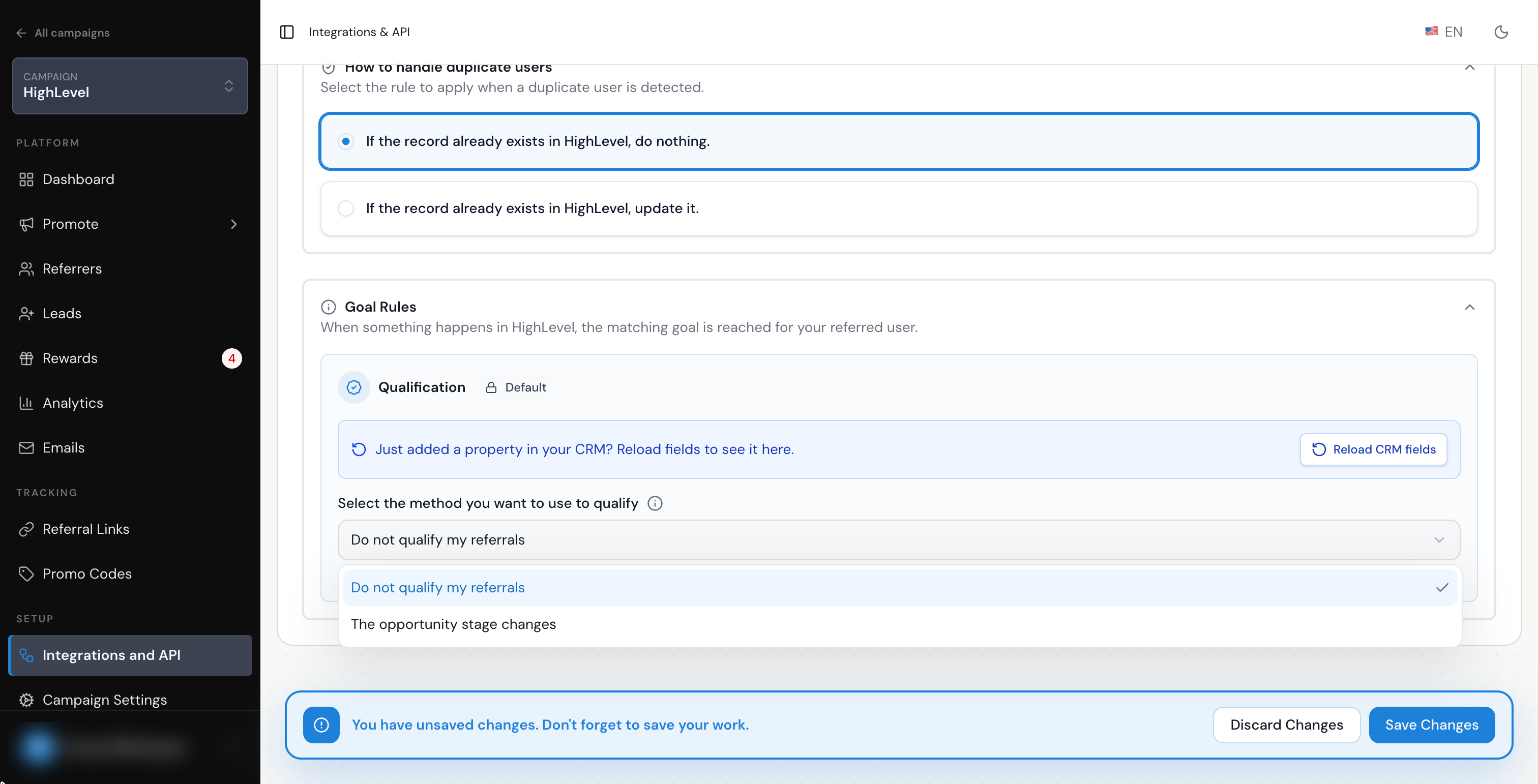
How do I qualify referrals when the opportunity reaches a stage?
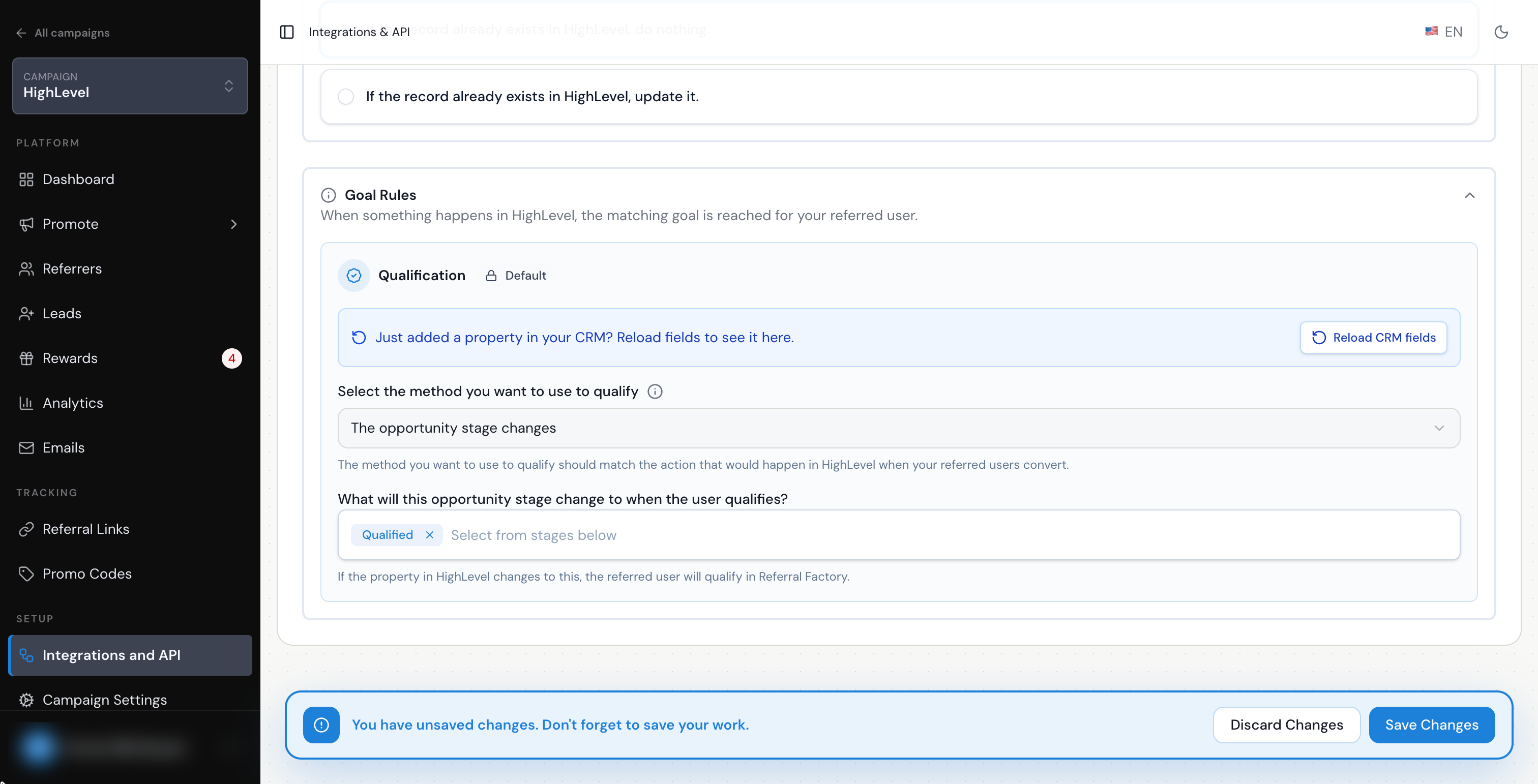
Make sure the Leads tab is set to Create or update an opportunity and that a Pipeline is selected in Map your fields. To set this up, follow the HighLevel lead-sync guide. Then choose The opportunity stage changes.
Under What will this opportunity stage change to when the user qualifies?, choose one or more stages of that pipeline. When the opportunity reaches one of these stages in HighLevel, the referral qualifies in Referral Factory. If you change the pipeline later, the selected stages are cleared, so choose them again.
How do I qualify referrals when a contact field changes?
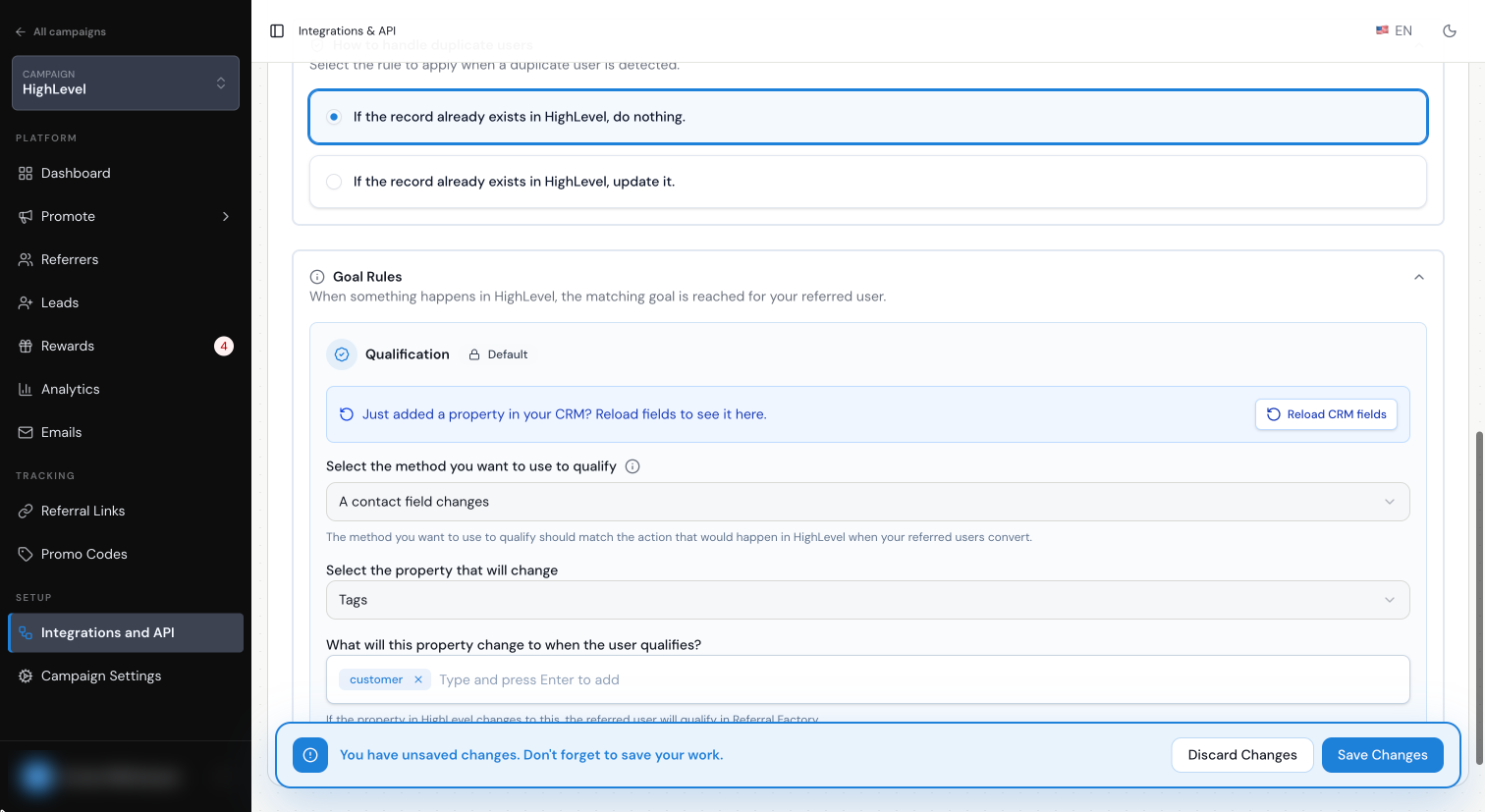
Make sure the Leads tab is set to Create or update a contact, then choose A contact field changes. Under Select the property that will change, choose the HighLevel contact field your team updates when a referral becomes a customer, such as Tags or a custom field.
Under What will this property change to when the user qualifies?, type each value and press Enter, or choose from the field’s options. For example, choose Tags and add customer to qualify the referral when your team or a HighLevel workflow adds the customer tag to the contact.
How does Referral Factory know which lead to qualify?
Referral Factory links the HighLevel contact or opportunity it created to the matching referral. When that specific record meets the rule you selected, Referral Factory qualifies that referral rather than every referral in the campaign. Leads that were not sent to HighLevel by Referral Factory cannot be qualified this way.
How long does automatic qualification take?
HighLevel sends each change to Referral Factory as it happens, so a referral is usually qualified within a few minutes. Qualification only runs while the campaign is live, so check that the campaign has launched and has not ended.
What happens in Referral Factory after a lead is qualified?
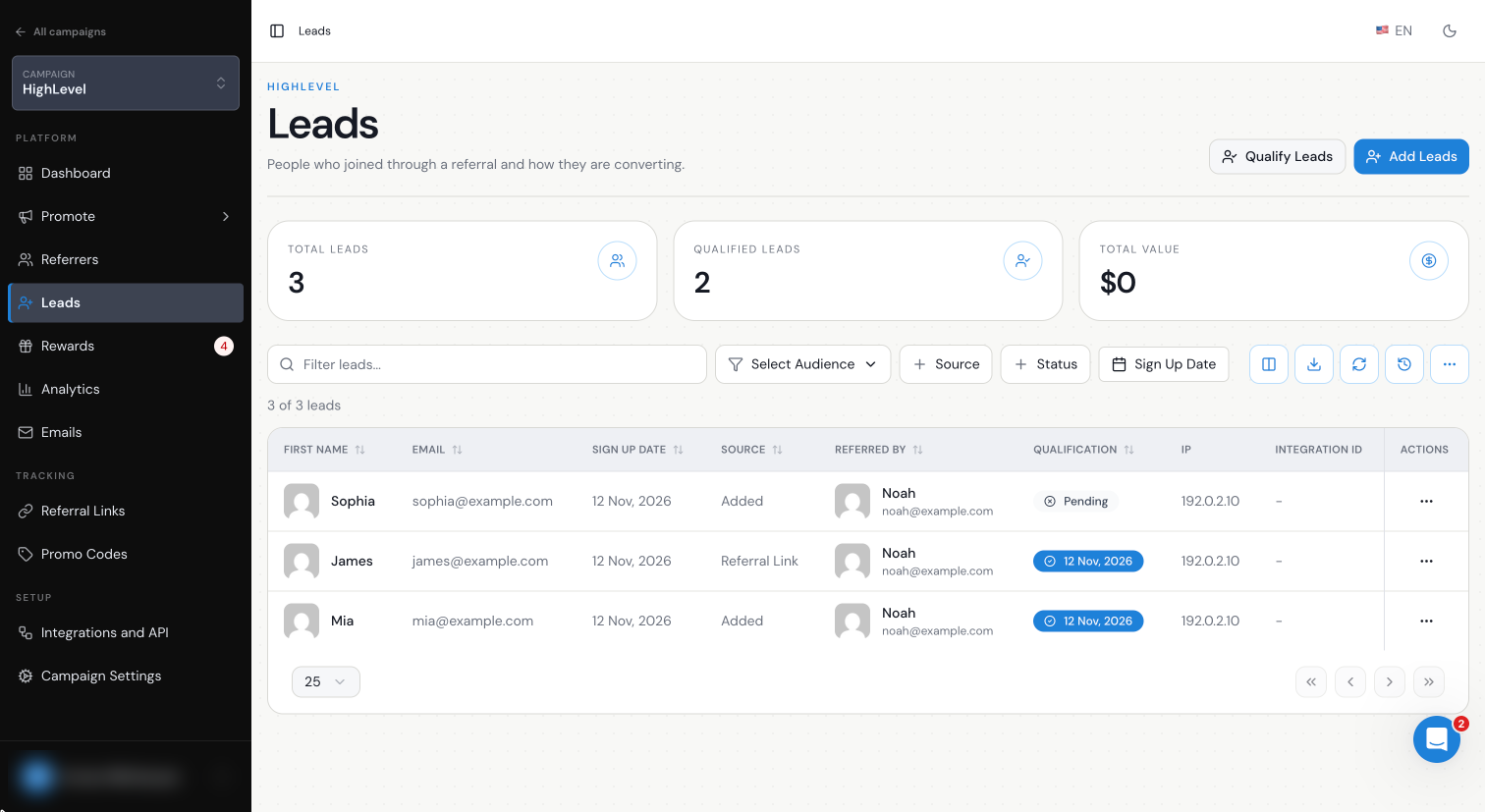
The referral status changes to qualified in Referral Factory, and the Leads table shows the qualification date. Any campaign reward rule that depends on qualification can then continue according to its own settings.
Can I use Goal Rules for other milestones?
Yes. Under Goal Rules you can also add a rule for a custom goal, using the same methods. Each goal is reached when the HighLevel contact or opportunity changes in the way you choose.
Does qualifying a lead trigger a reward?
It can. Qualification makes the referral eligible for a reward when the campaign has a reward rule based on qualified referrals. Qualification does not by itself define the reward, its timing, or its notification settings.
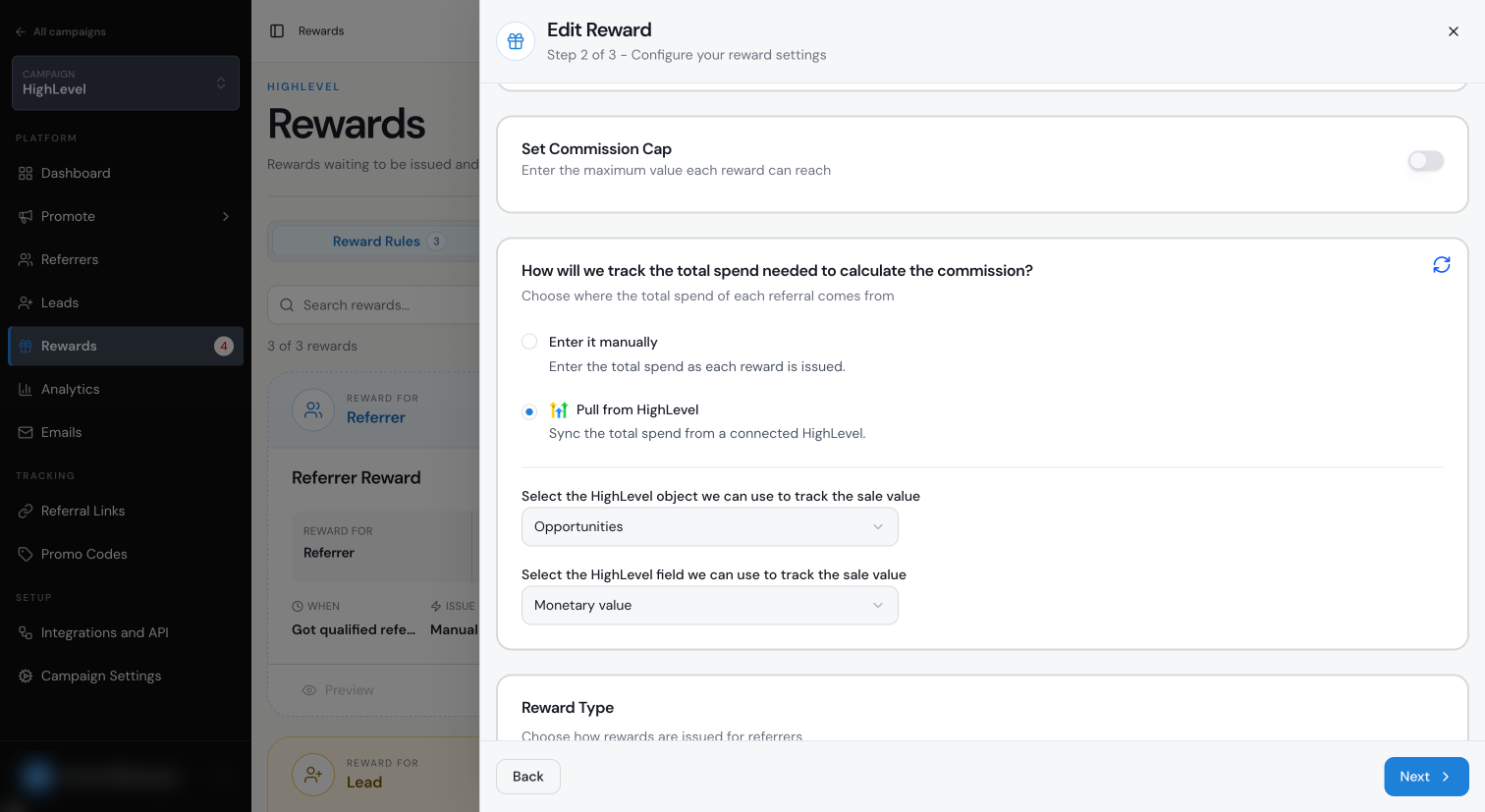
For commission rewards, choose Pull from HighLevel, then Opportunities, then Monetary value, to calculate the commission from the monetary value of the opportunities linked to the referral’s contact.
How do I test automatic qualification with HighLevel?
Use a dummy referral and the dummy HighLevel record that Referral Factory creates for it. Move the opportunity to the selected stage, or change the contact field to the selected value. After a few minutes, open the referral in Referral Factory and confirm that its status is qualified. Remember to select Save Changes before you test.
If the referral does not qualify, confirm that the opportunity is in the selected pipeline and stage, or that the contact field has exactly the value you chose. Use dummy data for testing so you do not change a real customer record.