
Need help applying this to your account?
Contact support and we will keep this article attached to your request.
Overview
When someone joins your campaign as a new referrer, Referral Factory can create or update a matching contact or opportunity in HighLevel. This guide covers new referrers who join after you save the setup. To import people who already exist in HighLevel, use the HighLevel referral-link sync guide.
Can I automatically send new referrers to HighLevel?
Yes. In the connected HighLevel settings, the Referrers tab lets you choose what happens when a referrer joins the campaign. You can create or update a contact or an opportunity in HighLevel, then map the referrer information that should be sent.
Before you start
Make sure HighLevel is connected on the CRM page and that you know whether you want new referrers to appear as contacts or as opportunities. To store referral links in HighLevel, create a text custom field for contacts first, for example Referral Link. Select the campaign first. You will then use Integrations and API, CRM, and the Referrers tab.
When is a new referrer sent to HighLevel?
Referral Factory sends the referrer when they join the campaign, after you have selected a HighLevel action, completed the required mappings, and saved the changes. The setting applies to new referrers who join after setup.
How do I choose what happens when a new referrer joins?
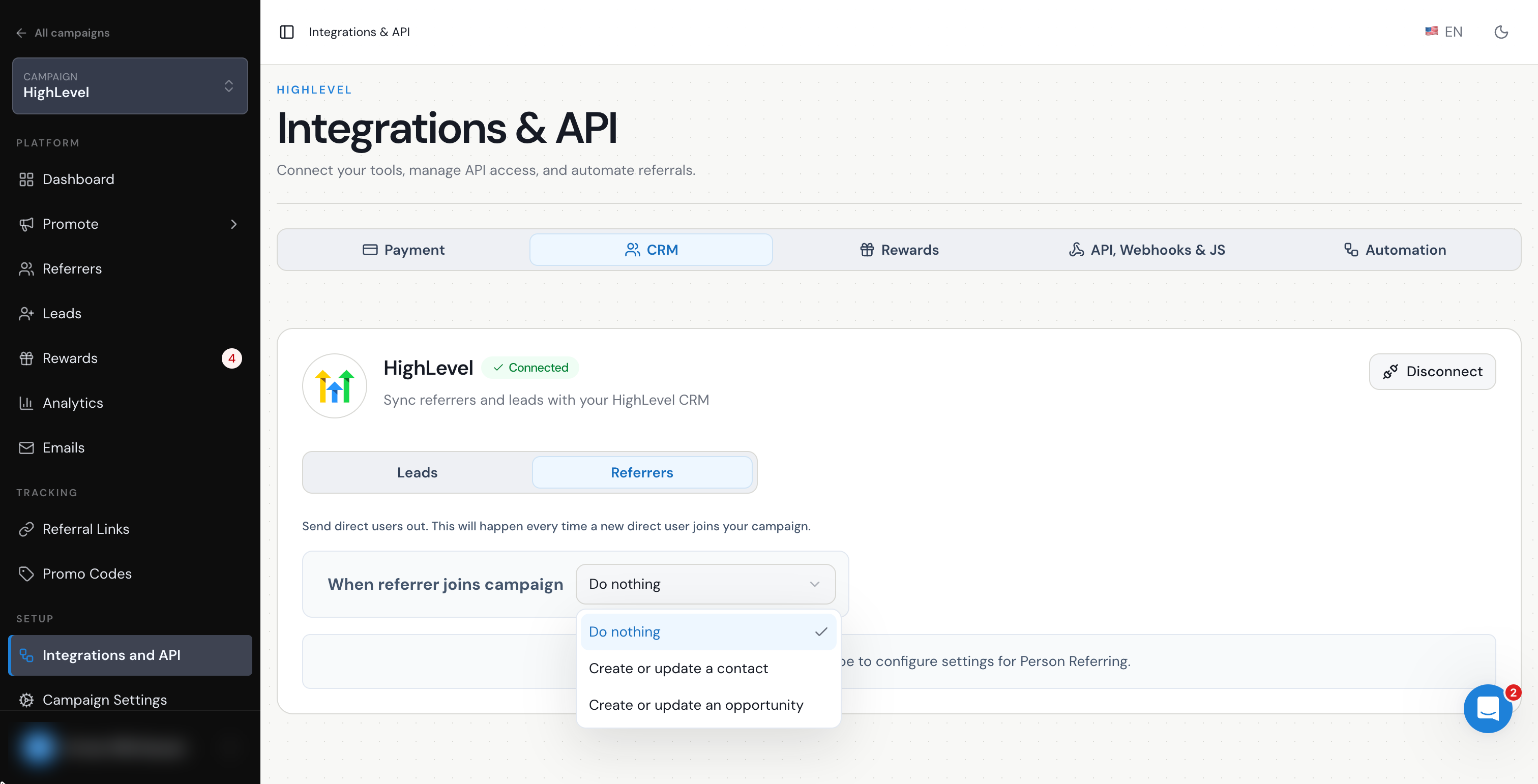
Open Integrations and API, select CRM, and select the Referrers tab. Under When referrer joins campaign, choose Create or update a contact or Create or update an opportunity. The default is Do nothing, so new referrers are not sent until you change it. The fields shown next depend on your choice.
How do I create or update a HighLevel contact for each referrer?
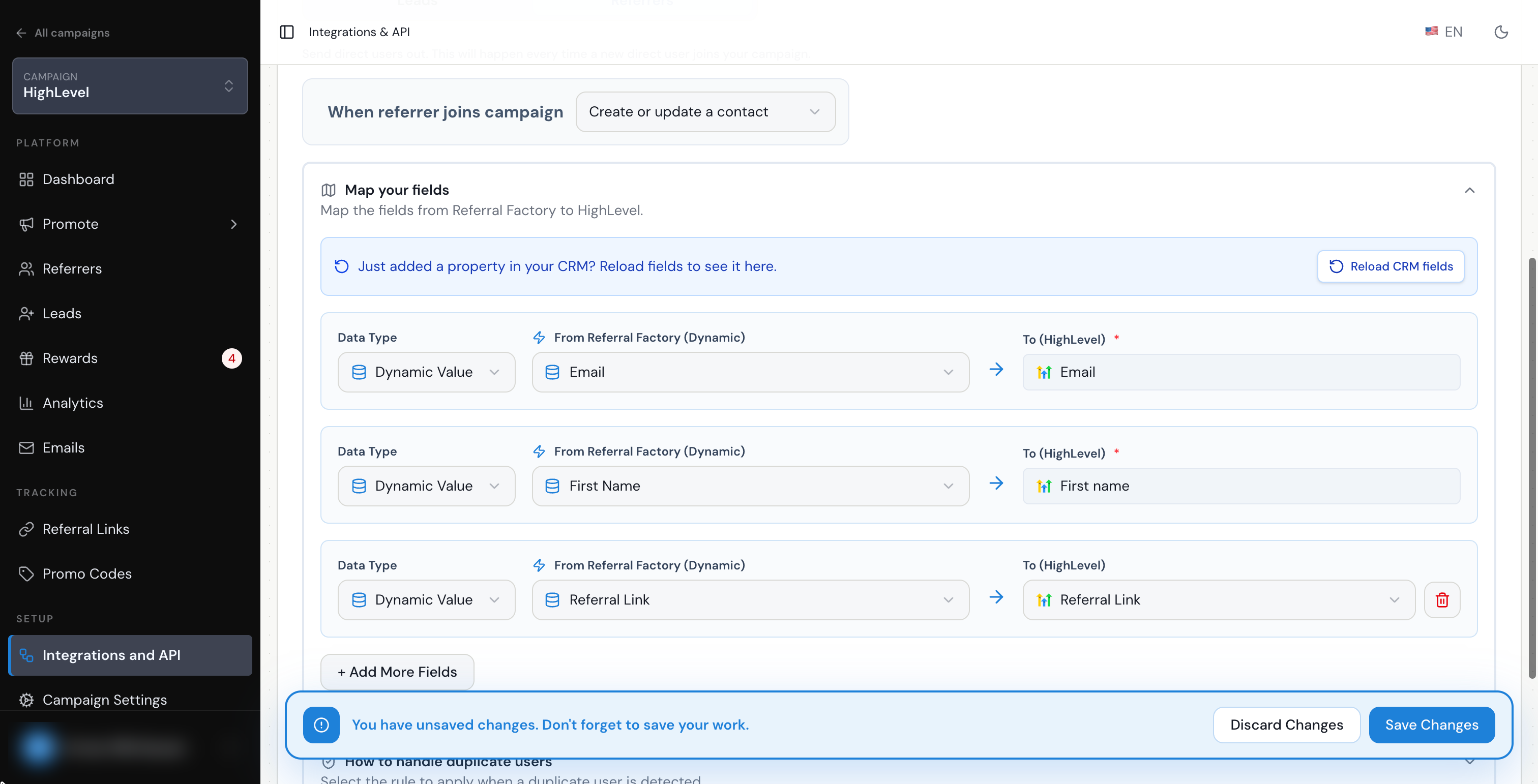
Choose Create or update a contact. Referral Factory opens Map your fields. Email and First name are required. Select the Referral Factory values that should be sent to them, usually the referrer’s email and first name.
Then select Add More Fields, choose Referral Link under From Referral Factory, and choose your Referral Link custom field in HighLevel. You can do the same for Submission Form Link, Promo Code, Referrals Count and Converted Referrals Count.
Do the referral details stay up to date in HighLevel?
Yes. Referral Factory sends the mapped referral details when the referrer is created, and sends them again whenever one of their referrals joins or their qualification changes. This keeps fields such as Referrals Count and Converted Referrals Count current, so you can use them in HighLevel workflows.
How do I create or update a HighLevel opportunity for each referrer?
Choose Create or update an opportunity. Choose the Pipeline and Stage for the new opportunity, check the Name row, and keep Also create or update the related contact turned on with Email and First name mapped.
What happens if the referrer already exists in HighLevel?
Referral Factory matches contacts by email. Under How to handle duplicate users, choose whether Referral Factory should leave the existing HighLevel record as it is, or update it with the mapped referrer details.
How do I send a referrer I added by hand?
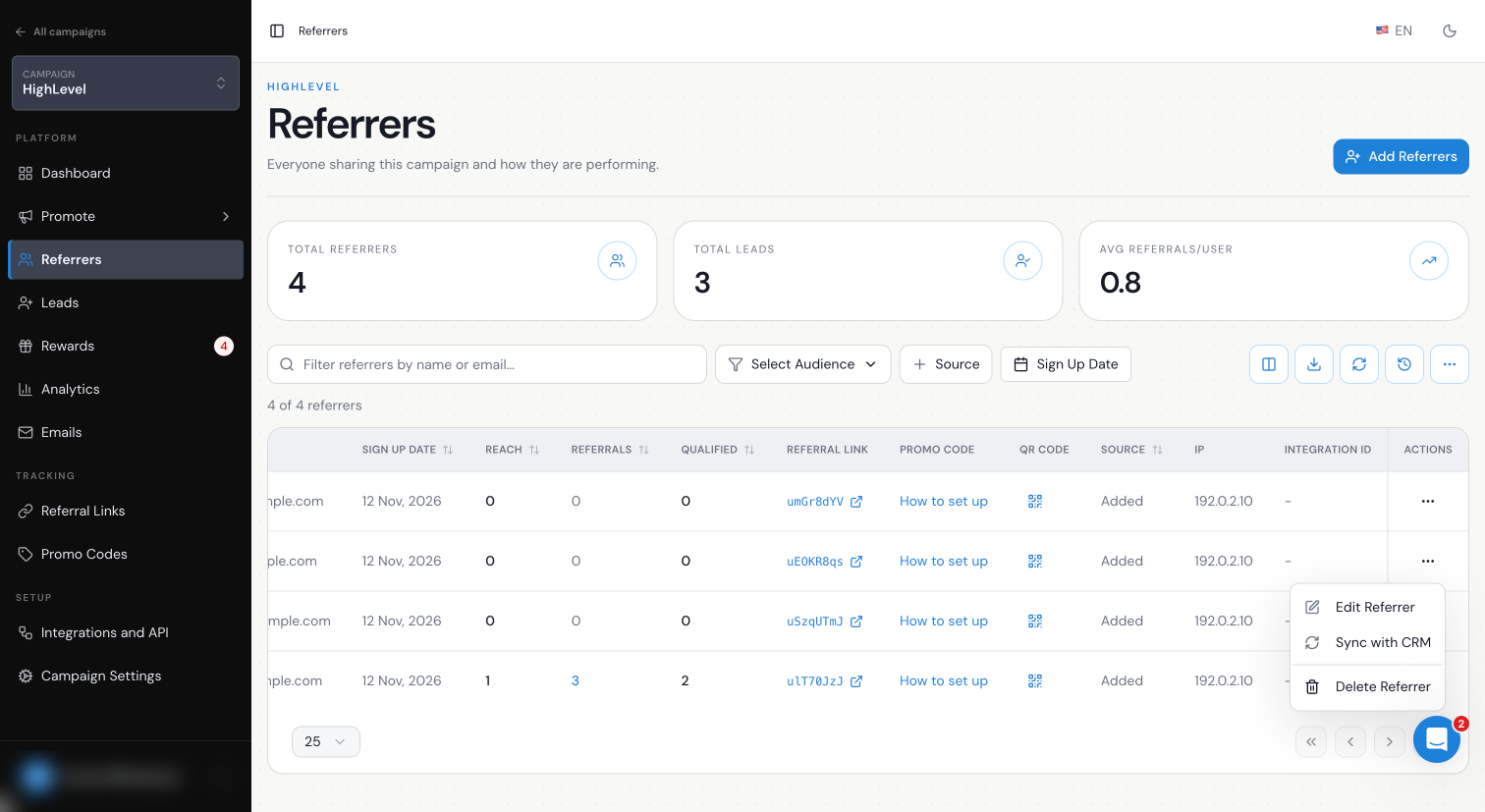
If a referrer you added yourself is not in HighLevel, open the campaign’s Referrers section, open the actions menu on that referrer’s row and choose Sync with CRM. This option appears once a Referrers action has been saved for the campaign.
How do I save and test the setup?
Review the mappings, then select Save Changes at the bottom of the page. Use a separate dummy email address to join the campaign as a new referrer. After joining, check the campaign’s Referrers table in Referral Factory and look in HighLevel for the contact or opportunity created by the saved action.
Confirm that the new record has the expected name, email and referral link, and that the correct pipeline and stage are used when you test the opportunity option. Use dummy data rather than a real customer.