
Need help applying this to your account?
Contact support and we will keep this article attached to your request.
Overview
Referral Factory sends events to Braze when something happens in your referral program. For example, when Tom signs up with Anna’s link, Anna gets the event RF - Friend signed up. In Braze, a Canvas can start from that event and send Anna a push, in-app message, email or SMS.
Which events can Referral Factory send to Braze?
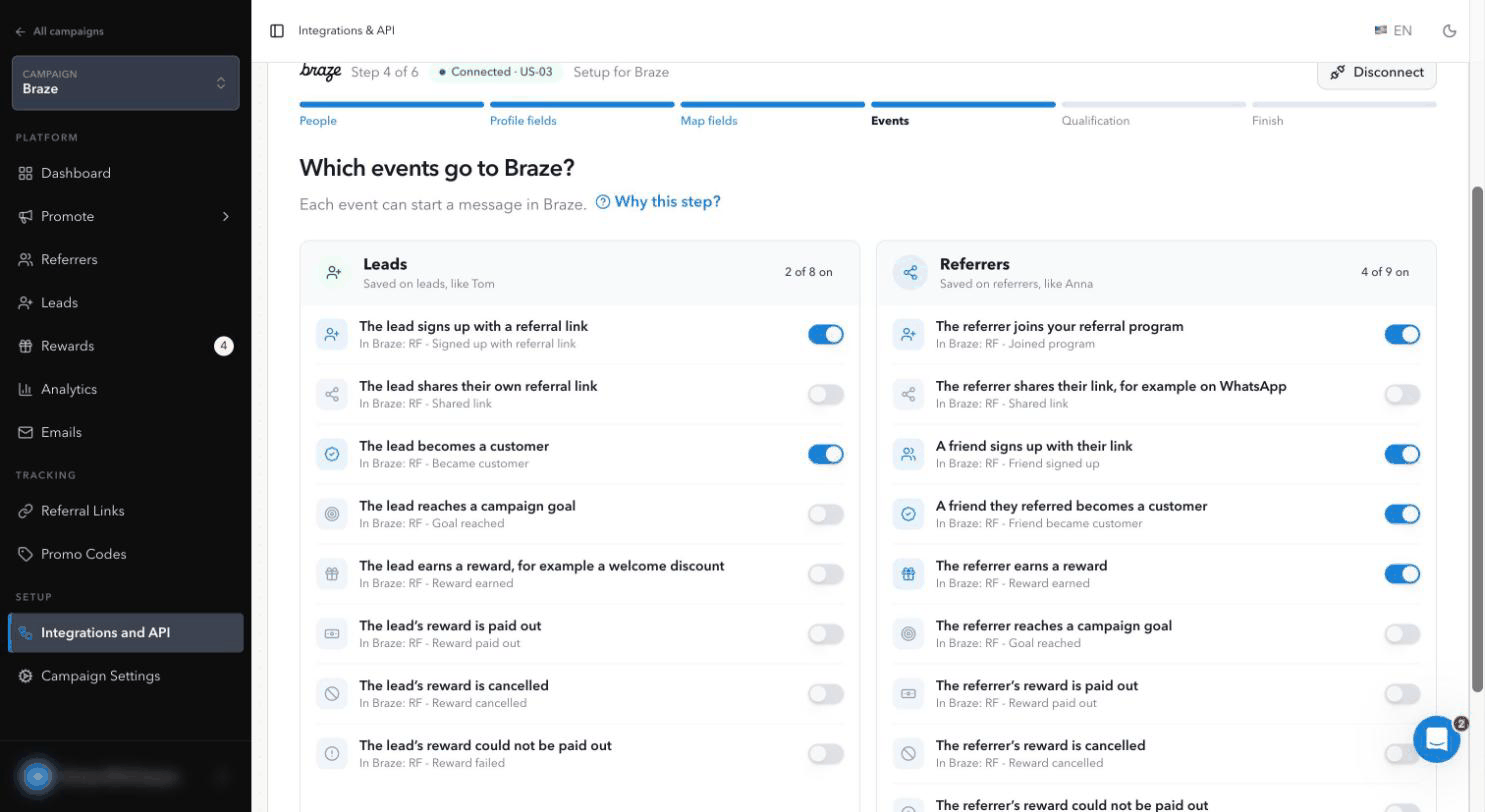
You turn events on or off in the Events step of the Braze setup. Each event name in Braze starts with “RF - ”.
- RF - Joined program: a referrer joins your referral program. Saved on the referrer.
- RF - Signed up with referral link: a lead signs up with a referral link. Saved on the lead.
- RF - Friend signed up: a friend signs up with the referrer’s link. Saved on the referrer.
- RF - Became customer: a lead becomes a customer. Saved on the lead.
- RF - Friend became customer: a friend the referrer referred becomes a customer. Saved on the referrer.
- RF - Shared link: a person shares their referral link, for example on WhatsApp.
- RF - Reward earned: a person earns a reward.
- RF - Reward paid out: a person’s reward is paid out.
- RF - Reward cancelled: a person’s reward is cancelled.
- RF - Reward failed: a person’s reward could not be paid out.
- RF - Goal reached: a person reaches a campaign goal.
Do some events go to both leads and referrers?
Yes. RF - Shared link, RF - Reward earned, RF - Reward paid out, RF - Reward cancelled, RF - Reward failed and RF - Goal reached can be saved on leads and on referrers. One Canvas on such an event starts for both.
To reach only one group, add a filter in Target Audience. For example, RF - Campaign ID is only saved on leads. Test your filter in Braze before you launch the Canvas.
Where do I see the events in Braze?
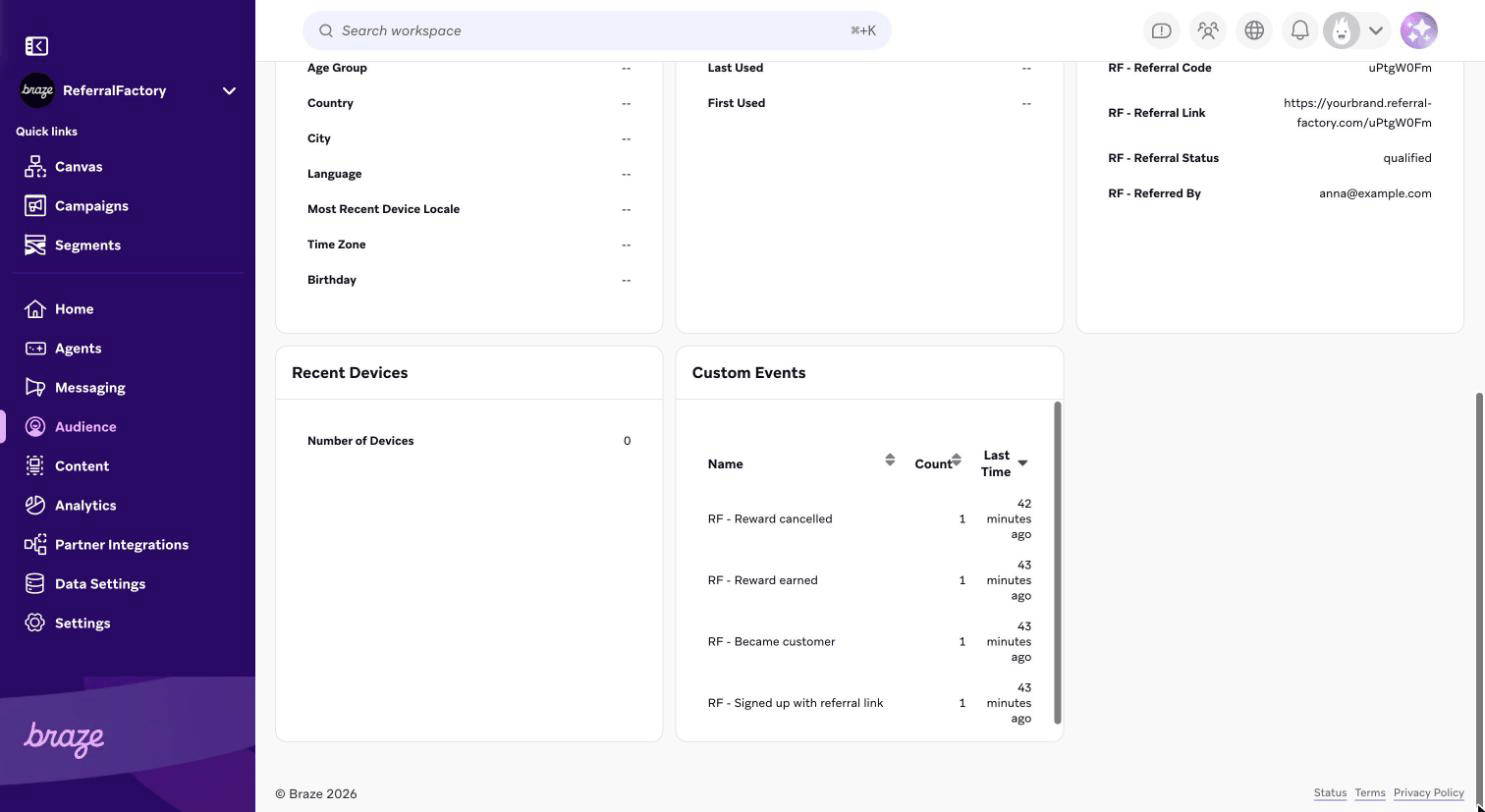
In Braze, go to Audience › Search Users and open the person. On the Overview tab, Custom Events shows each RF event, how many times it happened, and when it last happened.
How do I start a message when an event happens?
Step 1
Create a Canvas. In Braze, go to Messaging › Canvas and select Create Canvas.
Step 2
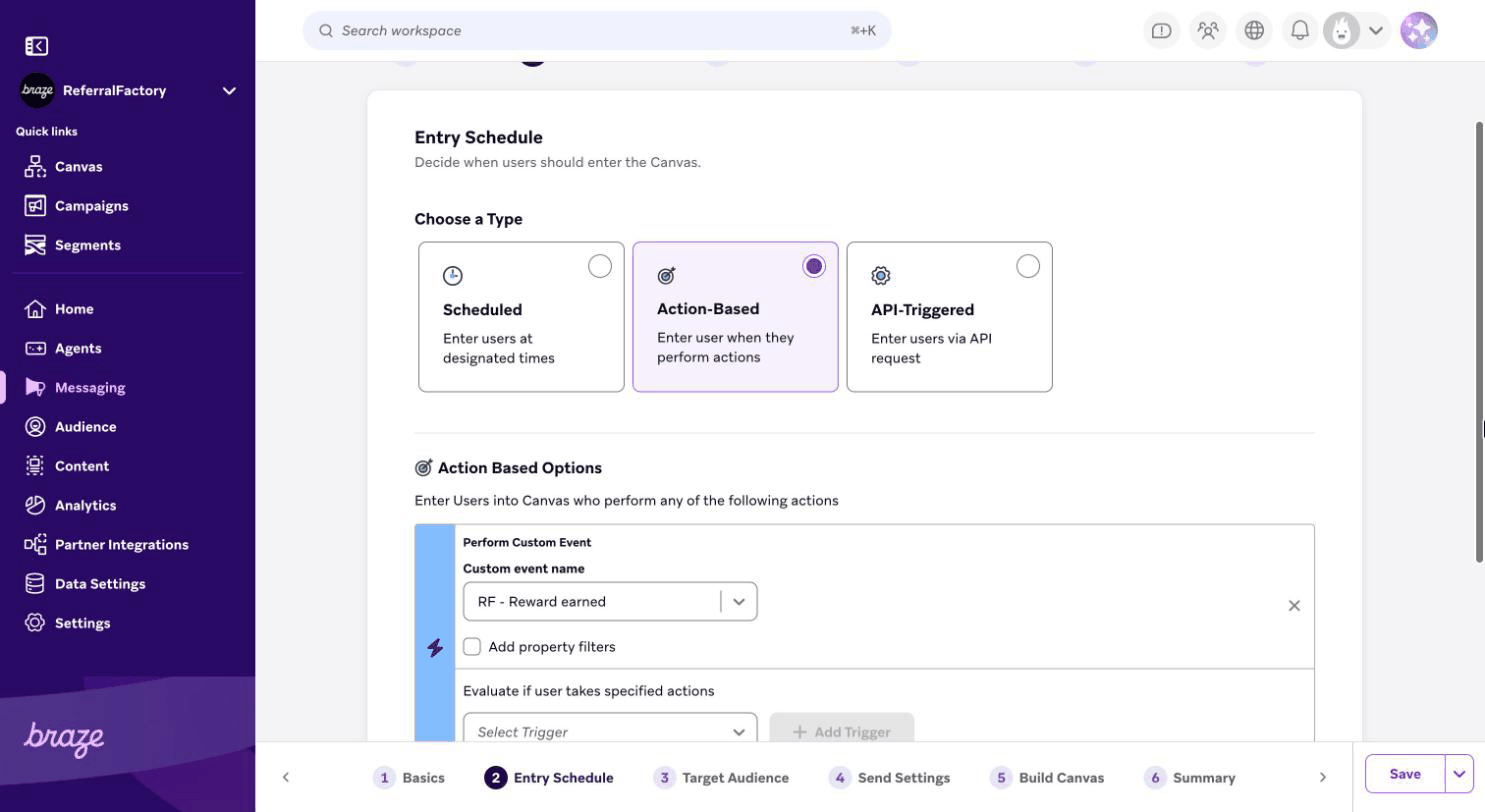
Choose Action-Based. In Entry Schedule, choose Action-Based.
Step 3
Pick the RF event. Under Action Based Options, open Select Trigger, choose Perform Custom Event, and select Add Trigger. Then pick the event under Custom event name, for example RF - Reward earned.
Step 4
Build the message. Add a Message step with the channel you want: push, in-app message, email or SMS.
Step 5
Launch the Canvas. On the Summary step, select Launch Canvas.
How do I add the referral link to a Braze message?
Referral Factory saves the referral link on the person’s Braze profile, for example in RF - Referral Link. Add it to your message with Liquid. Liquid is a short code in {{ }}. Braze replaces it with each person’s own data.
{{custom_attribute.${RF - Referral Link}}}for the referral link.{{custom_attribute.${RF - Referral Code}}}for the referral code.{{custom_attribute.${RF - Number of Referrals}}}for the number of referrals. Only referrers have this field.- If you use your own Braze fields, use your field names instead.
What details come with each event?
Each event also carries details, like the friend’s name or the reward. In a Canvas that starts on the event, use
{{canvas_entry_properties.${reward}}}. In a Braze campaign that starts on the event, use {{event_properties.${reward}}}. Change reward to the detail you need.- All events:
campaign, the Referral Factory campaign name. - RF - Joined program:
referral_linkandreferral_code. - RF - Signed up with referral link:
referrer_nameandreferral_code. - RF - Friend signed up and RF - Friend became customer:
friend_name. - RF - Became customer:
referrer_name. - RF - Goal reached:
goal_name. - RF - Shared link:
channel, for example WhatsApp. - RF - Reward earned, RF - Reward paid out, RF - Reward cancelled and RF - Reward failed:
reward,reward_nameandcoupon_code.
What messages can I send?
- Welcome a new referrer: on RF - Joined program, send their referral link and ask them to share it.
- Say thank you: on RF - Friend signed up, tell the referrer that their friend joined, with
friend_name. - Celebrate a reward: on RF - Reward earned, tell the person what they earned, with
reward. - Welcome a referred friend: on RF - Signed up with referral link, send the lead a welcome offer.
- Remind people to share: send a Braze campaign to referrers whose RF - Number of Referrals is 0.
Why don’t I see an event in Braze?
Check that the event is on in the Events step, and that Sending to Braze is on. Events are only sent for things that happen after you finish the setup. New event names can take a few minutes to show in Braze lists.
Learn more: the Braze troubleshooting guide