
Need help applying this to your account?
Contact support and we will keep this article attached to your request.
What does automatic Qualification mean?
Qualification marks that a lead has reached the success point defined for the campaign. It is separate from creating the person in Intercom.
Choose the Intercom attribute and value
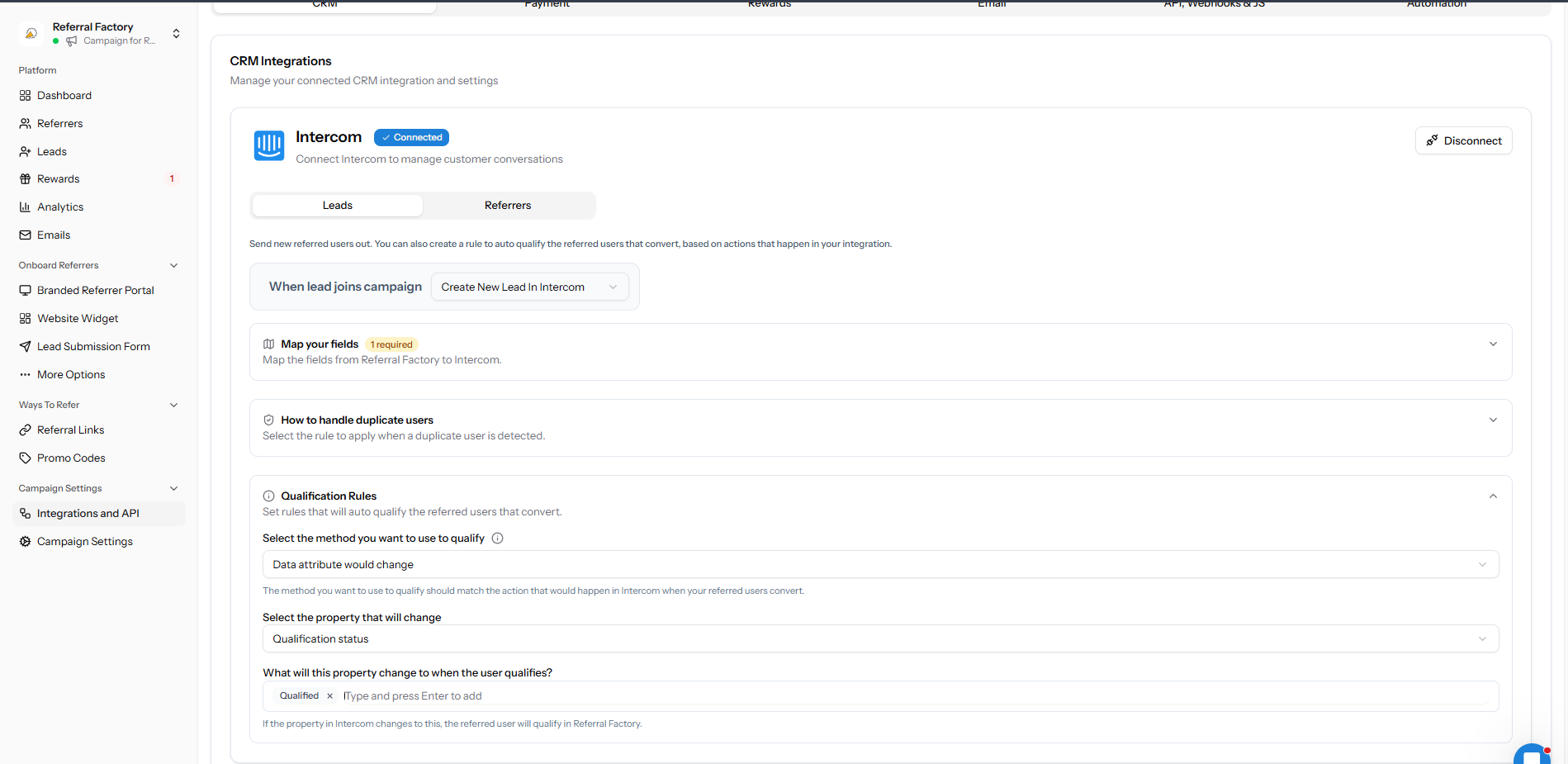
Open Integrations & API → CRM → Leads and expand Qualification Rules. Choose Data attribute would change, select the Intercom attribute to monitor, and enter the target value.
Use an attribute that changes only when the real conversion event has happened.
What happens after the attribute changes?
Referral Factory checks the matching lead and marks it as Qualified when the selected Intercom attribute reaches the target value.
If the campaign has a reward rule for qualified referrals, that rule can then issue a reward. Qualification and reward setup remain separate.
Test automatic Qualification
Create a test lead, confirm it is Pending, change the selected Intercom attribute to the target value, and then confirm the lead becomes Qualified in Referral Factory.
If it stays Pending, use the Intercom troubleshooting guide.