
Need help applying this to your account?
Contact support and we will keep this article attached to your request.
How does the automation work?
Referral Factory runs the referral journey. Intercom can store the people and customer data used by your team.
A typical journey starts by syncing existing contacts as referrers, sends each new lead to Intercom, watches for a successful Intercom attribute change, and then qualifies the lead in Referral Factory.
1. Add existing Intercom Contacts as Referrers
Choose the Intercom audience, map names and email addresses into Referral Factory, and map referral information back to Intercom where needed.
2. Send new Leads and Referrers to Intercom
The Leads and Referrers areas are separate. Configure the action, required email mapping and duplicate handling for each flow you need.
Use the new leads guide and the new referrers guide.
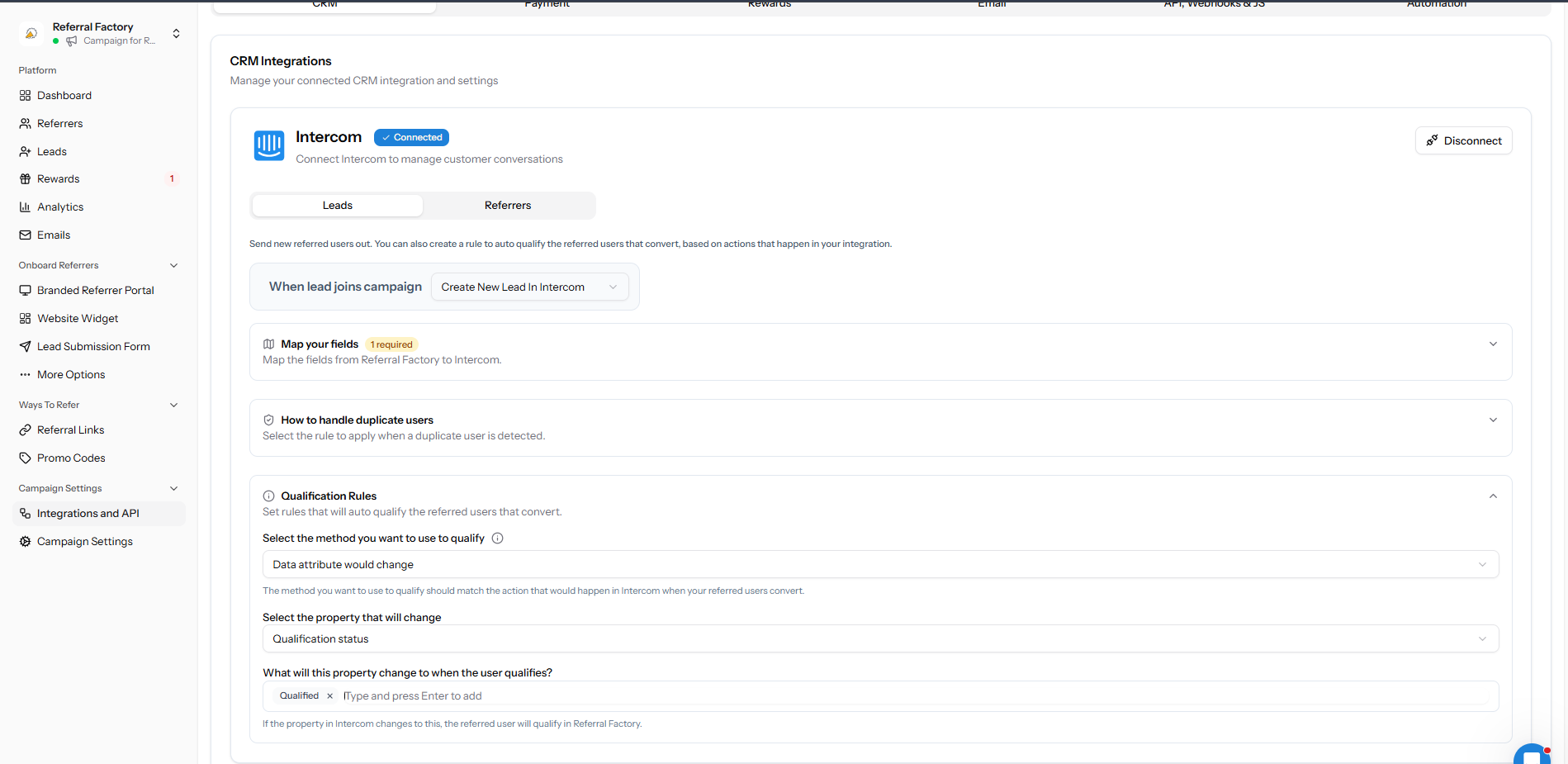
3. Qualify Leads from Intercom activity
Choose a meaningful Intercom attribute and target value. Referral Factory checks that rule and marks the matching lead as qualified when the condition is met.
Qualification and reward setup are separate. Confirm both if the campaign should issue a reward after qualification.
4. Test the full journey
Use a test contact and a test lead. Confirm the referrer receives a link, the lead appears in the correct Intercom audience, the selected attribute change qualifies the lead, and any reward rule behaves as expected.