
Need help applying this to your account?
Contact support and we will keep this article attached to your request.
Tremendous reward failures: connection status, funding/balance, campaign availability, recipient details, reward trigger/value/currency and provider errors
Check each of the following:
Connection statusGo to Campaign Settings → Integrations and API → Rewards and confirm that Tremendous shows as Connected.
Tremendous connections can occasionally become disconnected, for example if credentials change or the authorization token expires. If the connection is broken, rewards cannot be sent.
Funding/balanceLog in to Tremendous and make sure there are enough funds available to cover the reward.
Your Tremendous account needs either a sufficient pre-funded balance or an active funding method. If there are not enough funds available, the reward can fail when Referral Factory attempts to issue it.
Tremendous campaign availabilityWhen configuring a Tremendous reward in Referral Factory, make sure the correct Tremendous campaign is selected.
If the campaign you expect to use does not appear, check that you are connected to the correct Tremendous account and that the campaign is available there.
Recipient detailsCheck that the reward recipient has valid information, especially their email address. Tremendous uses the recipient details passed from Referral Factory to deliver the reward.
If the email address is incorrect, the recipient may not receive the reward even if the reward itself was successfully issued.
Reward trigger, value, and currencyCheck the reward configuration and confirm that:
The reward is active.
The correct person is being rewarded.
The Lead has completed the event required to trigger the reward.
The reward value is correct.
The selected currency and Tremendous campaign support the reward you are trying to send.
For monetary Tremendous rewards, the referred Lead must first become Qualified before the reward can be triggered.
Retry/reconnect steps
If a Tremendous reward has failed:
Go to Campaign Settings → Integrations and API → Rewards.
Confirm that Tremendous shows as Connected.
Check your Tremendous account balance or funding method.
Confirm that the correct Tremendous campaign is still available.
Review the recipient and reward details.
Go to Rewards → Failed Rewards.
Find the reward you want to resend
Click the resend icon — the circular arrow shown next to the failed reward.
Confirm that the reward moves out of the failed state and is processed again.
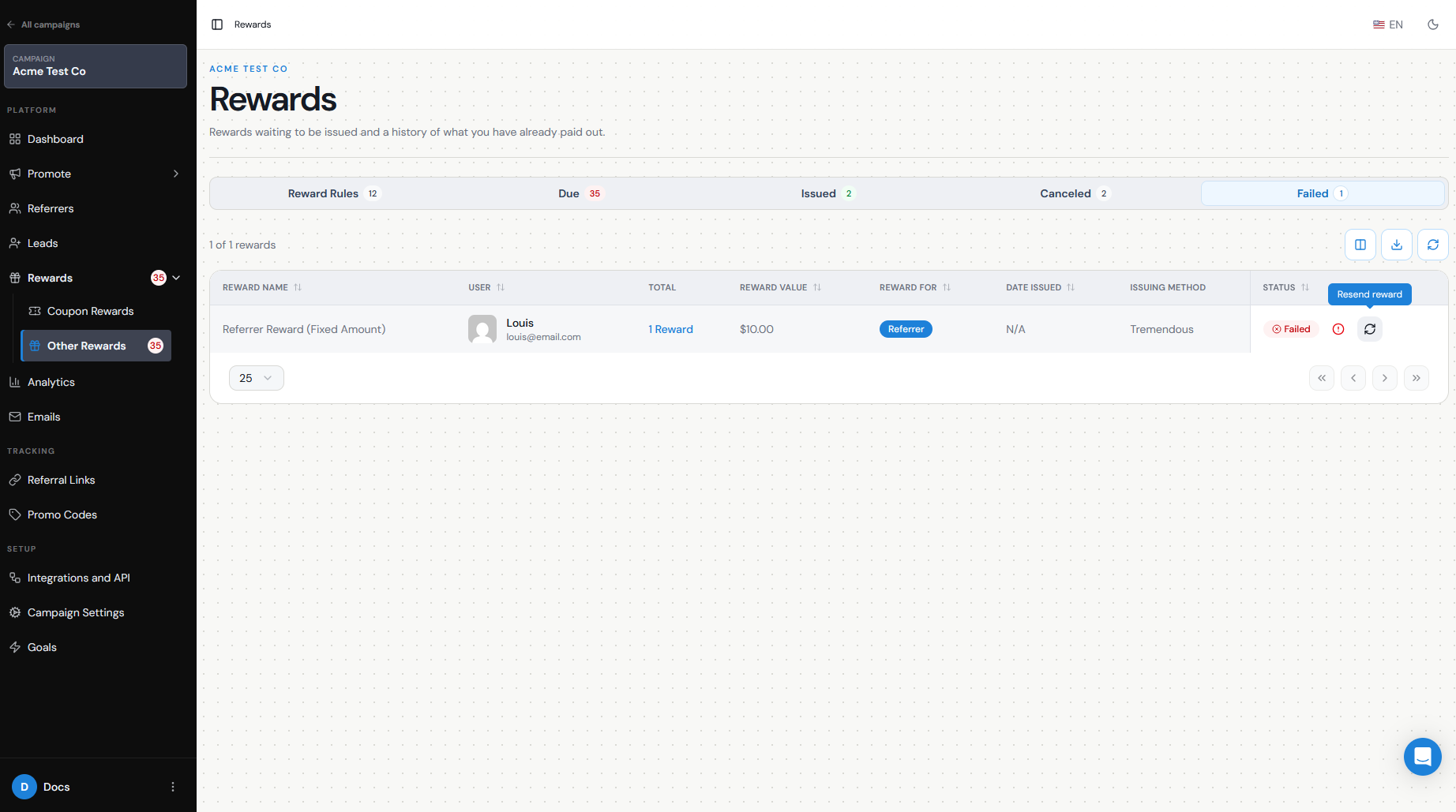
You can also select multiple failed rewards and retry them together using the available bulk actions.
If Tremendous appears disconnected, reconnect it first and then retry the failed rewards.
If it shows as connected but failures continue, disconnecting and reconnecting Tremendous can also refresh the authorization. Be aware that intentionally disconnecting the integration removes the existing connection settings, so make sure you are ready to reconnect the correct Tremendous account.
If the reward has not failed and is instead still under Due Rewards, it may simply be waiting for manual approval because Auto Issue Rewards is turned off. In that case, use Issue Now from the Due Rewards action menu.
Identify whether failure is in Referral Factory or Tremendous
The reward status can help you narrow down where the problem is happening.
If the reward never becomes Due, first check the Referral Factory setup. Confirm that the reward is active and that the Lead has met the qualification condition required to trigger it.
If the reward is sitting in Due Rewards, the reward has been triggered successfully but has not yet been sent. Check whether Auto Issue Rewards is disabled or issue the reward manually.
If the reward moves to Sending or Failed, Referral Factory has attempted to send it through Tremendous. At that point, check the Tremendous connection, funding, campaign, and provider-side payout requirements.
A useful troubleshooting flow is:
No reward generated → Check qualification and reward setup
Reward is Due → Check manual vs Auto Issue
Reward is Failed → Check Tremendous connection, funding, campaign, and recipient details
If the integration is connected, sufficient funds are available, the reward setup is correct, and the reward still fails after retrying, contact our support team so we can investigate the reward with you.