
Need help applying this to your account?
Contact support and we will keep this article attached to your request.
How the reward webhook works
The reward is earned according to the Reward Rule, the reward becomes Due, and someone or an automatic rule issues it. Only then does Referral Factory send the webhook to your endpoint.
A reward that is only Due does not send the webhook. Due means the reward is waiting to be issued; Issued means the webhook handoff can take place.
This guide covers Webhooks selected inside a Reward Rule. It is different from the general Integrations and API → API, Webhooks and JavaScript → Webhooks area used for other campaign events.
Prepare the receiving endpoint
Create an endpoint that can receive the HTTP method you plan to select and decide what your system should do with the reward data.
For example, the endpoint could find the customer, add 500 loyalty points, create an internal payout request or write the reward to a database.
Decide which headers, credentials and reward fields the endpoint needs. Keep secrets out of the payload and out of screenshots.
Choose Webhooks in Referral Factory
1. Open the campaign where you want to configure the reward.
2. Go to Rewards → Reward Rules.
3. Select New reward, or open the Draft Reward Rule you want to edit.
4. Complete the reward and trigger settings, then continue to Choose Issuing Method.
5. Select Webhooks.
6. Add the Endpoint URL.
7. Choose the HTTP Method your endpoint expects.
8. Add Headers and Credentials if your endpoint requires them.
9. Choose the reward data fields to include. The available information can include the recipient, campaign, referral and reward details.
10. Review Retry Failed Rewards if it is available. Use it only when your endpoint can safely handle a repeated request.
11. Select Activate when the rule is complete.
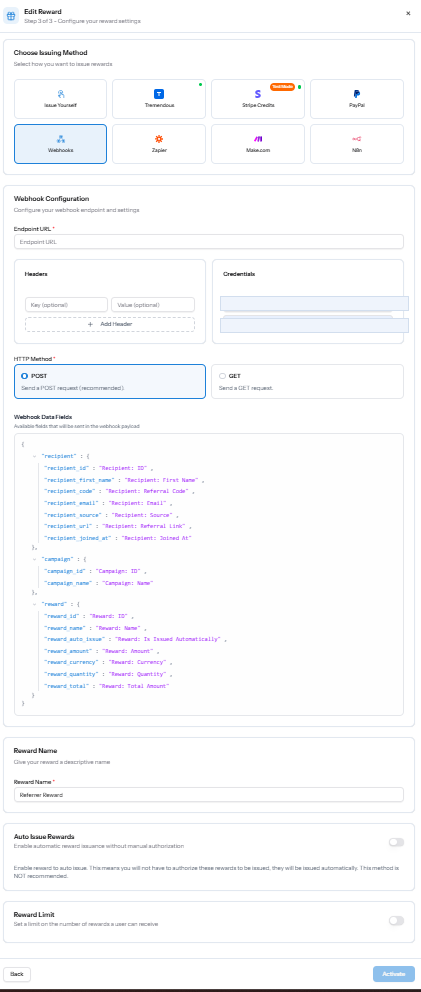
Webhook configuration inside the Reward Rule issuing method, including the endpoint, method, credentials and reward data fields.
What happens next
When Referral Factory issues a reward, it sends the configured request to your endpoint. Your system then validates the request, identifies the recipient and performs the next action you built, such as adding points or creating a payout request.
Check all three parts when testing: the reward is Issued in Referral Factory, the endpoint receives the request, and your system completes the final action.