
Need help applying this to your account?
Contact support and we will keep this article attached to your request.
Where can a Referrer find their unique referral link or Promo Code?
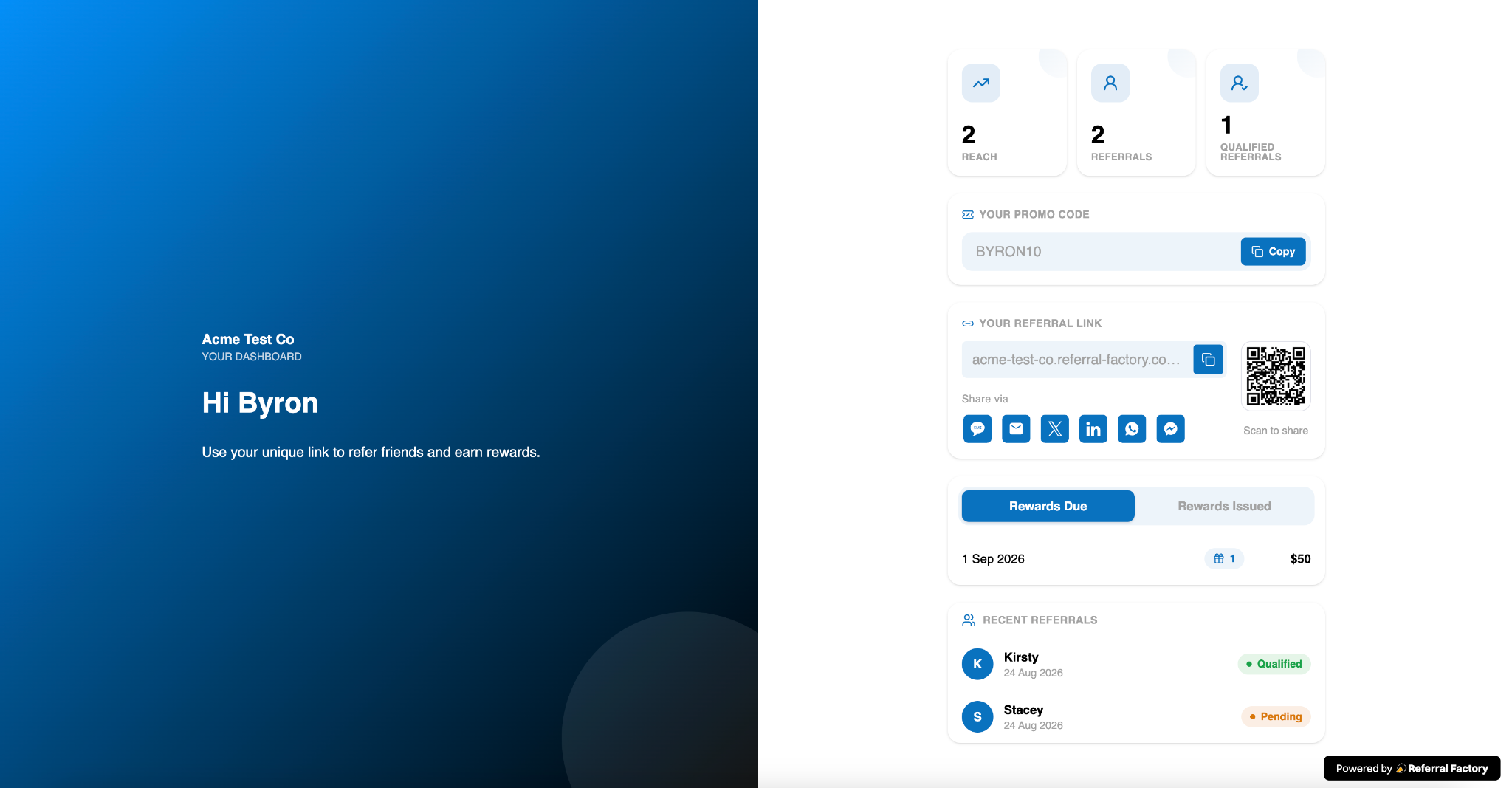
After a referrer joins the campaign and opens their Dashboard, they see the referral assets that the business has configured. A link-enabled Dashboard can show the referrer’s unique referral link, with copy, QR, email, or social-sharing actions when those blocks are included. A code-enabled Dashboard can show the referrer’s unique promo code. A campaign may show the link, the code, or both.
Can a Referrer see a Promo Code instead of their referral link?
Yes, if the business has configured promo codes for the campaign and added the Promo Code and Promo Code Sharing Settings blocks to the portal Dashboard. The business can configure a promo-code-only experience, a link-only experience, or a combined experience. Promo codes are not automatically shown to every referrer; they must be enabled and added to the referrer-facing experience.
Where can Referrers see the people they have referred?
Referrers see referred people in the Dashboard’s referral activity area when the business has added the relevant tracking block. The activity list can show the referred person’s name or initials, the date, and the current status shown by the campaign.
Can Referrers see the status of their referrals?
Yes. The Dashboard can show referral statuses such as Pending or Qualified when the business has included the recent-referrals or other tracking blocks. The status reflects the current state recorded for that referral in the campaign; it is not a separate status that the referrer edits from the portal.
Can Referrers see which referrals have converted or Qualified?
They can see the qualification state that the campaign exposes in the Dashboard, including qualified referrals where that status has been recorded. Whether a referral qualifies depends on the campaign’s qualification setup. A referrer does not qualify a referral themselves from the portal.
Can Referrers see their reward status?
If the business adds the rewards or reward-status block to the Dashboard, the referrer can see the reward information made available there. The displayed state depends on the campaign’s reward rules and the referral’s qualification status. If no rewards block has been added, the referrer will not see reward details in the portal.
How do Referrers log in to access their referral information?
Referrers use the campaign’s Branded Referrer Portal URL. New referrers select the configured sign-up option, complete the fields shown, and are taken to the Dashboard after registration. Returning referrers use the same portal URL and select the login option. They enter the email address associated with their referrer record and complete any verification step the business has enabled.
The portal opens the Dashboard for the signed-in referrer, so referral information is shown for that referrer rather than as a shared campaign-wide list.
What should a Referrer do if their link, Promo Code, referral or reward is missing?
First, refresh the Dashboard and confirm that the referrer is using the correct campaign portal URL and the same email address they used to join. Then check the relevant item:
If the business cannot find the referrer in the campaign, they should search the campaign’s Referrers section using the referrer’s name or email address and confirm that the person joined the intended campaign. Alternatively, our support team is always available.
- Missing referral link: the business may not have added the Referral Link block to the Dashboard. Ask the business to check the portal configuration or resend the portal URL.
- Missing promo code: promo codes may not be configured for the campaign, or the Promo Code block may not be included in the Dashboard. Ask the business to confirm that the campaign supports the code experience and that the code block is enabled.
- Missing referral activity: the referral may not yet have been recorded, or the Dashboard may not include the relevant tracking block. Ask the business to check the campaign’s Leads or Referrers records.
- Missing qualified status or reward: qualification may still be pending, the campaign rules may not yet have been met, or the Dashboard may not include the relevant status or reward block. The business should check the campaign record and qualification and reward settings.