
Need help applying this to your account?
Contact support and we will keep this article attached to your request.
One-time import versus ongoing sync
When you sync contacts from your CRM or payment processor into Referral Factory, you can choose whether to run the sync once or keep it running on an ongoing basis.
Both options add the selected contacts to your campaign as Referrers and generate their unique referral links. The main difference is what happens after the first sync is complete.
A one-time sync imports the contacts that match your selection at that moment.
Once the sync is complete, it stops. If new contacts are added to your CRM or payment processor later, they will not automatically be added to Referral Factory. You can always run another one-time sync later if you need to import more contacts.
An ongoing sync keeps the connection active and checks your selected source on a schedule. New contacts that meet the criteria you selected can then be automatically enrolled in your Referral Factory campaign as Referrers and receive their unique referral link.
For example, if you choose a HubSpot list and use an ongoing sync, new contacts added to that list can automatically be added to your referral campaign.
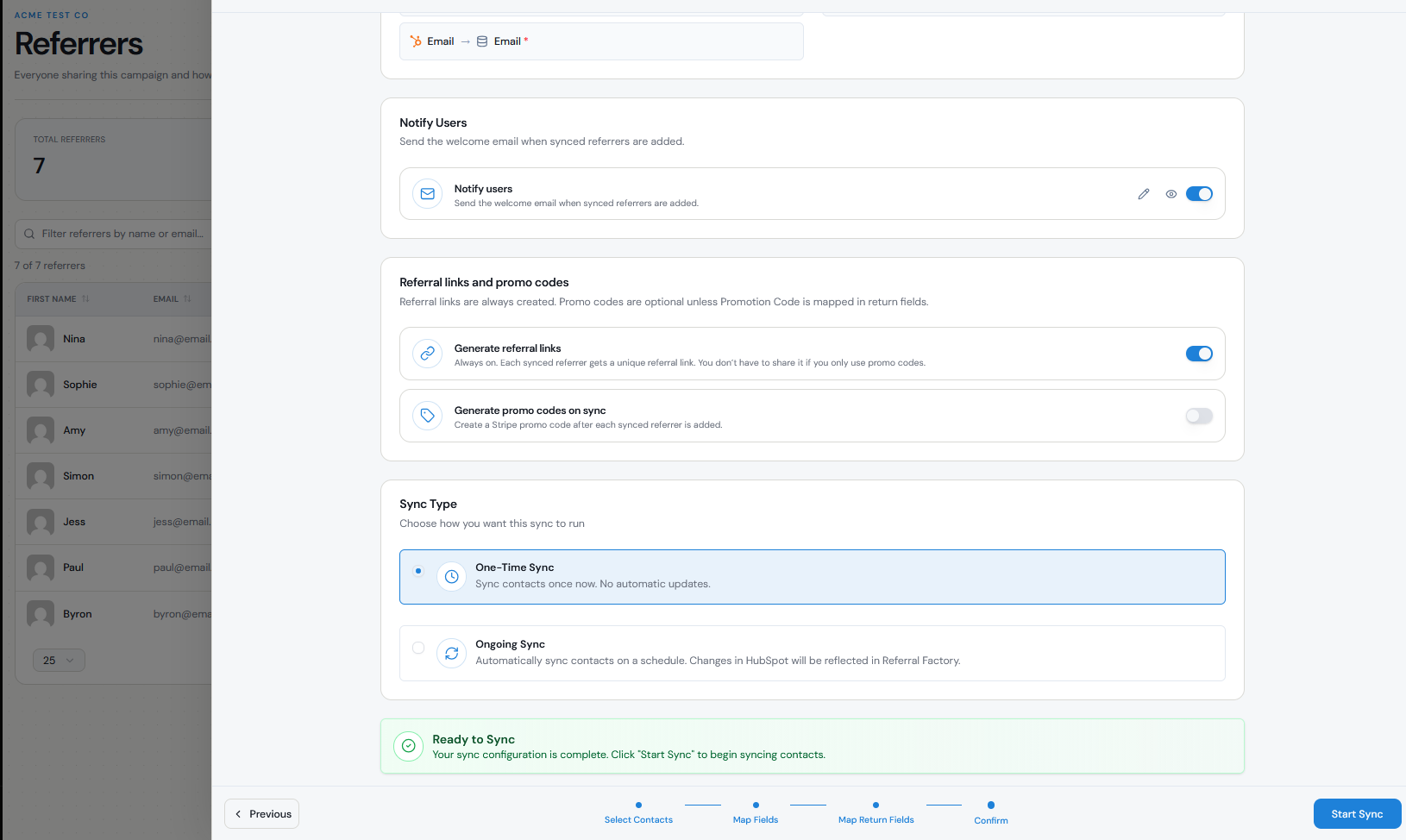
What changes are monitored after connection
With a one-time sync, no further automatic syncing happens after the initial import. Changes or new contacts added to the source later are not automatically brought into Referral Factory.
With an ongoing sync, we continue monitoring the CRM, payment processor, or selected list you configured. New contacts that meet the selected criteria can be added to Referral Factory automatically, and supported synced data can be updated over time.
An ongoing sync is not a full unrestricted two-way sync. What moves between systems depends on the integration and the fields you mapped. For example, CRM syncs can send a Referrer's Referral Link back to the CRM, and referral performance data such as Referrals Count and Converted Referrals Count.
Also note that changing a synced Referrer's email address in your CRM does not automatically change their email address in Referral Factory. Email is the Referrer's unique identifier within the campaign, so this must be updated manually in Referral Factory.
When to use each
Use a one-time sync when you want to add a specific group of existing contacts to your referral program once.
For example, you might use it to:
Use an ongoing sync when new people regularly become eligible to join your referral program and you do not want to import them manually each time.
For example, you could sync an active HubSpot list containing customers who have reached a particular lifecycle stage. As new contacts enter that list, they can automatically be enrolled as Referrers.
- Launch a referral program to your current customer list.
- Add a particular CRM segment as Referrers.
- Run an occasional import without keeping the sync active.
How new and updated Contacts are handled
With a one-time sync, only contacts included when you run the sync are imported. Contacts added afterward will not be enrolled automatically.
With an ongoing sync, new contacts that enter the CRM, payment processor, or selected list can be automatically added to the campaign according to your sync configuration.
When a contact is enrolled as a Referrer, we generate their unique referral link. If you mapped the Referral Link back to your CRM, that link can also be written to the CRM field or property you selected.
Contacts are not automatically emailed their referral link simply because they were added through a sync. If you want to notify them, you can use your own communication channels or Referral Factory's once-off email feature.
Duplicate handling
Referral Factory uses email address as the unique identifier for Referrers within a campaign.
If a contact has already been added to the same campaign, the sync should not create another separate Referrer for the same email address. Each Referrer has one unique referral link per campaign.
The same person can still participate in different campaigns. Each campaign is managed separately, and the Referrer receives a different referral link for each campaign.
Contacts that have already been synced are also not automatically removed from Referral Factory if they are later deleted or removed from the source CRM, payment processor, list, or segment.
Performance and testing considerations
The time required for a sync depends on how many contacts you are importing.
Standard syncs with fewer than 1,000 contacts typically complete within 30 minutes. For larger syncs with more than 1,000 contacts, allow up to 12 hours for the sync to complete.
Before using an ongoing sync with your full customer base, we recommend testing it with a small list or segment first.
Check that:
You can monitor the Referrers tab while the sync is processed. If a large sync has not added any new contacts after 12 hours, check your integration settings and make sure the connection is still active.
- The correct contacts are being added as Referrers.
- Required fields such as First Name and Email are mapped correctly.
- Any additional required fields for your CRM or campaign are included.
- A unique referral link is generated for each Referrer.
- The Referral Link is being written back to your CRM if you mapped it.
- New contacts added after the initial sync appear as expected when using ongoing sync.