
Need help applying this to your account?
Contact support and we will keep this article attached to your request.
Overview
Referral Factory can sit alongside your school, college, university, training provider or other education systems. You can capture and attribute the referral first, continue the prospective student into your normal enquiry or admissions process, and tell Referral Factory when the prospective student reaches the milestone that should qualify the referral.
For strategy, reward and promotion ideas, explore our education referral program guide.
The basic journey looks like this:
Existing student, parent or alumni member becomes a referrer → shares a Referral Link → prospective student details are captured → the prospective student continues into the normal admissions journey → enrolment is confirmed → the referral qualifies → the reward becomes Due.
Your audience, admissions process, qualifying milestone and reward may be different.
1. Decide who should become a Referrer
An education business might invite existing students, parents or alumni to refer friends and potential new students. You do not need to use every group, and the best audience depends on who knows the institution well and can make a relevant recommendation.
For example, a school could start with parents and current students, while a university or training provider might include alumni. Invite the chosen audience through your normal email, app, student portal or alumni communication, or let people join through the Branded Referrer Portal if self-sign-up is appropriate.
Choose the best way to promote your referral program
Education businesses often have both digital student environments and physical campuses. An On-Click Popup inside a student, parent or alumni portal can give referrers access to their Referral Link, referrals and rewards without taking them out of that environment. A Branded Referrer Portal is another standalone or embedded option. Use email campaigns for existing students, parents and alumni, Referral Links for digital sharing, and QR codes at campuses, open days, graduation events and alumni events.
The institution's CRM or admissions system can receive and route the captured prospective student into the normal enquiry and admissions workflow. When the student reaches the agreed milestone, the CRM can help record that Goal in Referral Factory; an API, inbound webhook or automation can be used when another admissions or student system owns the event.
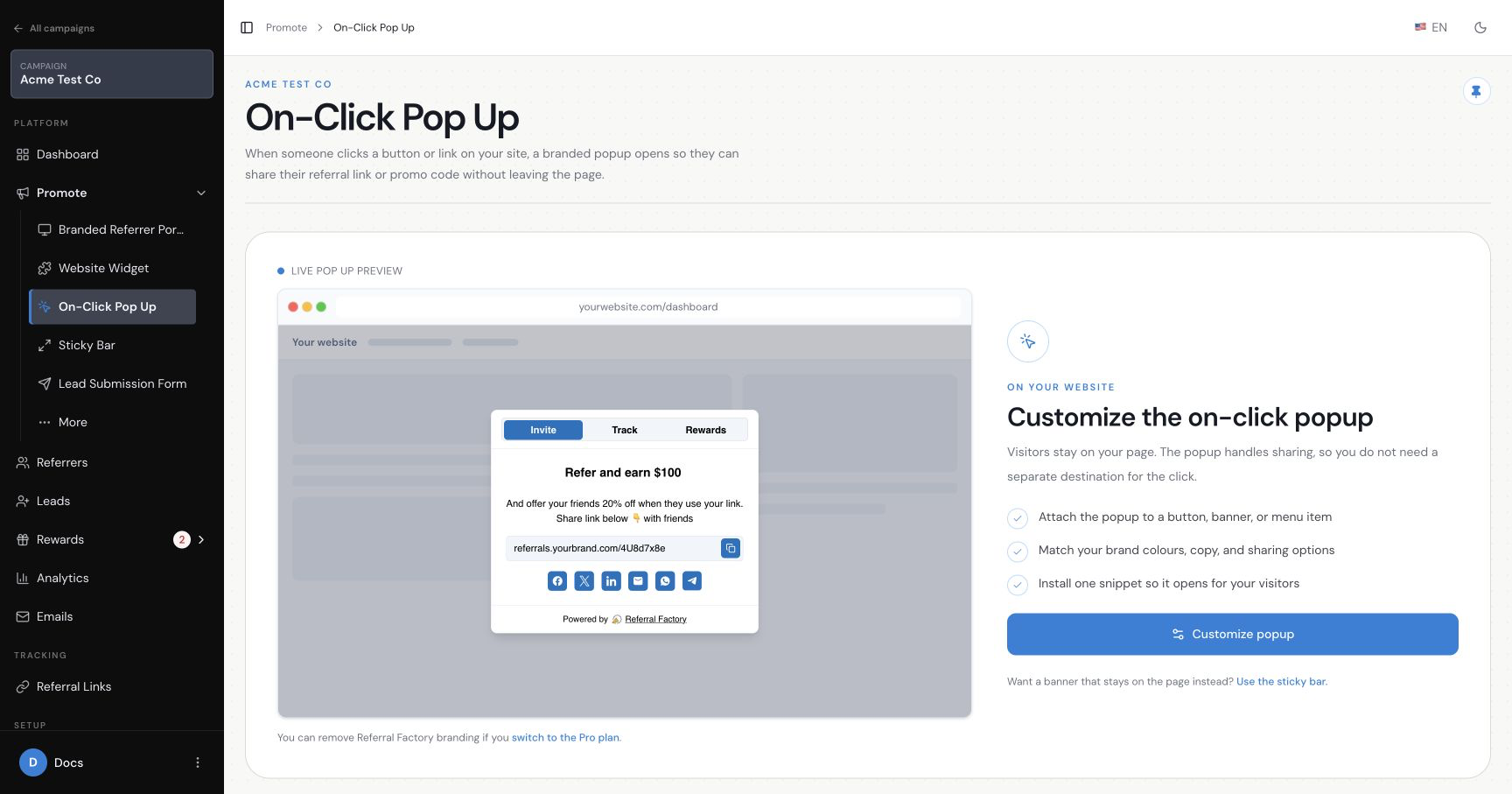
2. Give Referrers a place to access and share their referral link
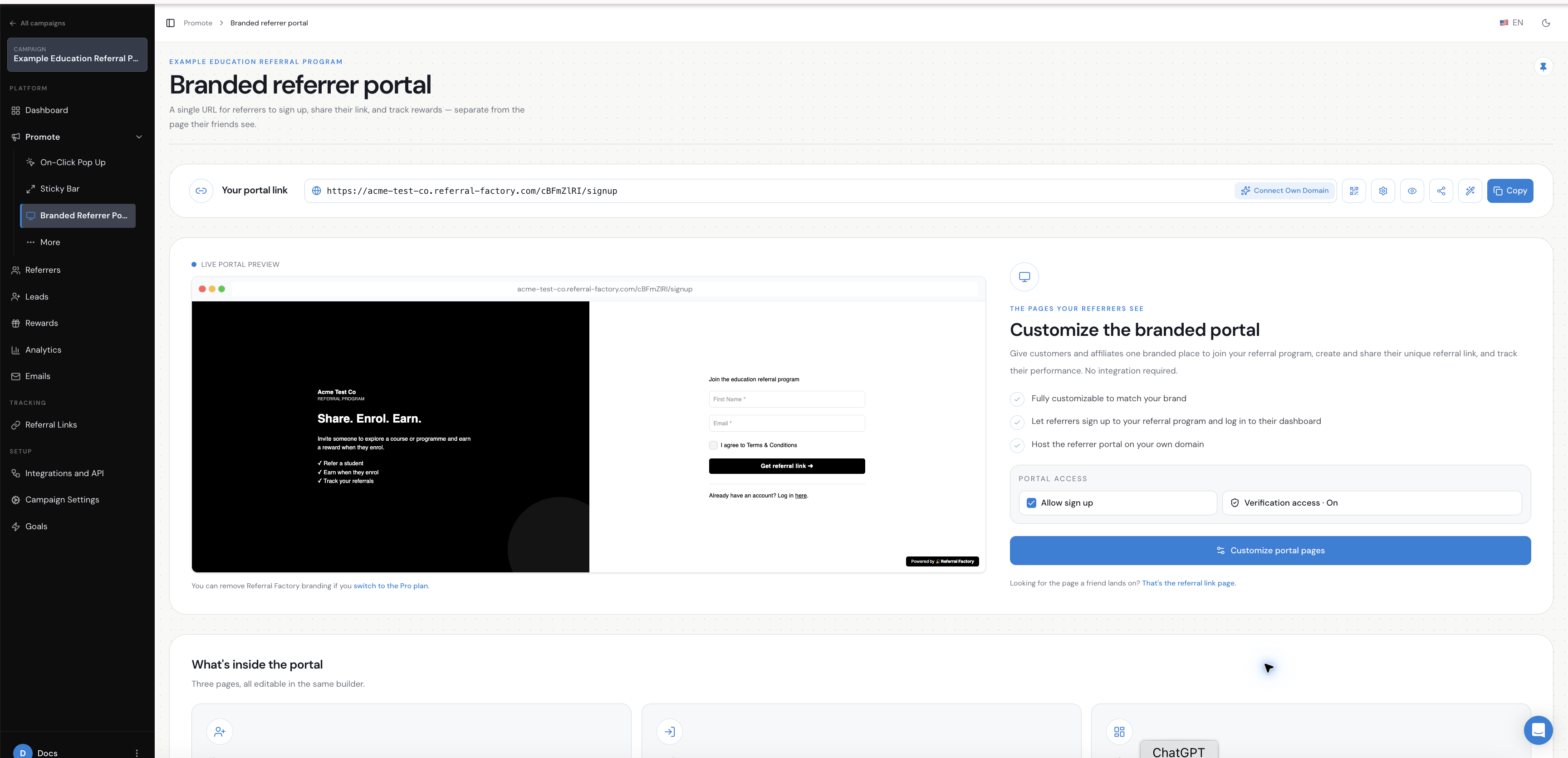
Each referrer needs a way to get their own tracked Referral Link and share it with a prospective student.
The Branded Referrer Portal can provide that experience. It includes sign-up, login and dashboard pages where referrers can access their link, share it and see referral activity. An On-Click Popup can also provide this referral access inside a logged-in student, parent or alumni environment, while the portal can be used on its own or embedded where appropriate.
The portal does not need to replace your student portal, LMS or authentication system. Your existing systems remain responsible for login, learning access and student information.
For more on the referrer experience, see How to create and use a branded referral portal.
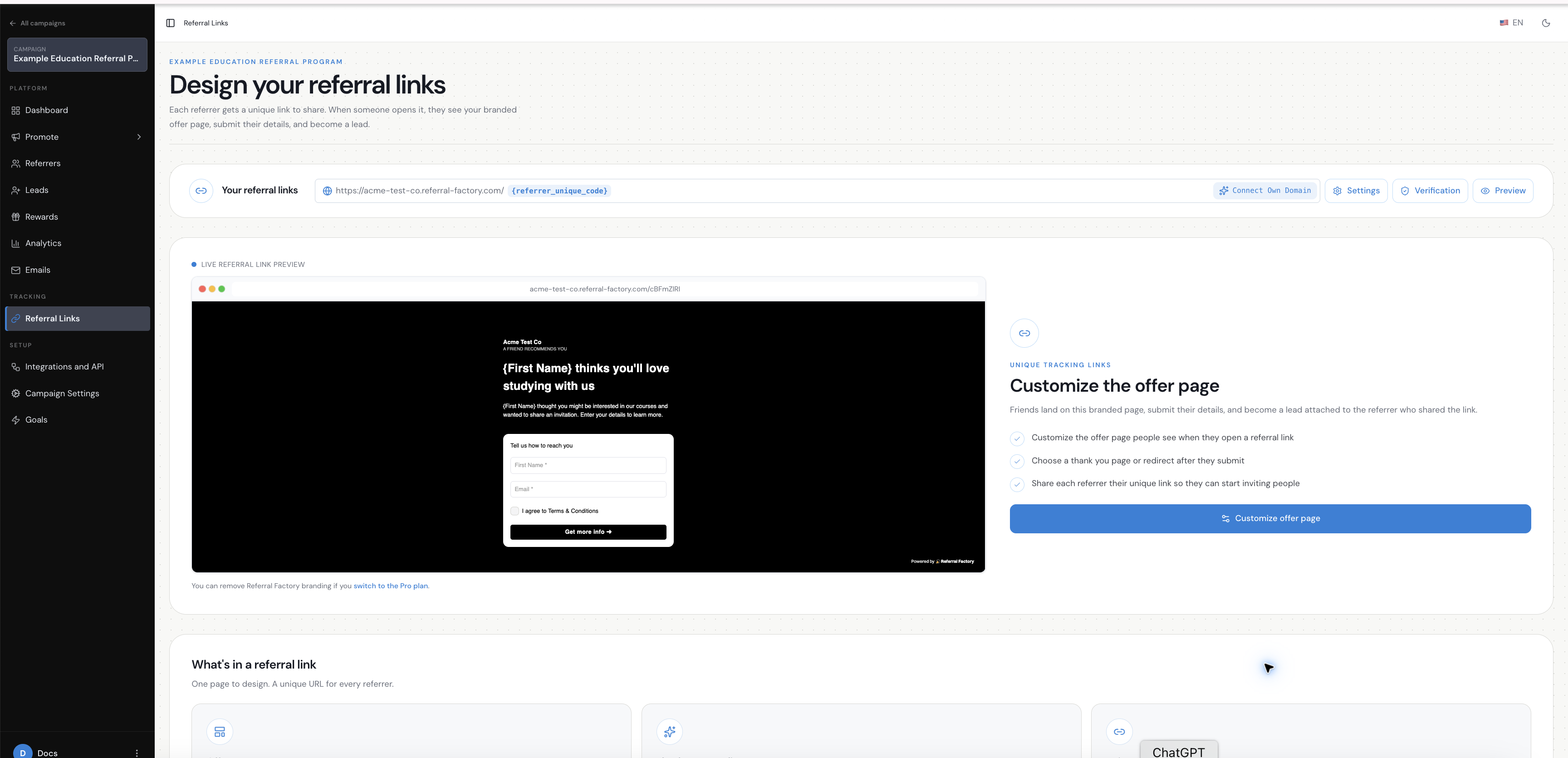
3. Create the Referral Link Page for prospective students
When a referrer shares a Referral Link, the prospective student lands on the Referral Link Page. This page carries the referral context forward, introduces the institution or offer, captures the details needed to identify the lead and explains what happens next.
Keep the initial form simple. For example, collect only a first name and email address. The goal is to capture and attribute the prospective student first, rather than trying to replace the institution’s full admissions form.
After submission, the prospective student can continue into the institution’s existing enquiry, application or admissions journey.
See the Referral Link Page overview and How to design your Referral Link Page for the page setup options.
4. Continue the student into your existing admissions journey
Referral Factory does not need to replace your admissions, enrolment or student-management systems.
After the prospective student submits the Referral Link Page form, send them into the normal journey your institution already uses. For example:
Referral Link Page → prospective student captured and attributed → existing enquiry or application process → normal admissions review → enrolment.
The application may live on your website, in an application portal, in an admissions platform, in a CRM-assisted process or in another internal system. Referral Factory keeps the lead connected to the referrer while your existing systems handle the admissions and enrolment process.
5. Decide what counts as a successful referral
A prospective student submitting the referral form is not automatically a successful education referral. Decide which business event should qualify the referral.
Possible milestones include:
There is no single correct milestone for every education business. Choose the event that represents meaningful value for your institution and that your systems can verify consistently.
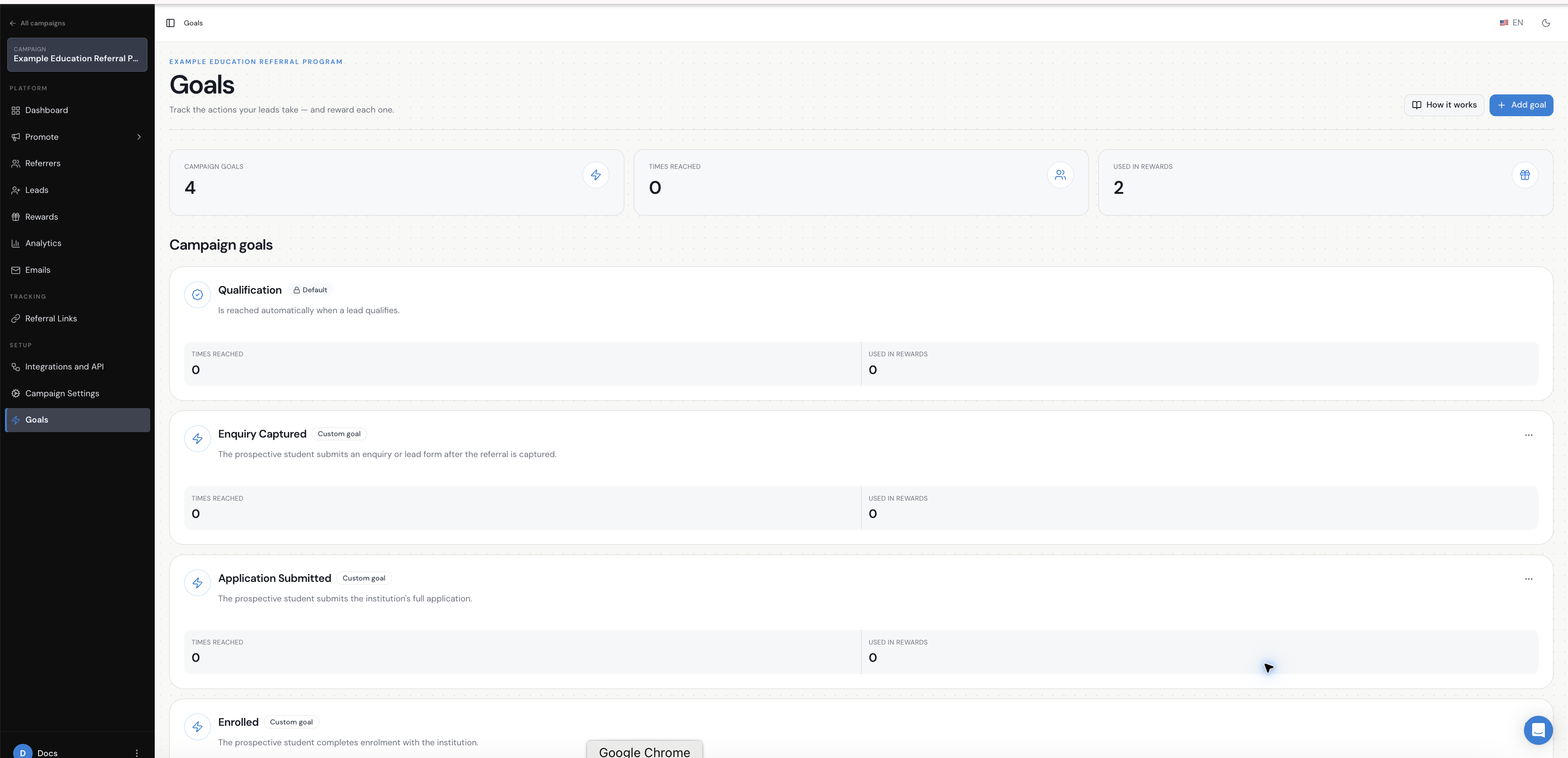
In this example, the journey is represented by three additional records under Goals. In Referral Factory, added records are labelled Custom goal:
1. Enquiry Captured — the prospective student submits an enquiry or lead form after the referral is captured.
2. Application Submitted — the prospective student submits the institution’s full application.
3. Enrolled — the prospective student completes enrolment with the institution.
The example rewards trigger only when Enrolled is reached. That illustrates the difference between capturing a lead, tracking progress and reaching the final reward condition.
- enquiry submitted;
- application submitted;
- application accepted;
- deposit paid;
- enrolment confirmed; or
- another business-defined milestone.
6. Decide how Referral Factory will know when the milestone happens
The milestone is the business action you want to track. These records are managed under Goals in Referral Factory.
The milestone and the method used to record it are separate decisions. First define the business event and the evidence that confirms enrolment. Then choose how your systems will send or record that event in Referral Factory.
Depending on your systems, you may use:
The institution continues to run its normal admissions and enrolment process, while the chosen event method records the relevant goal when the person reaches the required milestone.
If the journey has more than one meaningful stage, track those stages as separate goals where that helps your team. For example:
Lead captured → enquiry captured → application submitted → enrolled.
For a simple program, one final qualification event may be enough. For a longer journey, intermediate goals can help your team understand where referred applicants are progressing or dropping out.
- a CRM integration to map a CRM stage to a goal;
- the API;
- an inbound webhook;
- an automation platform such as Zapier, Make or n8n; or
- manual qualification by your team.
7. Set up the reward after enrolment
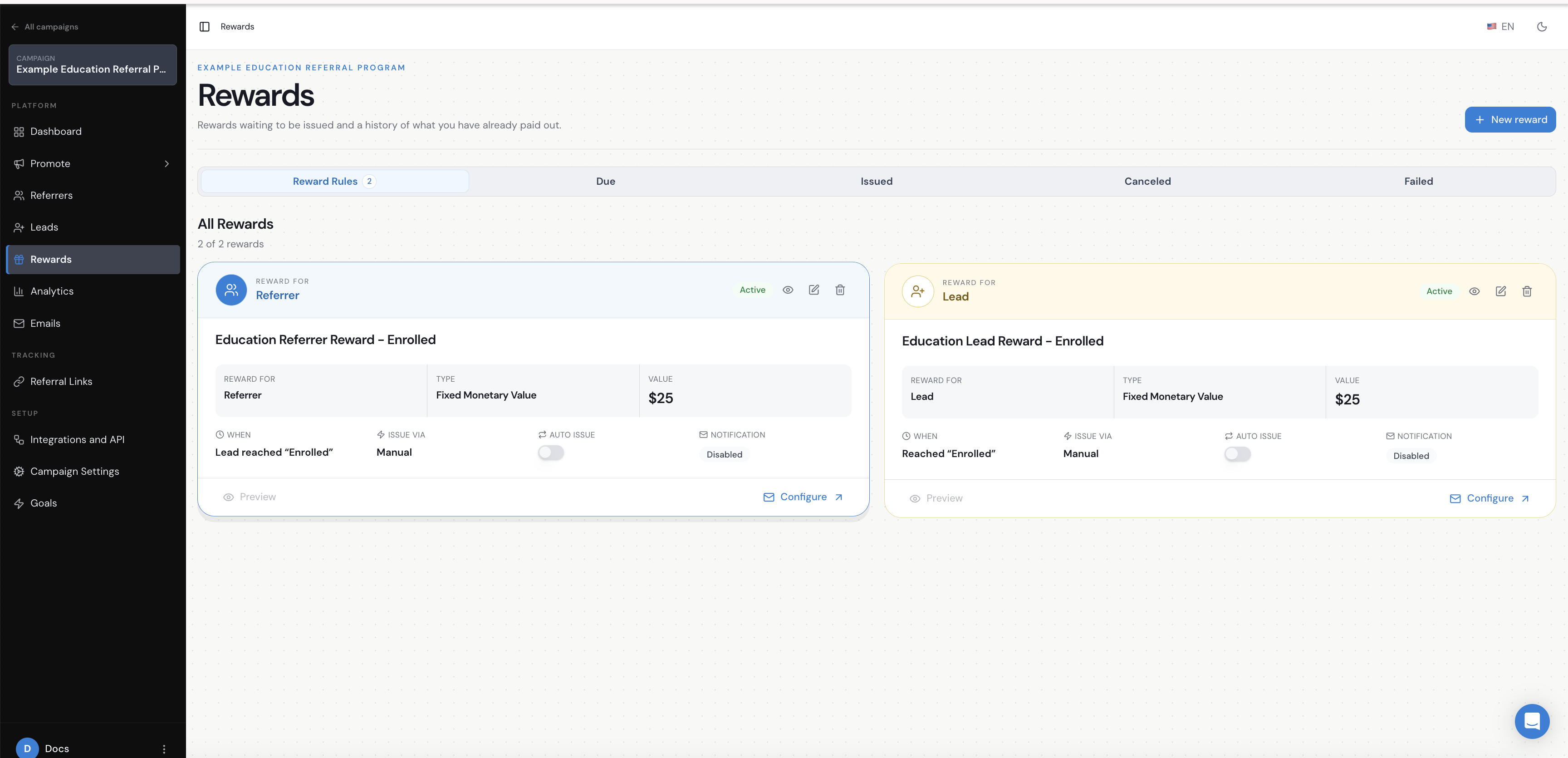
For example, both the referrer and the lead could have a manual fixed-value reward. Both rewards could be tied to the Enrolled goal, with automatic issuance turned off.
This is only an example. You can choose to reward the referrer, the prospective student or both, and you can use a different reward type or issuing method. Keep the reward explanation short in this guide and use the dedicated reward documentation for the available reward options.
Remember the difference between Due and Issued:
For education businesses, keeping rewards manual until the required enrolment milestone has been checked can be useful during testing or where your team wants an approval step. See How do I set up rewards for my referral program? for reward setup guidance.
- Due means the reward has been created because the qualifying condition was met, but it still needs to be issued according to your process.
- Issued means the reward has been paid or delivered.
8. Test the full student referral journey
Keep the campaign in Draft while you test the full path. Check that the referrer receives a unique link, the prospective student is captured and attributed correctly, the admissions destination is correct, the three Goals are recorded as intended, Enrolled is the only trigger for the example rewards, and no reward is Issued automatically unless that is intentional.
Important things to consider for education businesses
Keep the operational details short and decide how you will handle:
- existing students or applicants who may already be in the admissions database;
- duplicate referrals for the same prospective student;
- self-referrals;
- long periods between enquiry and enrolment;
- different intakes or academic terms;
- making sure the qualifying milestone can be verified; and
- collecting only the information actually needed on the Referral Link Page.
The education example in one view
For example, an education referral program can use this structure:
Existing student, parent or alumni member → Branded Referrer Portal → unique Referral Link → Referral Link Page → existing admissions process → Enquiry Captured → Application Submitted → Enrolled → manual rewards become Due.
Use the same structure as a starting point, then change the audience, fields, admissions destination, milestones and reward rules to match your own education business.