
Need help applying this to your account?
Contact support and we will keep this article attached to your request.
What does it mean to qualify a referral?
Qualification tells Referral Factory that a lead reached the campaign’s chosen success point. That status can then be used by the campaign’s reward rules.
Sending a lead to HubSpot and qualifying the referral are separate actions. First create or update the correct HubSpot record, then use a Goal Rule that matches the way your team records success.
How does automatic Qualification work?
Referral Factory watches the HubSpot condition configured in the campaign’s Goal Rules. A Contact-based setup watches a selected Contact property and value. A Deal-based setup watches a selected Deal stage.
Connect HubSpot and configure the Leads action before setting the Goal Rule. The Leads action and qualification rule must use compatible record types.
How do I qualify when Referral Factory creates a Contact?
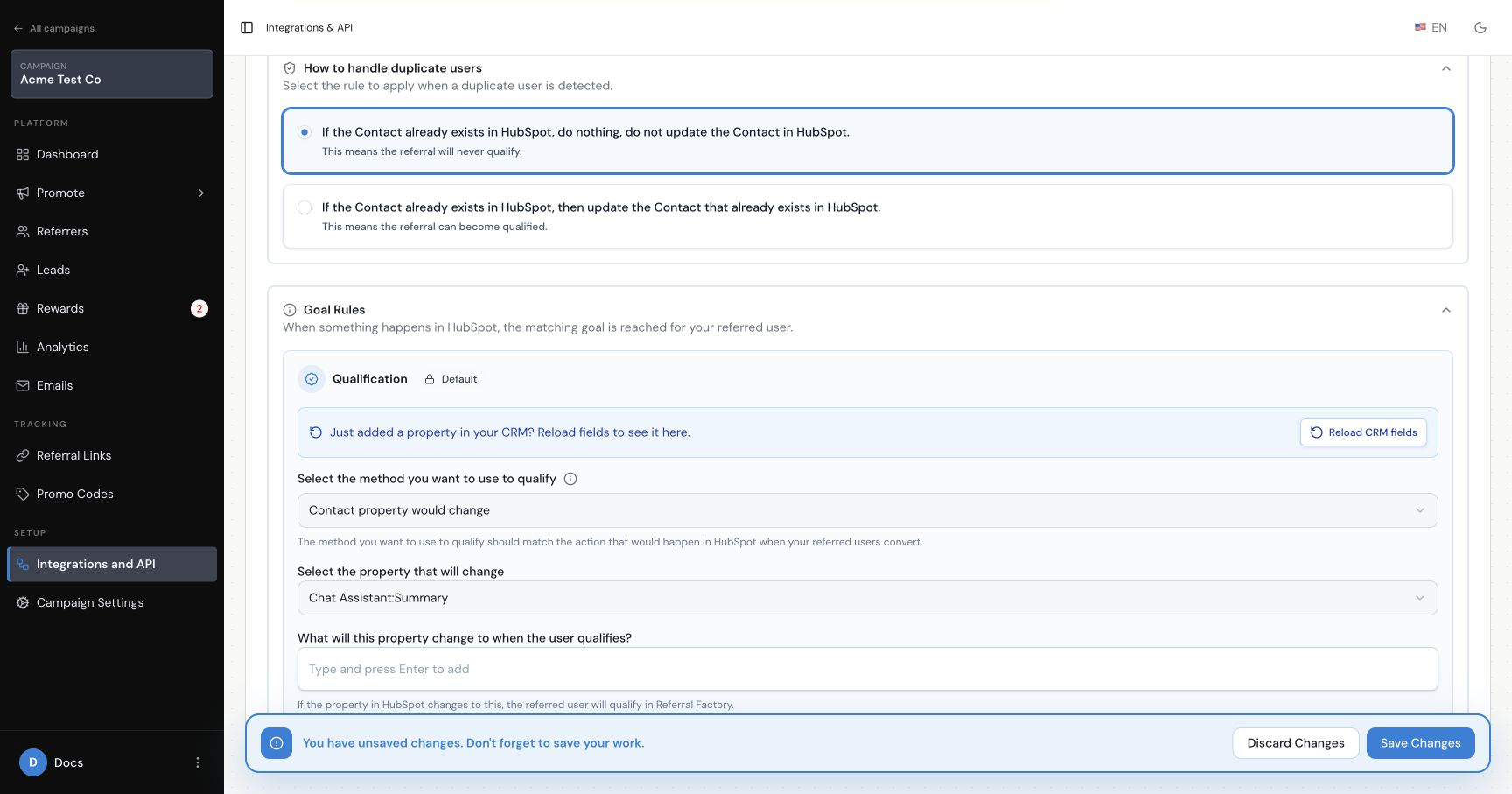
In the HubSpot Leads tab, choose Create new Contact in HubSpot. Under Goal Rules, choose Contact property would change, select the Contact property, and select the exact value that represents a successful referral.
For example, you might qualify when Lifecycle Stage becomes Customer or when a custom Referral Status property becomes Qualified. Save the selected property and target value.
How do I qualify when Referral Factory creates a Deal?
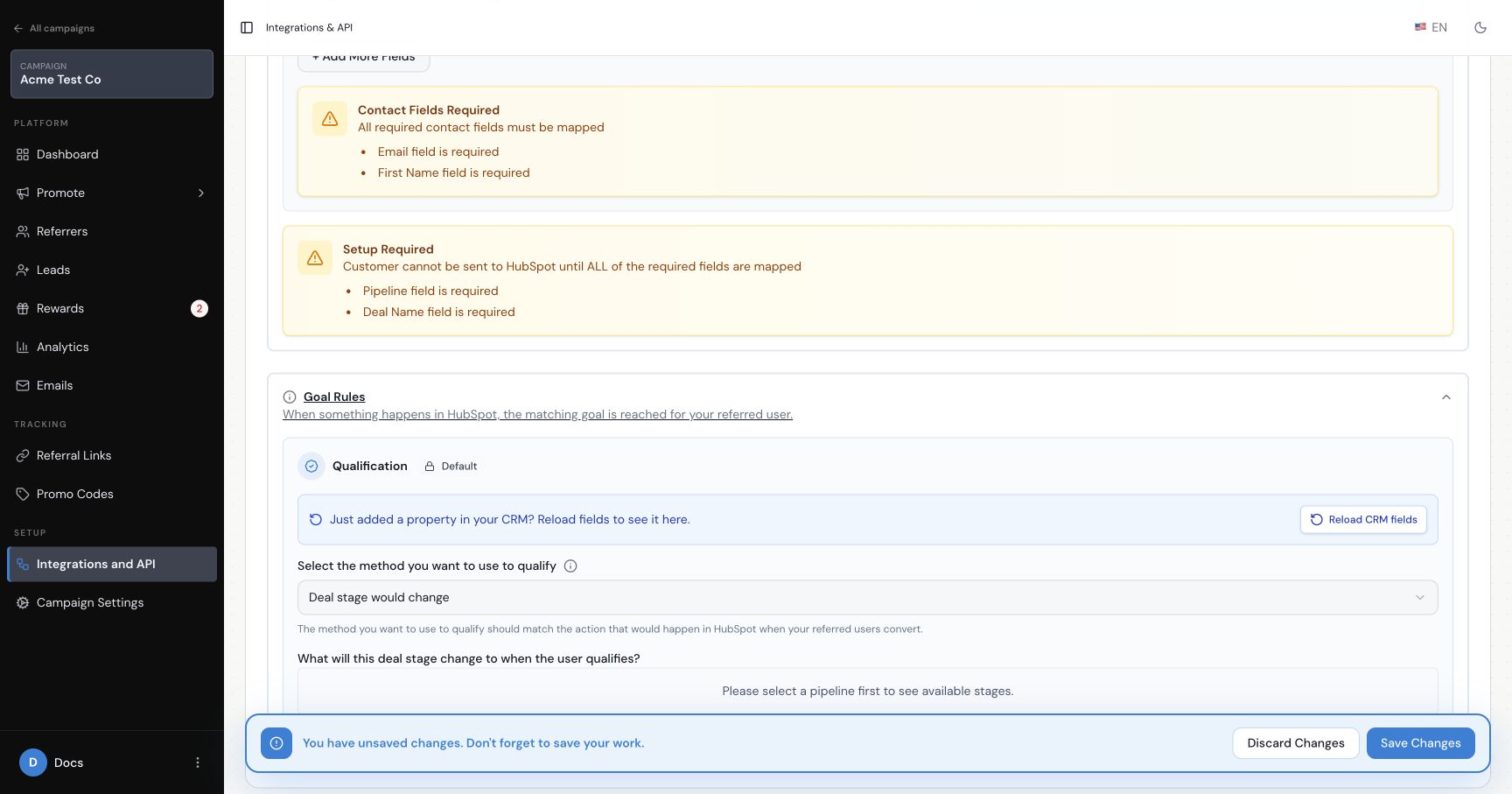
In the HubSpot Leads tab, choose Create new Deals in HubSpot. Under Goal Rules, choose Deal stage would change, select the correct pipeline, and choose the stage that represents success, such as Closed Won.
Save the rule, then test it with a dummy Deal created through the referral campaign.
What if Referral Factory creates Contacts but success is recorded on a Deal?
Referral Factory cannot directly create a Contact and watch a Deal stage as if they were the same record type. Choose one of these approaches:
- Switch the Leads action to create Deals, then qualify directly from the Deal stage. This is the simpler option for a deal-centred sales process.
- Keep creating Contacts and use a HubSpot workflow to update a custom Contact property when the associated Deal reaches the successful stage. Then configure Referral Factory to qualify when that Contact property reaches the chosen value.
How does duplicate handling affect Qualification?
If the Leads setting says not to update a Contact that already exists in HubSpot, a referred person who was already in HubSpot will not qualify through this integration. This can be used as a fraud-prevention rule for programs that only reward genuinely new customers.
If existing contacts should be eligible, choose the option that updates the existing Contact and test the behaviour with a controlled record.
How do I test automatic Qualification?
Step 1
Create a dummy lead through the Referral Factory campaign.
Step 2
Confirm that the expected Contact or Deal appears in HubSpot.
Step 3
Change the exact Contact property or Deal stage saved in the Goal Rule.
Step 4
Allow the integration time to process, then confirm that the matching lead is qualified in Referral Factory.
Step 5
Check the reward status separately. Do not use a real customer or issue a real reward during the test.
What should I check if Qualification does not happen?
Confirm that the Goal Rule is selected and saved, the property and value or pipeline and stage exactly match the HubSpot record, and the duplicate-handling option permits an update. Qualification can take up to 12 hours to appear. If the controlled test still has not qualified after that window, use the HubSpot troubleshooting guide.