
Need help applying this to your account?
Contact support and we will keep this article attached to your request.
You can use Make to connect Referral Factory with CRMs, marketing tools, spreadsheets, messaging apps, and other systems so referral activity can move automatically between them.
Common workflows include sending new Referrers or Leads into another system, adding existing contacts to Referral Factory, updating CRM records with referral information, qualifying Leads when a conversion happens, and triggering follow-up actions or notifications.
Practical automation examples between Referral Factory and make: create Referrers/Leads, update CRM records, qualify Leads, trigger rewards or notifications
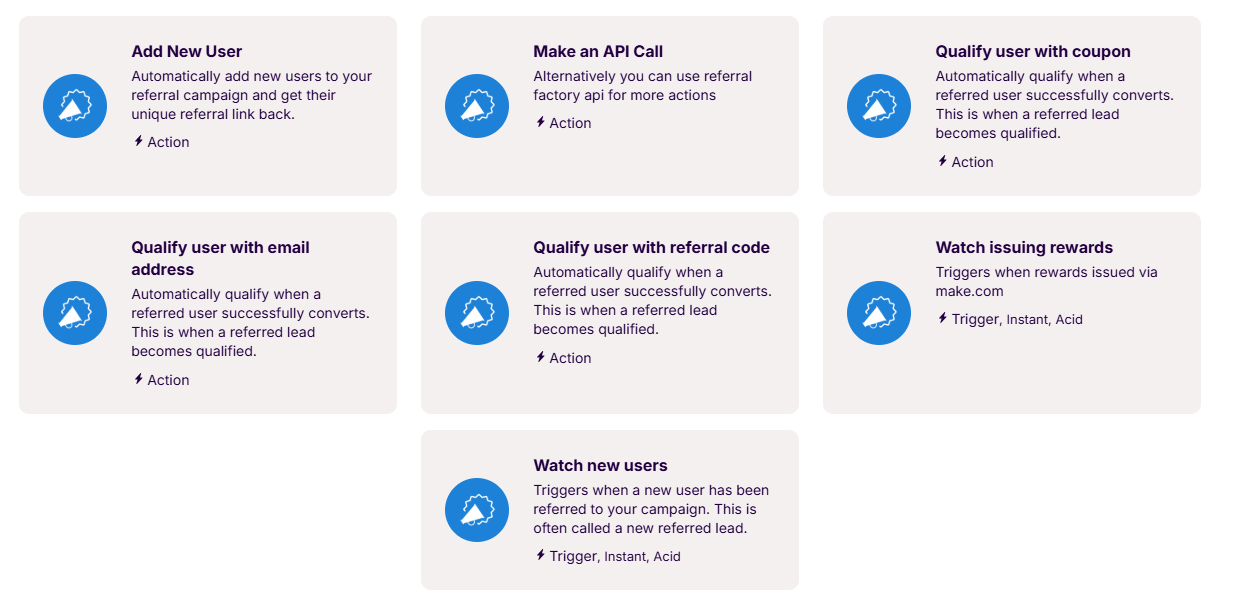
Here are some common ways to use Referral Factory with Make: 1. Send new Leads to your CRM Use Watch New Users to detect new referred Leads and send their information to your CRM or another app.
For example:
Lead signs up through a referral link → Make receives the Lead → Create a new Contact in your CRM
This lets your sales team follow up with referred Leads using the same CRM workflow they already use.
2. Send new Referrers to your CRM Use Watch New Users and select the user source that matches how your Referrers join the campaign, such as Direct for Referrers signing up through the Branded Referrer Portal or Popup for Referrers joining through an On-Click Pop Up.
For example:
Customer joins through the Branded Referrer Portal → Make receives the Direct user → Create or update the customer in your CRM with their referral information
3. Add contacts as Referrers Start with a contact in your CRM or another app and use Add New User to add them to Referral Factory as a Referrer and generate their unique Referral Link.
For example:
New customer is added to your CRM → Make → Add New User in Referral Factory → Customer becomes a Referrer and receives a unique Referral Link
This is useful when you want customers to become Referrers automatically without asking them to sign up again.
4. Update CRM records with referral information Referral Factory data such as a Referral Link, campaign information, or other available fields can be mapped into CRM fields when the destination app supports updating records.
For example:
Customer is added to Referral Factory as a Referrer → Referral Link is generated → Make updates the customer's CRM record with their unique Referral Link
Your team can then use that Referral Link directly from the CRM in emails or other customer communications.
5. Qualify Leads automatically When a conversion happens in another system, Make can use a Referral Factory qualification action to change the matching Lead from Pending to Qualified.
For example:
Referred Lead becomes a customer in your CRM → Make detects the qualifying status → Referral Factory marks the Lead as Qualified
Another example could be:
Referred Lead completes a purchase → Make receives the purchase event → Referral Factory qualifies the matching Lead
This allows qualification to follow the conversion event your business already uses, rather than requiring your team to qualify Leads manually.
6. Issue rewards through Make Referral Factory can use Make to pass rewards that are ready to be issued to another rewards or loyalty app. In Referral Factory, configure the reward to be issued via Make, then use Watch Issuing Rewards in your Make scenario to receive the reward details and continue the workflow in the app that will deliver the reward. Referral Factory
For example:
Referrer earns a $25 reward → Reward is issued via Make → Make receives the reward → Gift card is sent through your rewards provider
You could also use the same workflow to send custom swag, a handwritten card, or another reward through an app connected to Make. Referral Factory’s existing Make reward integration supports this kind of workflow across different reward providers.
Prerequisites
Before building your scenario, make sure you have:
You should also decide exactly what should start the automation and what should happen afterward.
For example:
New Referrer joins → Create or update CRM Contact
or:
CRM Contact becomes Customer → Qualify Referral Factory Lead
Keeping the workflow clear before building it makes the Make scenario much easier to configure.
- A Referral Factory campaign ready to use.
- A Make account.
- Access to the CRM or other app you want to connect.
- The necessary permissions to create or update records in the destination system.
- The fields you want to use already created in your CRM where needed.
Identifiers
Some automations need a way to match the same person between Referral Factory and another system.
For example, when using Qualify User With Email, the email coming from the source app must match the email address of the existing Lead in Referral Factory.
Other workflows may use values such as:
The required identifier depends on the specific action.
For qualification workflows, remember that the Lead must already exist in Referral Factory before Make can mark them as Qualified.
- Email
- Referral Factory user information
- Referral Link
- CRM record ID
- Other identifiers supported by the Make modules you are using
Error handling
Always test your scenario before turning it on for live users.
If an automation does not work as expected, check:
You can also review the scenario's execution history in Make to see which module ran successfully and where an error occurred.
- The Make scenario is active.
- The correct Referral Factory trigger or action is selected.
- The correct user source is selected when using Watch New Users.
- Required fields are mapped.
- The destination app connection is still authorized.
- The identifier matches the correct Referral Factory user.
- The CRM or destination app accepts the values being sent.
- Your filters are not preventing the scenario from continuing.