
Need help applying this to your account?
Contact support and we will keep this article attached to your request.
In Referral Factory, we call this qualification. A new Lead starts as Pending, and when the CRM event you have selected occurs, we automatically change that Lead to Qualified.
Connecting your CRM alone does not automatically qualify Leads. You also need to configure the qualification rule that tells us what a successful conversion looks like in your CRM.
How an external CRM can automatically qualify a Lead
The basic workflow is:
Lead joins Referral Factory → Lead is sent to your CRM → Conversion happens in the CRM → Referral Factory marks the Lead as Qualified
For example, your business might consider a referral successful when a prospect becomes a customer, a Deal is won, or another CRM milestone is reached.
Once the configured event happens, Referral Factory detects the change and updates the corresponding Lead from Pending to Qualified.
If you have rewards configured for Qualified Leads, qualification can also trigger the appropriate reward rules.
Choose the CRM record/stage/field condition
The qualification options available depend on the CRM you use and the type of record you have chosen for your Leads.
Depending on the integration, you may be able to qualify a Lead when:
For example, you might choose Lifecycle Stage → Customer or a Deal reaching Closed Won if those are the events your business already uses to record successful customers.
Choose a condition that represents a real conversion in your existing sales process.
- A CRM field or property changes to a specific value.
- A Lead or Contact reaches a particular status.
- A Deal or Opportunity reaches a specific stage.
- Another supported CRM event confirms that the referral has converted.
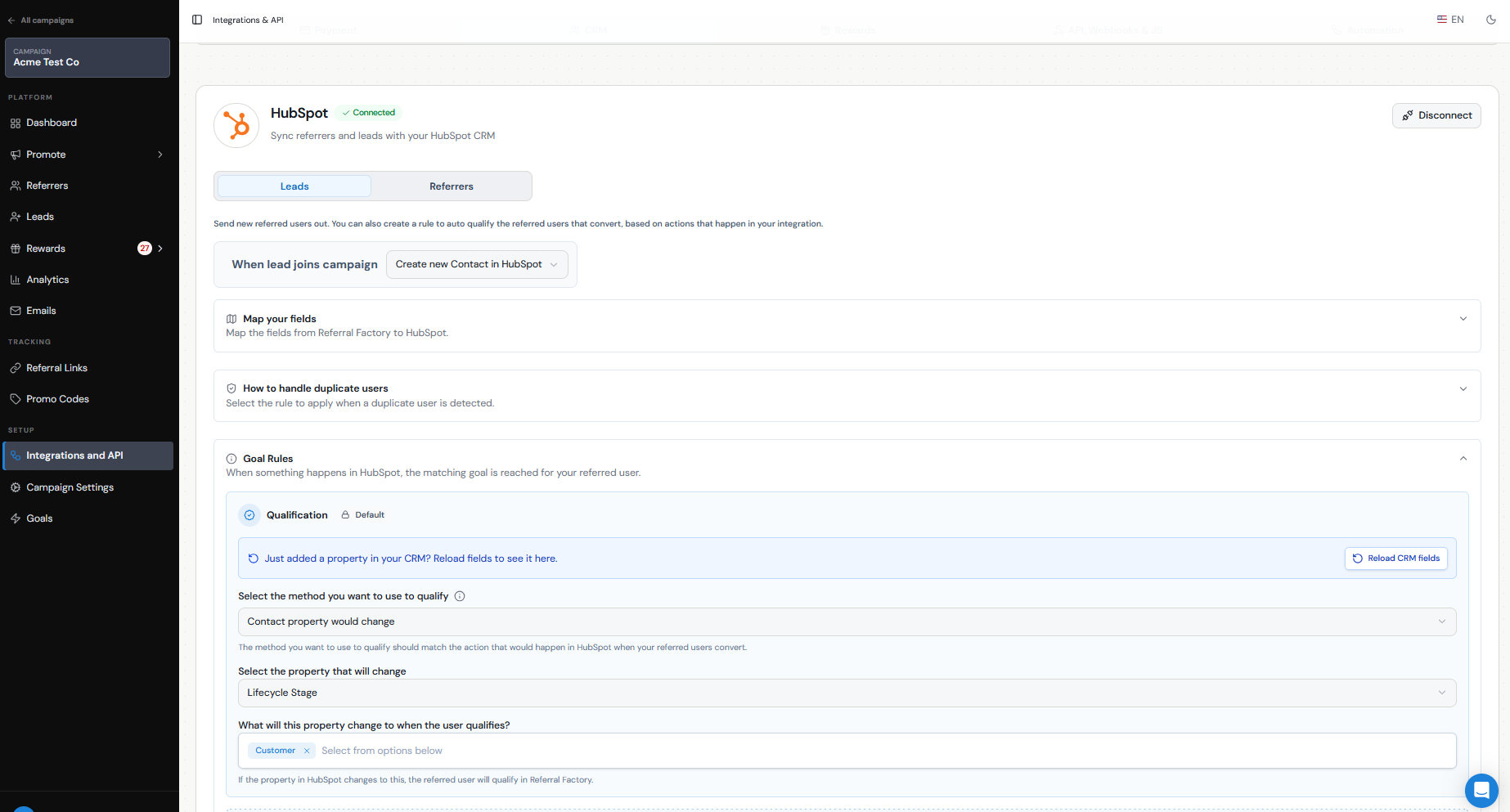
Identifiers
When you use a native CRM integration, you do not need to configure a separate identifier for automatic qualification.
Referral Factory tracks the Lead that was sent to your CRM through the integration and monitors the CRM condition you selected for that Lead. When the relevant field, status, Deal, Opportunity, or other supported CRM condition reaches the qualifying value, we mark the corresponding Lead as Qualified in Referral Factory.
Identifiers such as an email address, Referral Factory user ID, or other supported identifier become more relevant when qualification is being triggered through methods such as the API or a webhook, rather than through the native CRM qualification rules.
Timing
CRM qualification may not always appear instantly.
Once the qualifying change happens in your CRM, allow time for the integration to detect the update and process the qualification. During this period, the Lead may continue to show as Pending in Referral Factory.
If a Lead remains Pending longer than expected, first confirm that the correct CRM record actually reached the field value, status, or stage specified in your qualification rule.
Duplicate handling
Your duplicate settings can affect automatic qualification.
If a Lead already exists in your CRM and you have selected Do nothing for existing records, Referral Factory may not create or update the CRM record or establish the relationship needed to monitor it for qualification.
For example, with HubSpot, selecting Do nothing for an existing contact means that referral cannot later be automatically qualified through the HubSpot integration.
Review your duplicate handling settings when configuring the integration, especially if many of your referred Leads may already exist in your CRM.
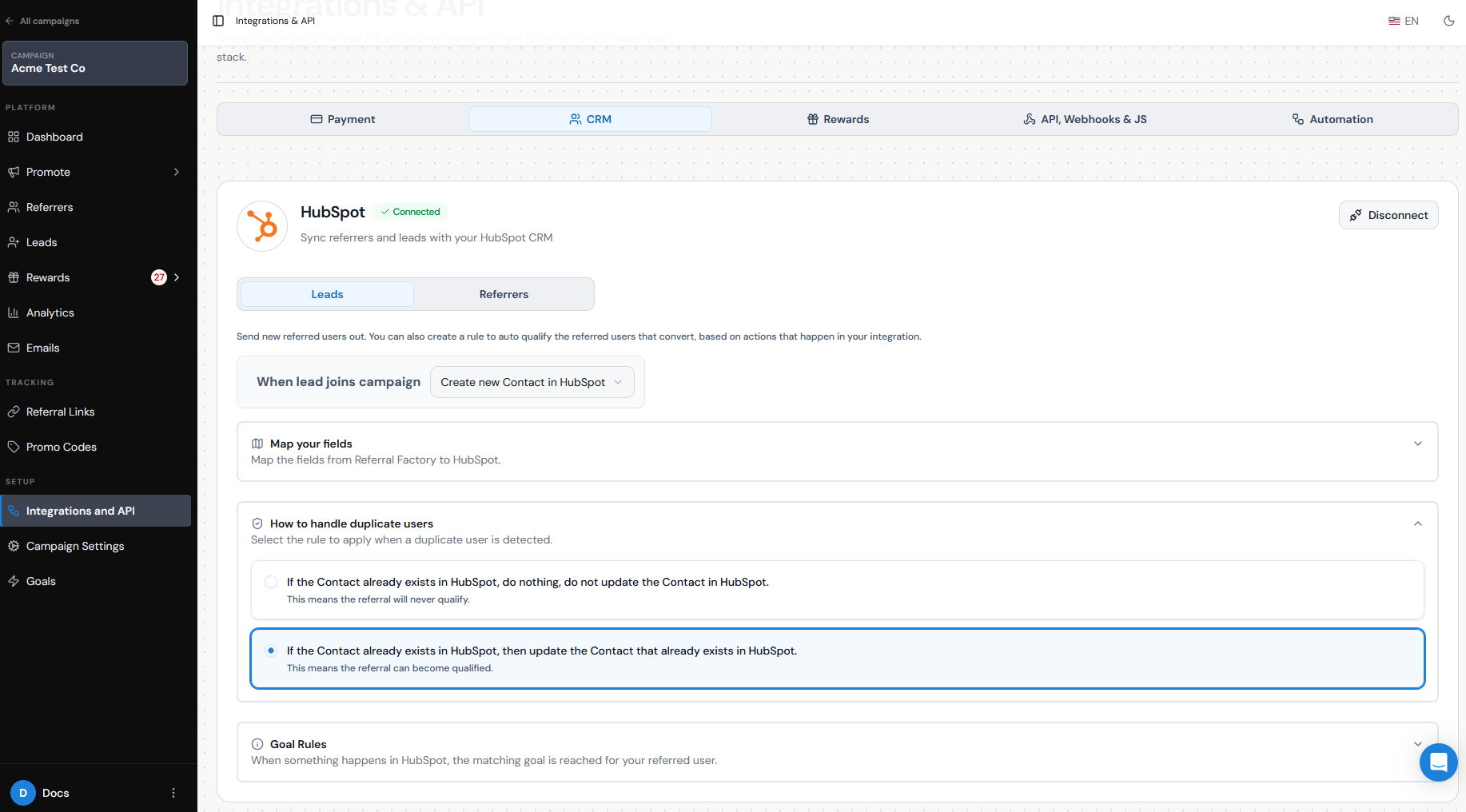
Testing
Before relying on CRM qualification for a live campaign, test the entire workflow with a test Referrer and Lead.
Send the Lead into your CRM, then complete the actual CRM action you selected as your qualification trigger. For example, if your rule qualifies a Lead when a Deal reaches Closed Won, move the test Deal to that stage.
Then return to Referral Factory and confirm that the correct Lead changes from Pending to Qualified.
Testing the real CRM event is important. Manually qualifying the Lead inside Referral Factory does not confirm that your CRM qualification rule is working.
CRM-specific instructions
The exact setup differs depending on the CRM and record type you use.
For step-by-step instructions, refer to the dedicated integration guide for your CRM. These guides explain the available record types, field mapping, duplicate handling, qualification options, and how to test the connection.
Referral Factory supports automatic qualification through several native CRM integrations, and the qualification options available will depend on the CRM you connect.