
Need help applying this to your account?
Contact support and we will keep this article attached to your request.
How can I verify that the email addresses entered are valid emails
You can verify that people joining your referral program enter a valid email address.
When the Email Verification is enabled, Referrers and Leads must verify their email address with a 4-digit code sent to their inbox before they can complete their sign-up.
Why should I validate email addresses in a referral program?
Validating email addresses helps improve the quality of the Referrers and Leads joining your referral program.
It can help you:
This is particularly useful when you offer rewards, as it can help reduce attempts to create fake referrals using invalid email addresses.
- Reduce fake or incorrect sign-ups.
- Prevent people from using email addresses that do not belong to them.
- Keep your campaign data more accurate.
- Add another layer of protection against referral fraud.
How do I enable email validation?
To enable it:
When verification is required, we send a 4-digit verification code to the email address entered. The Referrer or Lead must enter the code to continue.
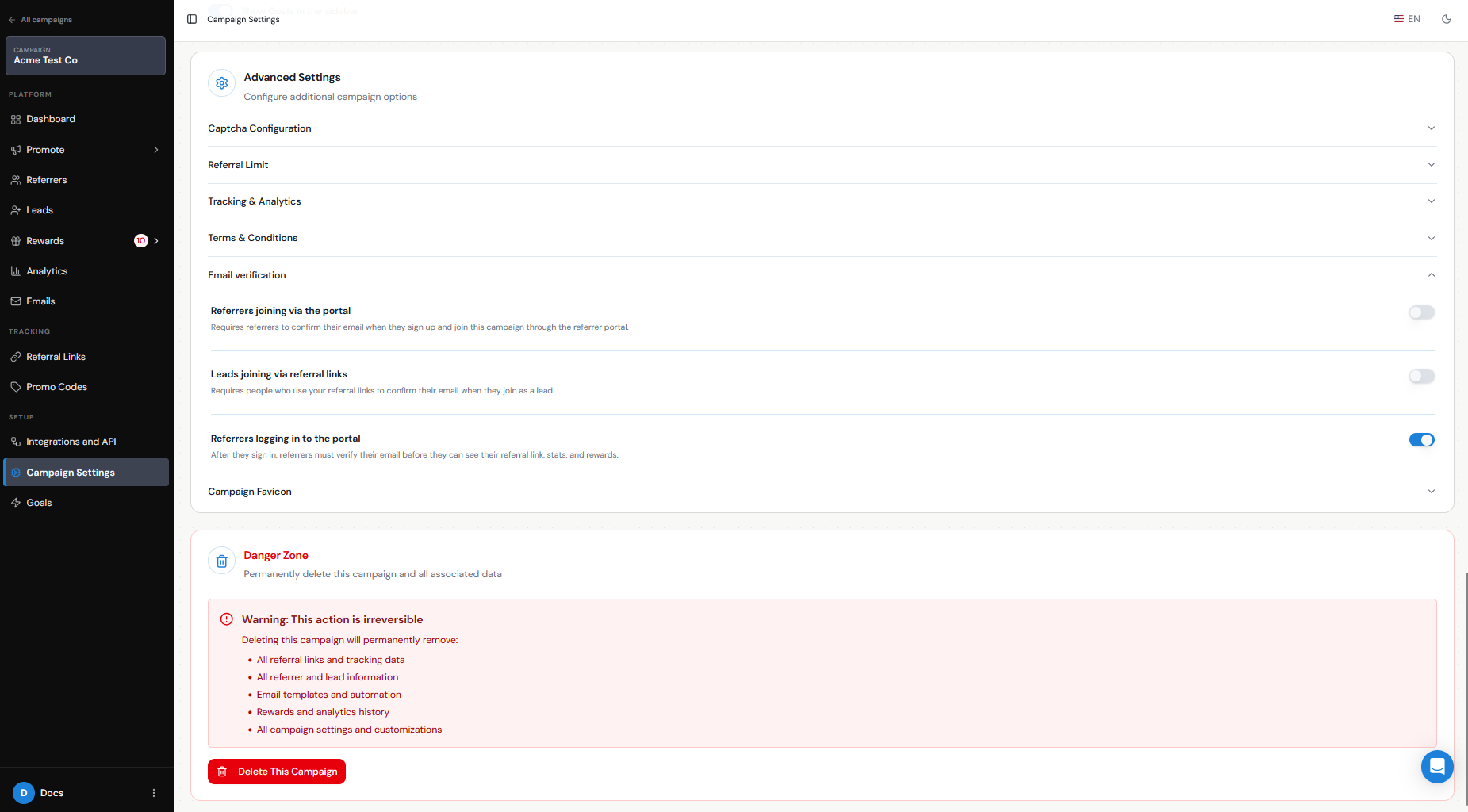
- Referrers joining via the portal — requires Referrers to verify their email when they sign up and join the campaign through the Referrer Portal.
- Leads joining via referral links — requires Leads to verify their email when they join through a referral link.
- Referrers logging in to the portal — requires Referrers to verify their email after signing in, before they can access their referral link, stats, and rewards.
Step 1
Go to Campaign Settings.
Step 2
Scroll down to Advanced Settings.
Step 3
Expand Email Verification.
Step 4
Choose where you want email verification to apply by enabling one or more of the available options:
What happens if an email address is invalid?
If the email address is invalid, the person will not receive the verification code and will not be able to complete the verification process.
They will need to enter a valid email address and successfully verify it before they can complete their sign-up.
This helps prevent invalid or unverified email addresses from being added to your referral program.