
Need help applying this to your account?
Contact support and we will keep this article attached to your request.
Overview
Send people who newly join your referral program to Monday.com
When a new person joins your referral program as a referrer, Referral Factory can send that person’s information to a Monday.com destination. This is separate from importing existing Monday.com contacts and from sending new leads.
Can I automatically send new Referrers to Monday.com?
Yes. Configure the Referrers path for the campaign, choose a Monday destination, map the required information, and choose what to do if an existing item is found.
Before you start
- Connect Monday.com under Integrations and API.
- Choose the campaign.
- Make sure the selected destination exposes the fields you need to send.
When is a new Referrer sent to Monday.com?
The Referrers automation runs when a person becomes a new referrer in the campaign. It does not describe the separate existing-contact sync.
How do I choose what happens when a new Referrer joins?
Step 1
Open the campaign and select Integrations and API, then open Monday.com.
Step 2
Select Referrers.
Step 3
Choose the Monday destination.
Step 4
Open mapping and duplicate handling, then review the choices before saving.
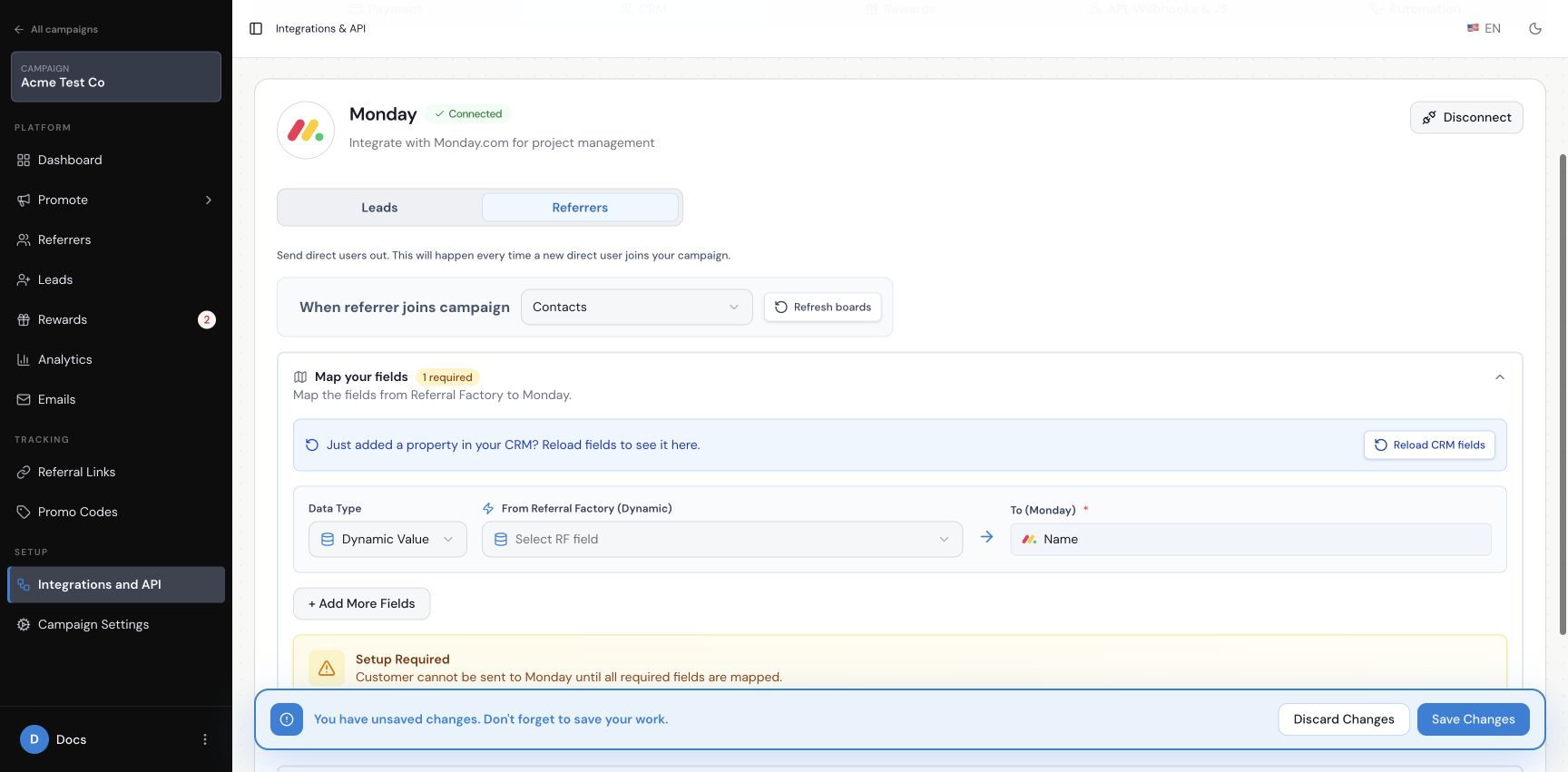
How do I choose the Monday.com destination?
Use the destination selector in Referrers. The current interface includes Leads, Deals and Contacts, along with other Monday.com areas. Choose the destination your team uses for new referrers.
How do I map Referrer information to Monday.com?
Use Dynamic Value when the value should come from the referrer or campaign, or Fixed Value when every new referrer should receive the same value. The current screen exposes fields including First Name, Email, Referral Code, Source, Referral Link, Submission Form Link, Promo Code, Referrals Count, Converted Referrals Count and Campaign Name. Map the fields your selected destination requires before saving.
Can I send a Referrer’s referral link back to Monday.com?
The current Referrers mapping screen includes Referral Link. If the campaign uses referral links, map it to a Monday column so your team can find each new referrer’s link.
What happens if the Referrer already exists in Monday.com?
The current screen offers three choices: do nothing, create a new item with the same email, or update the existing item. Select the option that matches how you want a possible existing item handled.
How do I save and test the setup?
Step 1
Check the destination and map the fields it requires.
Step 2
Review duplicate handling and optional fields.
Step 3
Save the settings.
Step 4
Use one dummy referrer and check the selected Monday destination.