
Need help applying this to your account?
Contact support and we will keep this article attached to your request.
Overview
Referral Factory can sit alongside your accounting or consulting sales process. You can capture and attribute the introduction first, continue the prospective client into your normal consultation, advisory or opportunity journey, and tell Referral Factory when the prospective client reaches the milestone that should qualify the referral.
For strategy, reward and promotion ideas, explore our consulting referral program guide.
The basic journey looks like this:
Existing client or partner becomes a referrer → shares a Referral Link → company details are captured → the prospective client enters the normal consultation and sales process → an engagement is signed → the referral qualifies → the reward becomes Due.
Your audience, sales cycle, qualifying milestone and reward may be different.
1. Decide who should become a Referrer
Accounting and consulting businesses often start with existing clients, trusted partners and former clients who understand the value of the service.
For example, an accounting firm might invite current clients to introduce another business for tax, bookkeeping or advisory help, while a consultancy might invite clients or strategic partners to introduce a company that needs specialist support. Invite the chosen audience through email, client portals or account reviews, or let people join through the Branded Referrer Portal if self-sign-up is appropriate.
Choose the best way to promote your referral program
Accounting and consulting referrals are usually relationship-based. Use email campaigns after a successful engagement, account review or positive client outcome. An On-Click Popup can give referrers access to their Referral Link, referrals and rewards inside a client area, while a Branded Referrer Portal provides a fuller standalone or embedded option. Referral Links work well when clients want to make an introduction digitally, and direct referral submission can help when a client already knows the person or business they want to introduce. QR codes are not necessary unless the business has a genuine in-person use case.
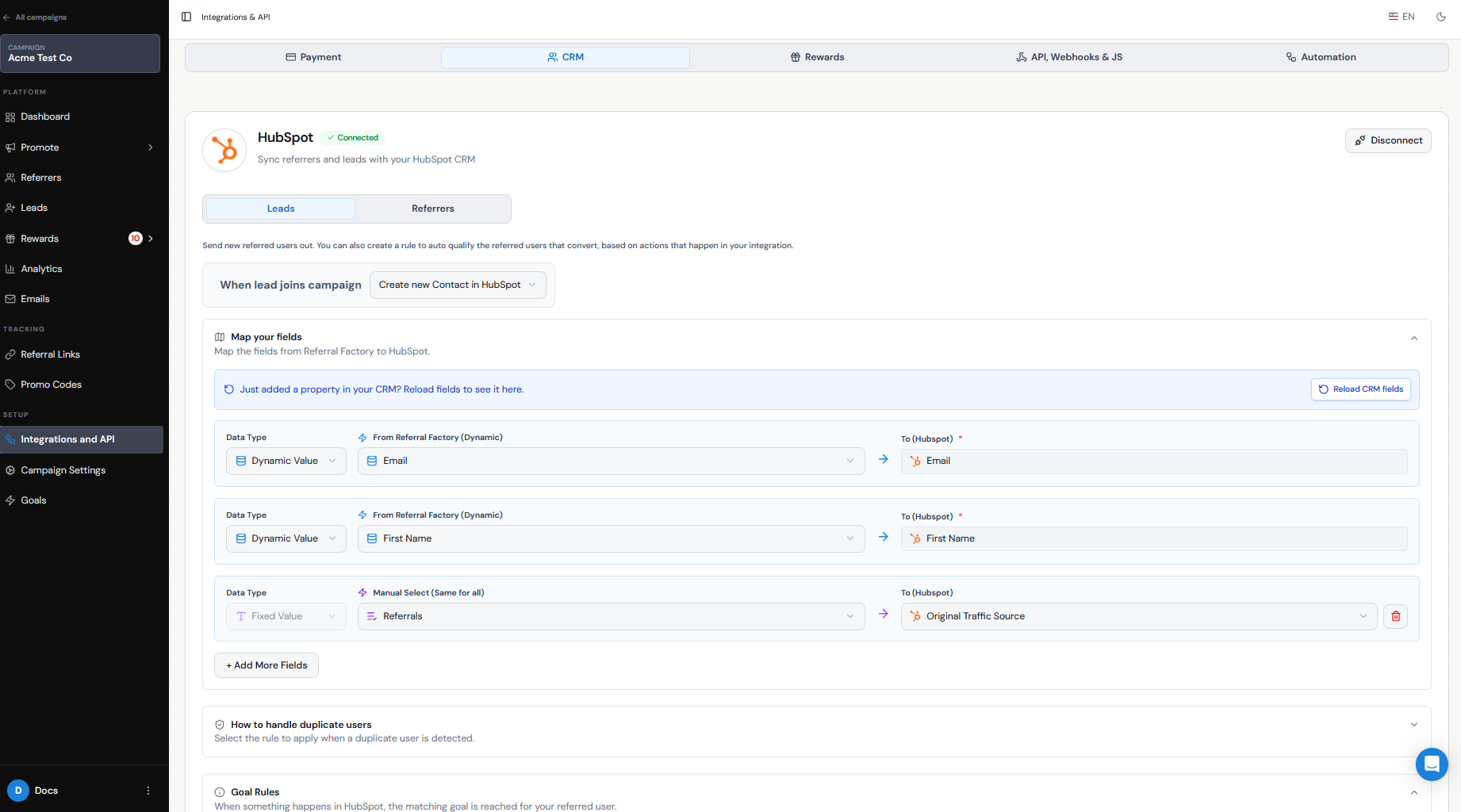
The CRM or practice-management system is especially important for this longer sales cycle. Referral Factory captures and attributes the introduction first, the CRM continues the consultation, opportunity and proposal workflow, and the CRM can record Engagement Signed when the agreed stage is reached. Use the API, an inbound webhook or automation when another sales system owns that event.
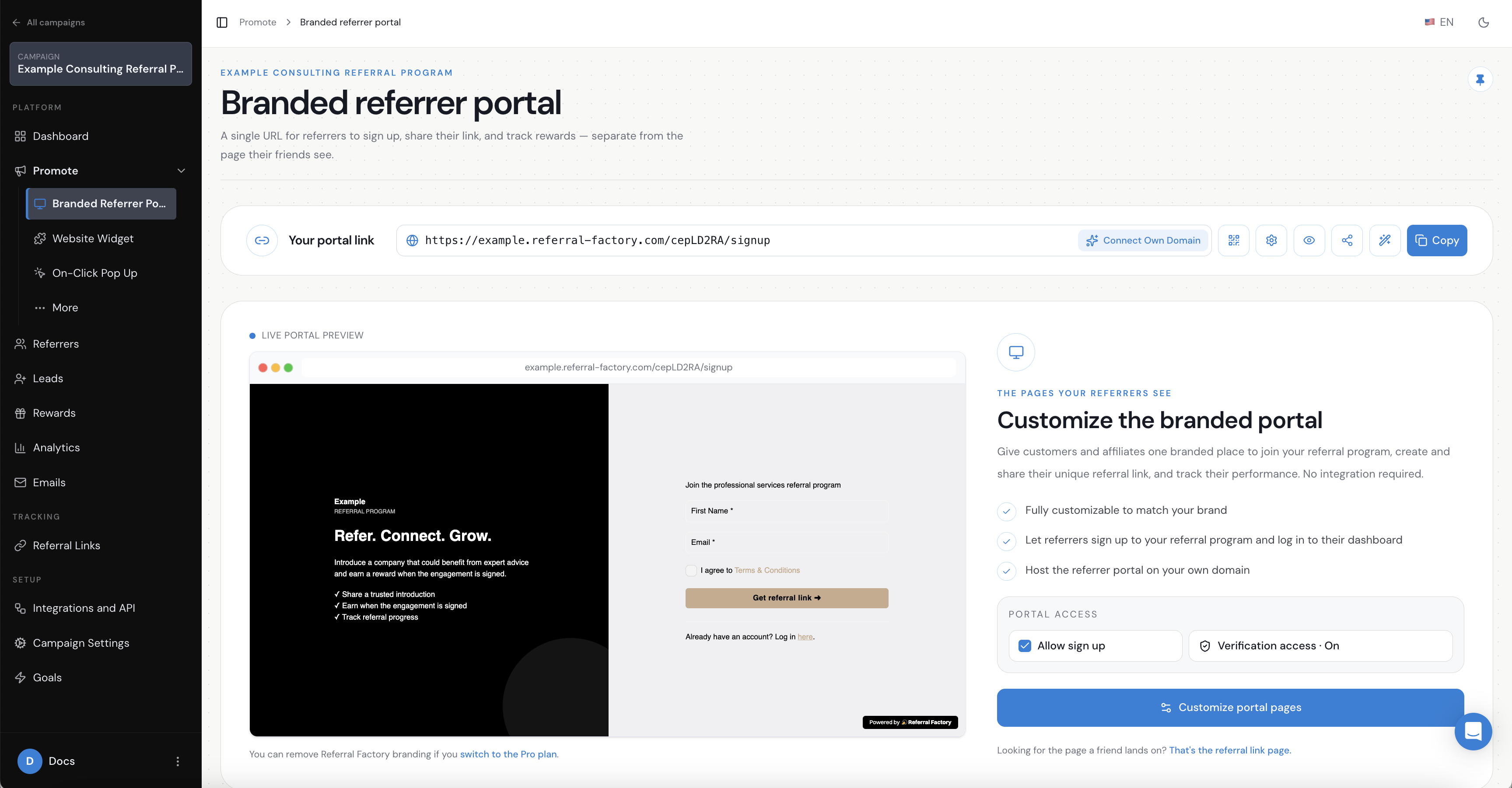
2. Give Referrers a place to access and share their referral link
Each referrer needs a way to get their own tracked Referral Link and share it with a company that may need help.
The Branded Referrer Portal can provide that experience. It includes sign-up, login and dashboard pages where referrers can access their link, share it and see referral activity. An On-Click Popup can provide the same referral access inside a client area, while the portal can be used on its own or embedded inside a client or partner area where appropriate.
The portal does not need to replace your CRM, client portal, proposal system or contract process. Your existing systems remain responsible for client records, sales activity and signed agreements.
For more on the referrer experience, see How to create and use a branded referral portal.
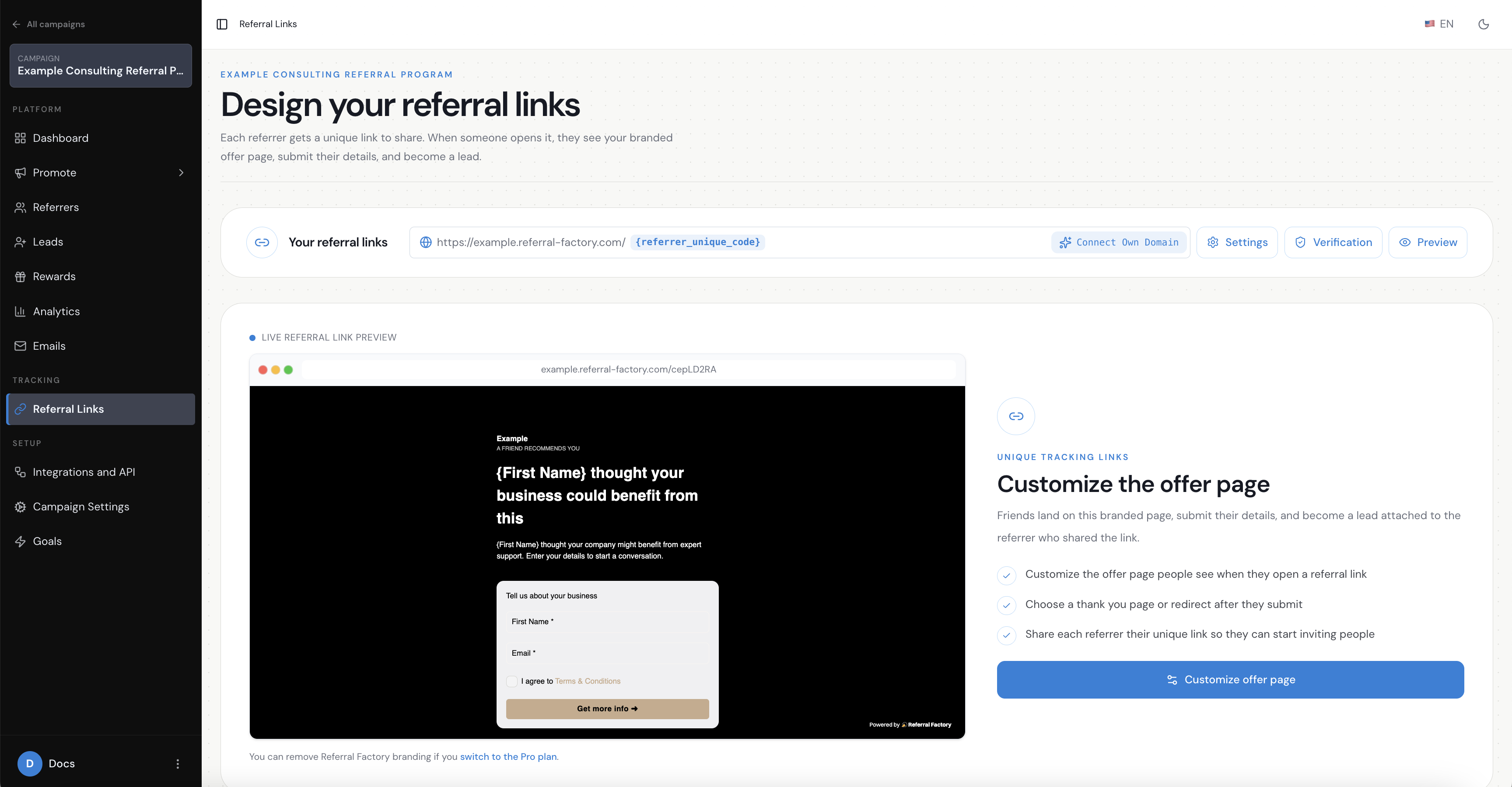
3. Create the Referral Link Page for the prospective client
When a referrer shares a Referral Link, the prospective client lands on the Referral Link Page. This page carries the referral context forward, introduces the service, captures the details needed to identify the opportunity and explains what happens next.
Keep the initial form simple. For example, collect a first name, work email address and company name if those fields help your sales team. After submission, the prospective client can continue into the accounting or consulting business's existing enquiry, consultation or sales journey.
See the Referral Link Page overview and How to design your Referral Link Page for the page setup options.
4. Continue the prospective client into your existing sales journey
Referral Factory does not need to replace your CRM, consultation booking, proposal or contract systems.
After the prospective client submits the Referral Link Page form, send them into the normal journey your business already uses. For example:
Referral Link Page → prospective client captured and attributed → consultation or advisory meeting → opportunity qualified → proposal and engagement letter → engagement signed.
The next step may live on your website, in a calendar tool, in a CRM or in a contract platform. Referral Factory keeps the lead connected to the referrer while your existing systems handle qualification, proposals and agreements.
5. Decide what counts as a successful referral
A prospective client submitting an enquiry is not automatically a successful accounting or consulting referral. Decide which business event should qualify the referral.
Possible milestones include:
There is no single correct milestone for every accounting or consulting business. If the sales cycle is long, choose an event that represents meaningful commercial value and that your team can verify consistently.
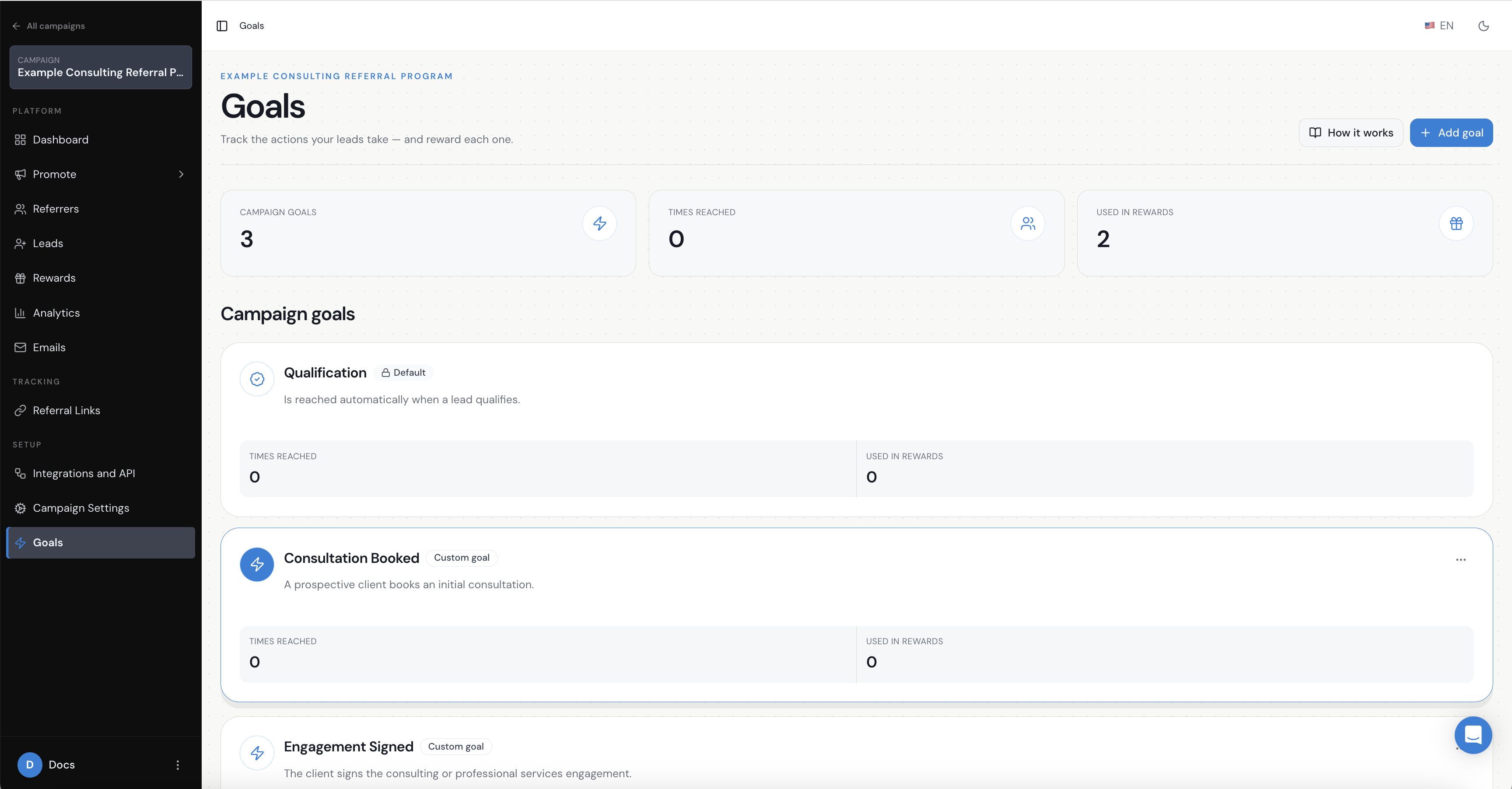
In this example, the journey is represented by three additional records under Goals. In Referral Factory, added records are labelled Custom goal:
1. Consultation Booked: a prospective client books an initial consultation or advisory meeting.
2. Opportunity Qualified: the opportunity meets the agreed qualification criteria.
3. Engagement Signed: the client signs the accounting, advisory or consulting engagement.
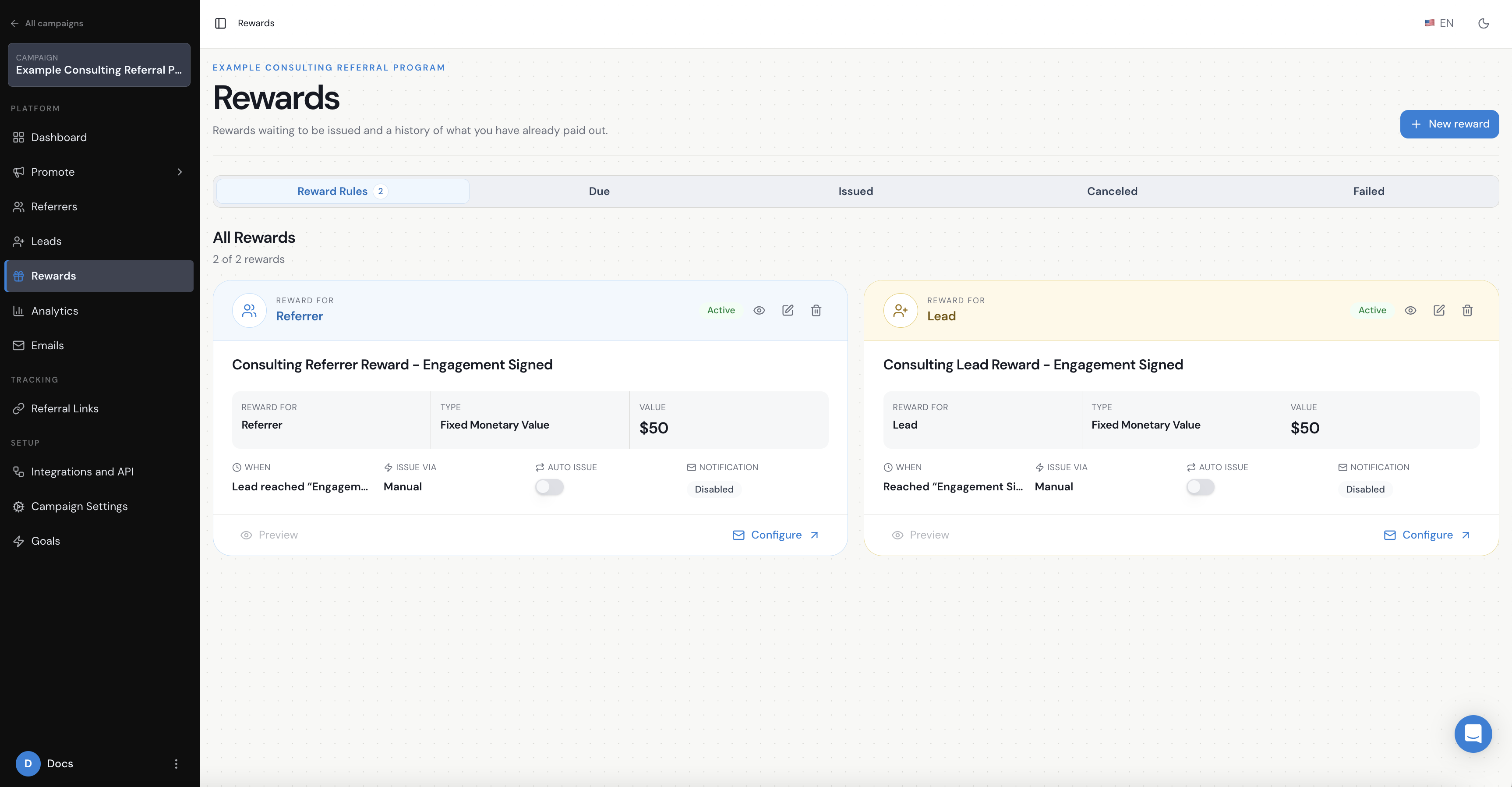
The example rewards trigger only when Engagement Signed is reached. That illustrates the difference between capturing an introduction, tracking progress and reaching the final reward condition.
- consultation booked;
- opportunity qualified;
- proposal sent;
- deposit paid; or
- engagement signed.
6. Decide how Referral Factory will know when the milestone happens
The milestone is the business action you want to track. These records are managed under Goals in Referral Factory.
The milestone and the method used to record it are separate decisions. First define the business event and the evidence that confirms the engagement is signed. Then choose how your systems will send or record that event in Referral Factory.
Depending on your systems, you may use:
Intermediate goals can help your team understand where referred opportunities are progressing or dropping out. For a small practice, one final qualification event may be enough.
- a CRM integration to map a deal stage to a goal;
- the API;
- an inbound webhook;
- an automation platform such as Zapier, Make or n8n; or
- manual qualification by your team.
7. Set up the reward after the engagement is signed
For example, the referrer could have a manual fixed-value reward tied to the Engagement Signed goal, with automatic issuance turned off.
This is only an example. You can reward the referrer, the new client or both. Depending on the commercial relationship, the reward might be a referral fee, account credit, gift card or another incentive. See How do I set up rewards for my referral program? for reward setup guidance.
Remember the difference between Due and Issued:
- Due means the reward has been created because the qualifying condition was met, but it still needs to be issued according to your process.
- Issued means the reward has been paid or delivered.
8. Test the full referral journey
Check that the referrer receives a unique link, the prospective client is captured and attributed correctly, the consultation or sales destination is correct, the Goals are recorded as intended, Engagement Signed is the only trigger for the example rewards, and no reward is Issued automatically unless that is intentional.
Important things to consider for accounting and consulting businesses
Keep the operational details short and decide how you will handle:
- existing clients or opportunities already in your CRM or practice-management system;
- duplicate introductions for the same company;
- self-referrals and conflicts of interest;
- referral ownership when several people introduce the same business;
- long sales cycles and staged contracts;
- confidentiality and the information appropriate to collect; and
- collecting only the information actually needed on the Referral Link Page.
The accounting or consulting example in one view
For example, an accounting or consulting referral program can use this structure:
Existing client or partner → Branded Referrer Portal → unique Referral Link → Referral Link Page → existing consultation and sales process → Consultation Booked → Opportunity Qualified → Engagement Signed → manual rewards become Due.
Use the same structure as a starting point, then change the audience, fields, sales destination, milestones and reward rules to match your own accounting or consulting business.