
Need help applying this to your account?
Contact support and we will keep this article attached to your request.
Overview
Referral Factory intentionally shows a Referral Link Page before sending a Lead to your website. This is not just a technical step. It helps you capture the Lead while their interest is fresh, keep them connected to the correct Referrer, preserve the trust and context of the recommendation, and continue the sales journey even if they are not ready to convert straight away.
After the Lead submits their details, you can show a thank-you page or redirect them immediately to your website, checkout, booking page, signup flow, or another destination.
Capture the Lead before they are ready to buy
Not every referral Lead will purchase, book, register, or speak to sales immediately. This is especially important for B2B businesses, SaaS, financial services, education, home services, and other businesses with longer sales cycles.
If the Lead submits their details on the Referral Link Page first, you have captured the referral opportunity even if they leave your website later without converting. You can then follow up or nurture the Lead through your normal CRM, sales, or marketing process where appropriate.
Keep the referral personal
Referral traffic is different from normal website traffic. The Lead has arrived because someone they know or trust recommended your business.
Instead of dropping them onto a generic homepage, the Referral Link Page can carry that context forward with your branding, the referral offer, and personalised information such as the Referrer’s name.
Example: “Jess thinks you’ll love Acme” or “Jess has invited you to get 20% off your first order.”
That gives the Lead a focused experience that explains why they are there and what to do next, without making them work it out from a general website homepage.
Preserve attribution between the Referrer and Lead
Each Referrer has a unique Referral Link. When the Lead submits the form on that Referral Link Page, Referral Factory records the Lead and associates them with the correct Referrer.
That relationship is established before the Lead continues to the rest of your website or sales journey. Referral Factory does not need third-party cookies or tracking pixels to work out who referred that Lead.
What does the Lead see after clicking a Referral Link?
The Lead first sees that Referrer’s personalised Referral Link Page. Depending on how you design it, the page can include:
Once the Lead submits the form, you decide what happens next: show a thank-you page or redirect them to another URL.
- your branding and referral offer
- the Referrer’s name or other referral personalisation
- a short explanation of what the Lead should do next
- the form used to capture the Lead’s details
- a clear call to action
Can I send the Lead to my website after they submit?
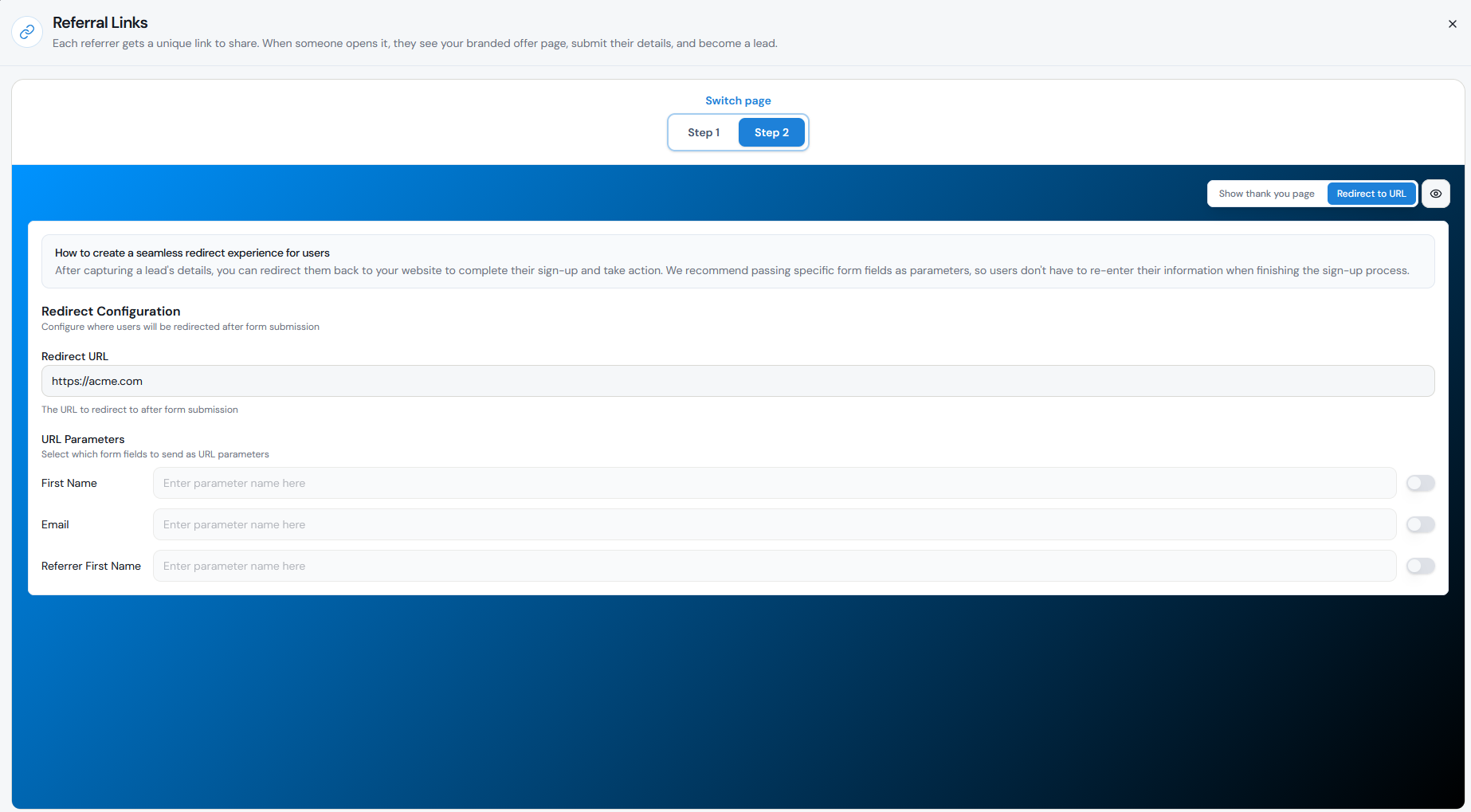
Yes. If you want the Lead to continue directly to your own website, checkout, booking page, signup flow, or another destination, configure a redirect on Step 2 of the Referral Link Page.
Go to Tracking → Referral Links and open the Referral Link Page editor.
You can optionally pass supported values such as First Name, Email, and Referrer First Name in the redirect URL. Your website can use these values to pre-fill information so the Lead may not need to enter the same details again.
The result is a short journey:
Step 1
Choose Redirect to URL.
Step 2
Enter the Redirect URL you want the Lead to visit.
Step 3
Optionally enable URL Parameters if you want to pass supported values to your website.
Step 4
Click Save.
Can a standard Referral Link skip the Referral Link Page?
With the standard Referral Factory Referral Link flow, the Lead does not bypass the Referral Link Page. That page is where the Lead is captured and the Referrer–Lead relationship is established.
If your priority is to get the Lead onto your website as quickly as possible, keep the Referral Link Page short: explain the offer, collect the minimum information you need, and redirect the Lead immediately after submission.
There are also other ways to create Leads when a journey does not use the standard Referral Link, for example the Lead Submission Form or adding Leads programmatically through the API. In every case, the Lead still needs to be associated with a Referrer for the referral to be tracked correctly.
How do I test the referral journey?
Before sharing your campaign, test the complete journey using a test Referrer and a new Lead email address.
If the redirect does not work: check that the destination is a complete URL including https://, confirm that you saved the Referral Link Page settings, and test the flow again in a private/incognito browser window.
Why this matters: A referral Lead may be interested today but only become a customer weeks or months later. Capturing their details first means you do not have to rely on an anonymous website visit turning into an immediate conversion.
Step 1
Open the Referrer’s unique Referral Link.
Step 2
Confirm that the correct Referral Link Page appears and that the personalised content looks right.
Step 3
Submit a test Lead.
Step 4
Check that the Lead appears in Referral Factory and is connected to the correct Referrer.
Step 5
Confirm that the Lead is redirected to the URL configured on Step 2.
Step 6
If you are passing URL parameters, confirm that the expected values reach your website correctly.