
Need help applying this to your account?
Contact support and we will keep this article attached to your request.
What is a referral page?
A referral page is a page designed to help someone take part in a referral program. It should make three things obvious: what the offer is, what the person needs to do, and what happens next.
What are the two types of referral pages?
Most referral programs have two different audiences, so they often need two different page experiences:
The two pages should feel connected, but they have different jobs.
- A referrer page helps someone make and manage referrals.
- A lead page helps someone respond to a referral they have received.
What is the Referrer-facing page?
The referrer page is built for the person making the referral.
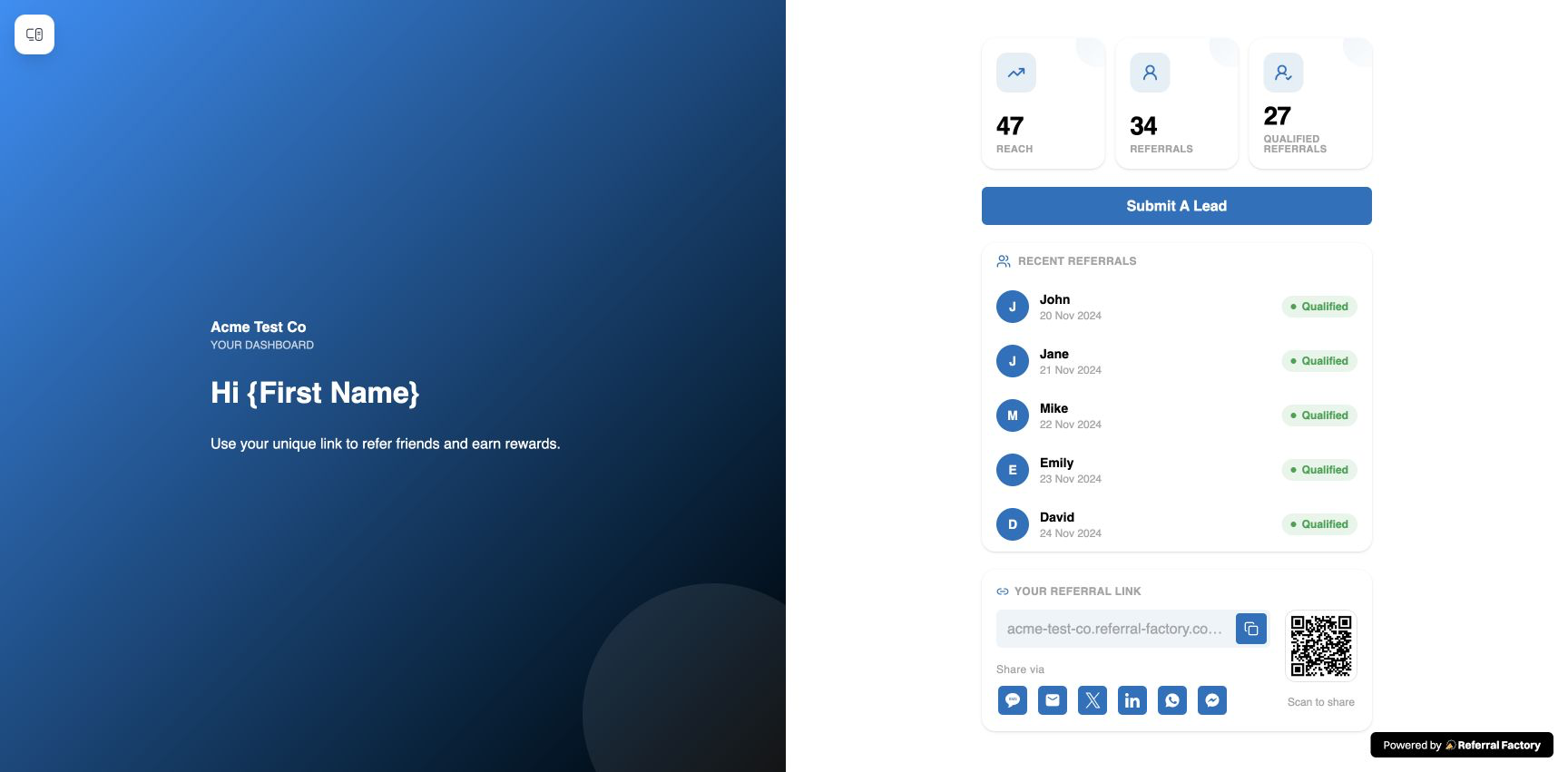
Its job is to make it easy for the referrer to understand the program, get their personal Referral Link, share it, and come back later to check their activity or rewards if needed.
A good referrer page might include:
In Referral Factory, the referrer-facing experience is created using the Branded Referrer Portal.
The portal can include separate Sign Up, Login and Dashboard pages, so you can create an experience that works both for new referrers joining your program and existing referrers coming back to share again.
- a clear explanation of the referral offer;
- the reward or benefit for referring, where applicable;
- a short explanation of how the program works;
- the referrer’s personal Referral Link;
- sharing options;
- a QR code for in-person referrals;
- referral activity or progress; and
- reward information, where configured.
What is the Lead-facing page?
The lead page is what someone sees after they click a referral link.
Its job is to carry the context of the referral forward and make the next action clear.
A good lead page should quickly answer:
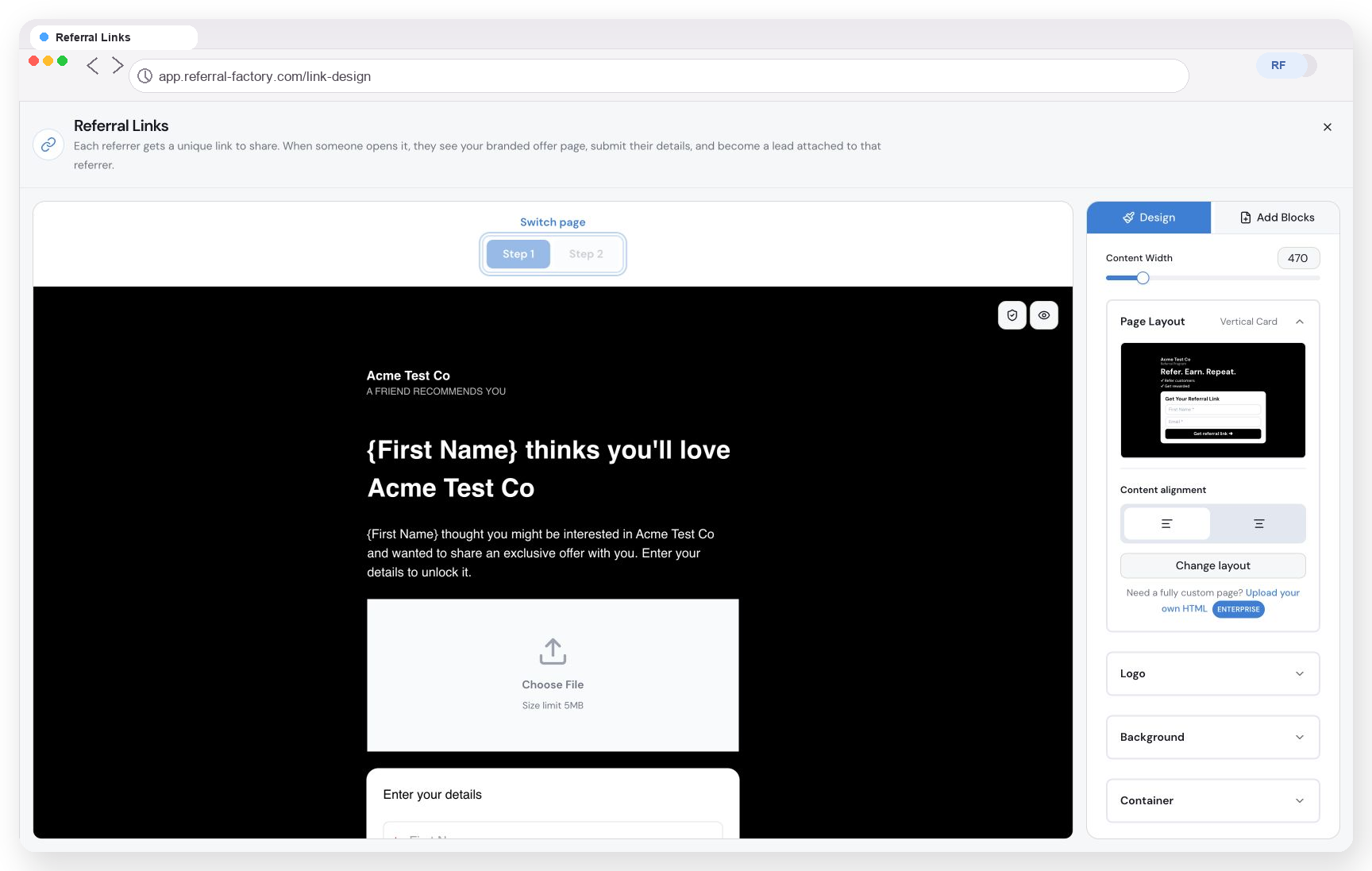
In Referral Factory, this is the Referral Link Page.
You can use it to explain the offer, personalise the referral experience, collect the lead’s details and then guide them to the next step.
- Who is this from?
- What am I being offered?
- Why should I take action?
- What do I need to do?
- What happens afterwards?
Capture the Lead before they are ready to buy
A referral lead may be interested without being ready to buy, book, subscribe or speak to sales immediately. That is common for B2B businesses, services, SaaS, financial services and businesses with longer sales cycles.
If the lead submits their details on the Referral Link Page first, the business has captured the referral opportunity even if the lead is not ready to convert that day. Where appropriate, the business can then follow up or nurture the lead through its normal sales, CRM or marketing process.
Sending referral traffic straight to a generic homepage can lose that opportunity if the lead browses and leaves without submitting details. This is not a guaranteed conversion advantage; it is a way to capture interest earlier and keep the next step clear.
Keep the trust of the referral
Referral traffic is also different from normal website traffic. The lead arrived because someone they know or trust recommended the business. A dedicated page can preserve that context with:
For example:
Jess thinks you’ll love [Business Name].
or:
Jess has invited you to get 20% off your first order.
That context reinforces the recommendation and can make the page feel more trustworthy than a generic homepage.
- the referrer’s name;
- personalised referral copy;
- the specific referral offer; and
- a clear explanation of why the lead is seeing the page.
Give the Lead a more focused experience
A homepage has to serve many audiences and goals. A dedicated referral page can focus on who referred the lead, what the offer is, why the lead should act, what information is needed and what happens next. That can create a more focused and relevant experience than a generic homepage while preserving the context and trust of the referral.
For the lead, that means they don’t have to land on a general homepage and work out where to go next. The referral page can show them the offer, explain why they’ve been invited and give them one clear next step.
Keep the Lead connected to the Referrer
In Referral Factory, the lead’s details are captured when they submit the form on the Referral Link Page. The unique Referral Link keeps the lead connected to the correct referrer, even if the lead does not convert immediately. The high-level journey is:
capture the lead now → preserve who referred them → continue the sales journey → qualify or reward later when the required action happens.
See the separate guide What Happens After A Lead Clicks a Referral Link? for the detailed click, attribution, submission and qualification mechanics.
What should a referral page include?
There isn’t one perfect referral page template for every business, but the strongest pages usually contain the same core elements.
What should the headline and offer say?
The visitor should understand the offer without having to read the whole page.
For example:
Give 20%, Get 20%
Invite a business. Earn account credit.
You’ve been referred — get an extra 14 days free.
Avoid vague headlines like “Welcome to our referral program” if the real benefit can be stated more clearly.
Tell people what they get and what needs to happen.
If the referrer earns a reward only once the lead becomes a paying customer, say that.
If the lead receives a discount, free trial, consultation, account credit or another benefit, make that easy to understand.
Not every referral program needs a reward. If yours doesn’t, explain why participating is still valuable.
How should the process and CTA work?
You usually don’t need a long explanation.
A short three-step flow is often enough:
For the lead, the steps may be even simpler:
The CTA should tell the person exactly what to do.
For a referrer, that could be:
For a lead:
Try not to make several buttons compete for attention.
- Get My Referral Link
- Start Referring
- Share My Link
- Claim My Offer
- Start My Free Trial
- Book a Consultation
- Get Started
Step 1
Share your Referral Link.
Step 2
Your lead takes the required action.
Step 3
The referral progresses according to your program rules.
Step 4
Enter your details.
Step 5
Continue to the next step.
Step 6
Receive the offer when the requirements are met.
How much information should the form collect?
Every additional field adds friction.
If all you need to start the referral journey is a name and email address, don’t ask the lead to complete a ten-field form.
For a B2B referral, you may need additional information such as company name or a work email. The form should match what your business genuinely needs at that stage.
How should the page build trust?
A referral page should clearly feel like it belongs to your business. Use your logo, colours, typography, images and normal brand voice so the lead feels confident they are in the right place.
The referrer page and lead page don’t need to look identical, but they should clearly belong to the same business and referral program.
What should happen after the CTA?
Don’t leave people wondering what happens after they click the button.
Tell them whether they will:
That small bit of clarity can make the whole experience feel more trustworthy.
- see a thank-you page;
- continue to another page on your website;
- start a trial;
- make a purchase;
- book something; or
- hear from your team.
Make the benefit obvious
A good referral page is usually focused rather than complicated.
The person should be able to understand the page in a few seconds.
Don’t bury the referral offer halfway down the page.
The headline and opening copy should explain why the person should care.
Design the page for one audience
Your referrer and your lead are doing different things.
A referrer needs to know how to refer.
A lead needs to know why they should take the next step.
Trying to explain both journeys on the same page usually makes the message less clear.
Remove unnecessary friction
Make Referral Links easy to find. Keep forms as short as possible. Don’t add steps just because the page builder allows you to.
Every element should help someone move forward.
Design for mobile
Referral Links are often shared through messaging apps, social media, email or QR codes, so many leads will open them on a phone.
Always check that:
- the headline is readable;
- the CTA is obvious;
- forms are easy to complete;
- Referral Links can be copied; and
- sharing controls work comfortably on a small screen.
What should a Referrer page look like?
Here’s a simple example.
Share something useful. Earn account credit.
Refer another business using your personal link. When your referral meets the program requirements, you’ll earn account credit.
Your Referral Link is unique to you.
Send it by email, message, social media or QR code.
Come back to see your referral activity and rewards.
Copy My Referral Link
Below that, you could show sharing buttons, the referrer’s QR code, recent referrals and reward information.
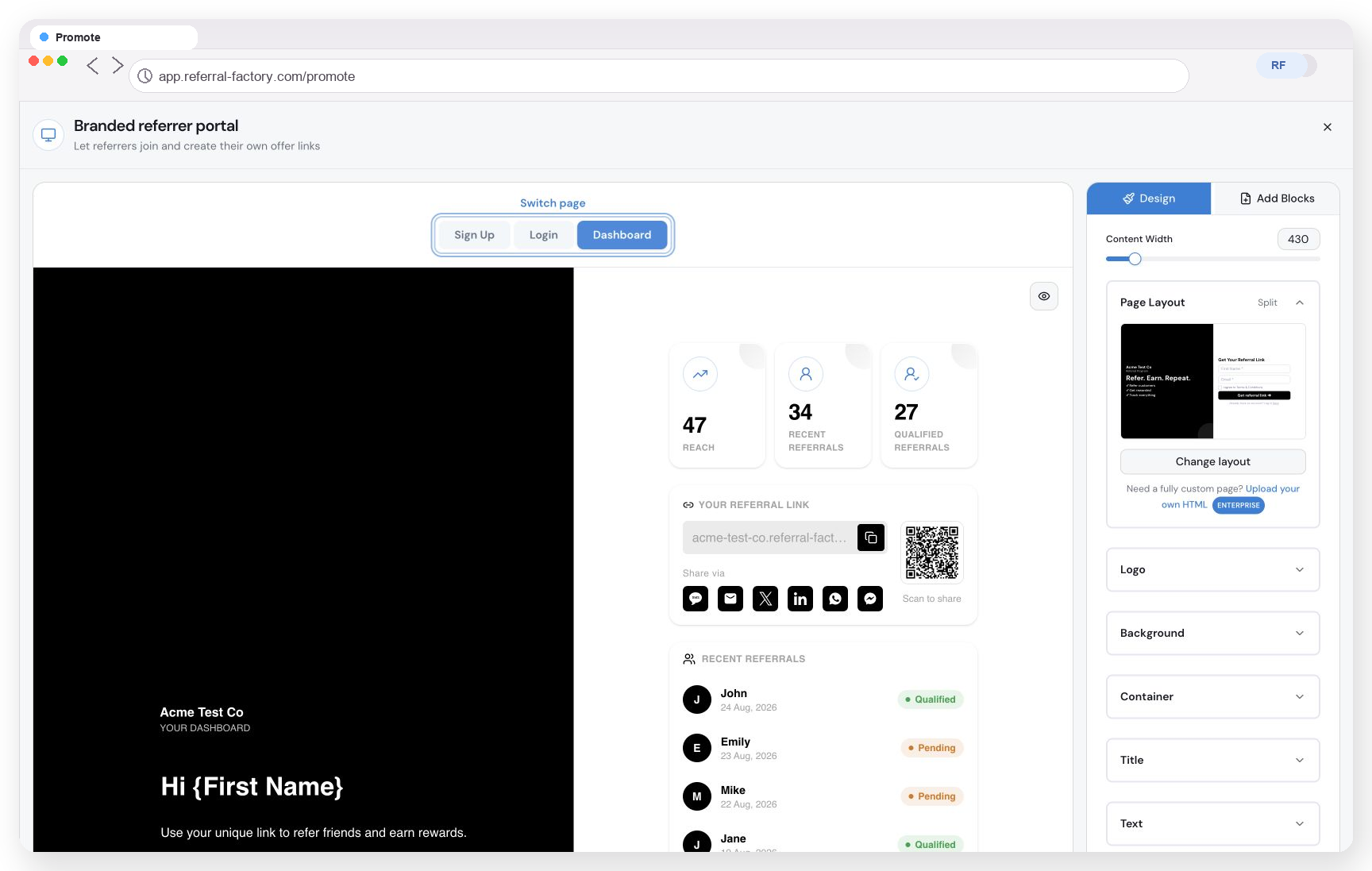
Referral Factory’s Branded Referrer Portal lets you build this type of referrer experience and decide what information and sharing options your referrers can access.
Step 1
Copy your link
Step 2
Share it
Step 3
Track your referrals
What should a Lead page look like?
The lead-facing page should be even more focused.
For example:
Jess thinks you’ll love [Business Name]
Get 20% off your first order when you sign up through this referral.
First name
Email
Claim My 20% Off
After submitting, the lead continues to the next step in the customer journey.
Referral Factory’s Referral Link Page is built for this part of the experience. It can show personalised referral content, collect the lead’s information and then move them to the next stage you have configured.
The basic structure stays similar, but the offer and next action will depend on your business.
B2c or ecommerce
A retail business might offer:
Give 15%, Get 15%
The referrer shares their Referral Link. The lead receives a discount on their first purchase, while the referrer earns their reward once the required purchase has been completed.
The lead page should focus heavily on the offer and make it easy to continue shopping.
SaaS
A SaaS business might offer:
Give your lead an extended trial. Earn account credit when they become a customer.
The lead page could explain the product briefly and use a CTA such as Start My Free Trial.
In this case, getting the lead into the product may matter more than collecting lots of information upfront.
B2b or professional services
A professional services business might not use a discount at all.
The referral offer could instead be:
Know another business that could use our help? Introduce us.
The lead page could explain the service, establish trust and use a CTA such as Request a Consultation.
A B2B form may reasonably ask for a little more information, such as company name and work email, because the next step is usually a sales conversation.
How do I create referral pages in Referral Factory?
Referral Factory lets you create both sides of the referral journey.
How do I create the Referrer-facing experience?
Use the Branded Referrer Portal to create the pages your referrers use. Open Promote → Branded Referrer Portal.
You can build the experience around Sign Up, Login and the referrer’s Dashboard.
Think about what the referrer actually needs when designing the portal:
Keep the most important actions easy to find.
- How does the program work?
- Where is their Referral Link?
- How should they share?
- Do they need to see referral activity?
- Do they need reward information?
How do I create the Lead-facing experience?
Use the Referral Link Page to design what a lead sees after clicking a Referral Link. Open Tracking → Referral Links.
The first part of the page should explain the referral offer and collect any information you need from the lead.
You can then configure what the lead sees or where they go after submitting their details. The current editor uses Step 1 for the lead-facing page and Step 2 for the post-submission experience, such as a thank-you page or redirect.
The Referral Link Page editor uses Design and Add Blocks controls. Use them to build the page around your offer and brand, without adding blocks that do not improve the journey.
How do I preview my referral pages?
Check the desktop, tablet and mobile views.
Pay particular attention to forms, Referral Links, sharing controls and your main CTA.
How do I test my referral pages before launch?
Don’t only preview the pages. Test the full referral journey.
Use a test referrer and lead and follow the same steps a real customer would:
This is the best way to spot confusing copy, unnecessary steps or gaps between the referrer and lead experience before you launch.
Step 1
Join or access the referrer experience.
Step 2
Find the referrer’s personal Referral Link.
Step 3
Copy or share the link.
Step 4
Open the link as a lead.
Step 5
Check the Referral Link Page.
Step 6
Submit the lead’s details.
Step 7
Confirm that the correct next step happens.
Step 8
Check that the lead is connected to the correct referrer.
Step 9
Test any relevant qualification or reward steps.
Step 10
Repeat the important parts of the journey on mobile.