
Need help applying this to your account?
Contact support and we will keep this article attached to your request.
Overview
Use a Monday.com change to mark a campaign referral as qualified
In Referral Factory, qualifying a lead means confirming that the referral reached the point your business counts as successful. Monday.com can provide that signal when a property changes or when the Monday item moves to a group or board you choose.
What does it mean to qualify a Lead in Referral Factory?
Qualification is the point at which Referral Factory marks a referral as successful according to your campaign rules. It is different from merely sending the lead to Monday.com.
How does automatic Qualification with Monday.com work?
The lead enters Referral Factory and keeps its referrer attribution. When the selected condition is met on the lead’s Monday.com item, Referral Factory can mark the referral as qualified.
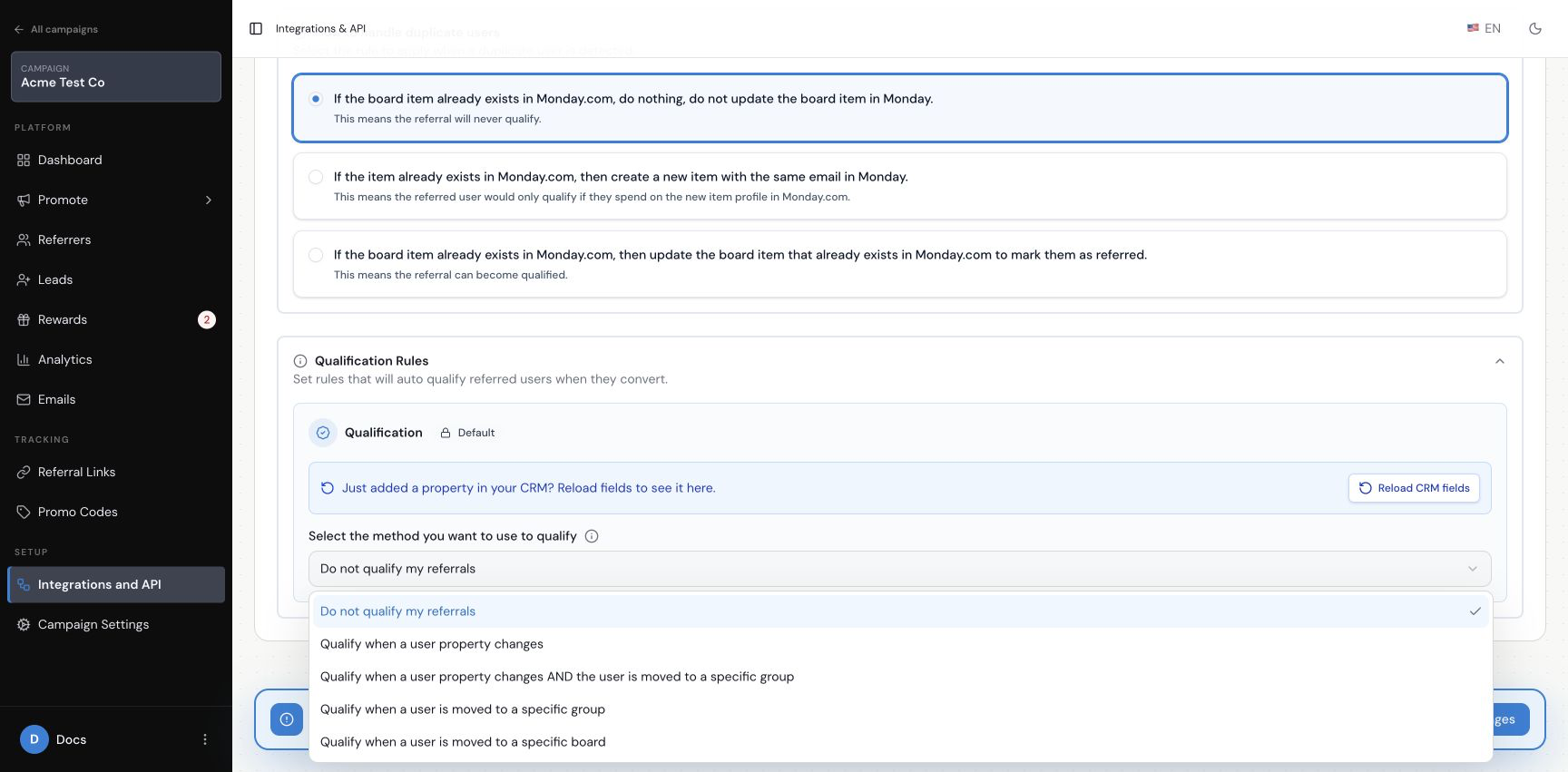
How do I choose between property, group and board Qualification rules?
Property change: qualify when a selected Monday.com property changes.
Property change and group movement: require both conditions.
Group movement: qualify when the item moves to a selected group.
Board movement: qualify when the item moves to a selected board.
The interface also includes Do not qualify my referrals. Choose the rule that matches how your team marks a lead as successful.
How do I qualify a referral when a Monday.com property changes?
Choose the property-change rule, then select the property to watch. The current choices include Name, Email, Accounts, Deals, Phone, Type, Comments and Leads. Select the change your team uses to identify a successful referral, then save the rule.
How can I require both a property change and a move to a specific group?
Choose the combined property-and-group rule. Select the property and the group to watch. Referral Factory waits for both conditions.
How do I qualify a referral when a Monday.com item moves to a group or another board?
For a group rule, choose the group that represents success. For a board rule, choose the board that should qualify the referral. The current board list includes Leads, Deals, Contacts, Accounts, Quotes & Invoices, Activities, Client Projects and Products & Services.
How does Referral Factory know which Monday.com item belongs to the Lead?
Referral Factory keeps the attribution from the referrer’s link and applies the qualification rule to the Monday.com item connected to that lead. If the condition is met but the referral does not update, use the troubleshooting guide.
How long does Monday.com Qualification take?
The update is processed after the selected Monday.com condition is reached. If a dummy lead does not update after you check the rule and the Monday.com item, use the troubleshooting guide or contact support.
What happens in Referral Factory after a Lead is Qualified?
Referral Factory marks the lead’s referral as qualified. The next step depends on the campaign’s reward rules.
Does qualifying a Lead trigger a reward?
Qualification can be the condition that makes a referral eligible for the campaign’s reward process, but qualification and reward setup are separate. Check the campaign’s reward rules before promising a reward.
How do I test automatic Qualification with Monday.com?
Step 1
Create one dummy lead and confirm it is present in Monday.com.
Step 2
Make only the change used by the rule.
Step 3
Check the lead in Referral Factory and confirm it is qualified.
Step 4
If the rule uses a referrer, confirm the correct referrer is attached.