50% off

Half price through October on Basic and Pro plans. New customers only. See pricing

Back to Help Hub
AnalyticsGuide3 min readUpdated 2026-09-29

How Do I Find Out Who Referred a Specific Lead?

Find the referrer connected to a lead using the Referred By column in the Referral Factory Leads view.

Send this article context to support so a human can pick up quickly.
Browse topics and support
Navigation

Topics

Article

On this page

Support

Ask AI

Ask a product or setup question without leaving this page.

Need human help?

Still stuck?

If this article does not solve the problem, send the context to support or book time with a human.

We will keep the article or page context with your request so support can respond faster.
Need help applying this to your account?

Contact support and we will keep this article attached to your request.

Overview

You can find the referrer connected to a lead in the Referred By column in Referral Factory’s Leads view.

How do I find who referred a lead?

1. Open Leads in Referral Factory.
2. Find the lead you want to check.
3. Look at the Referred By column.
4. Referred By shows the referrer that lead is attributed to.
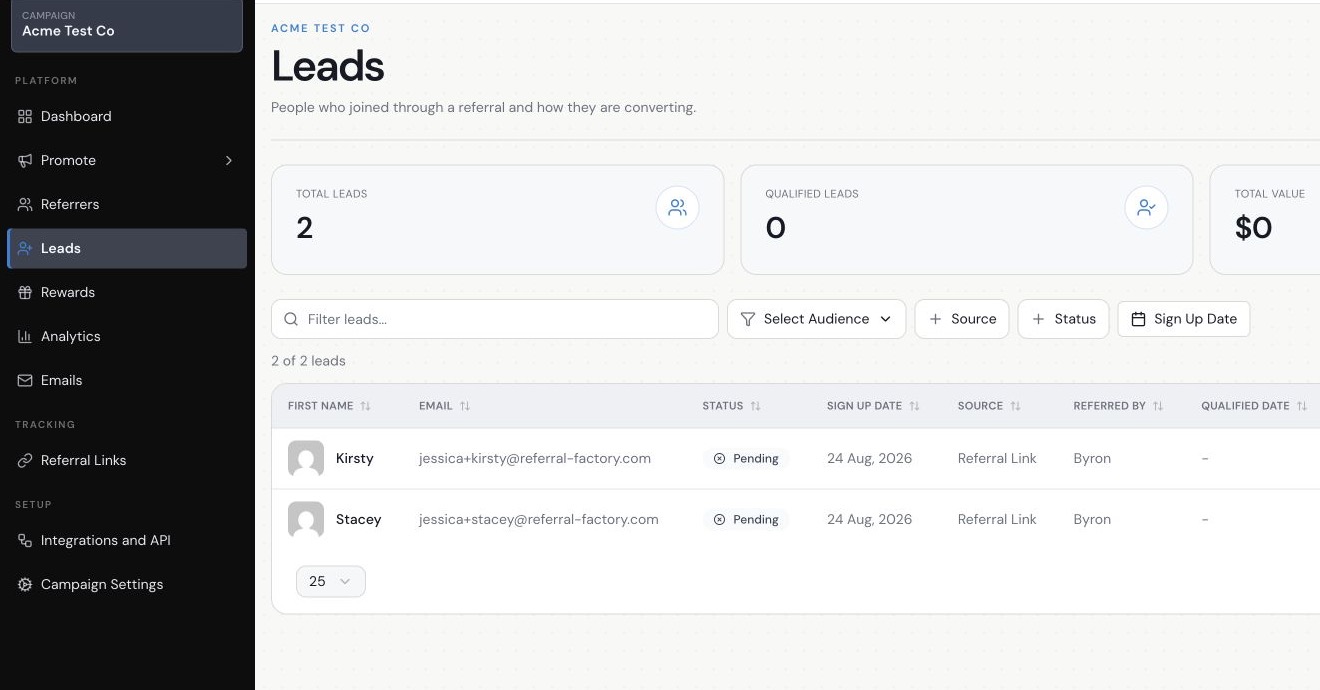
Referral Factory Leads view showing the Referred By column
The Referred By column identifies the referrer connected to each lead.

What does Referred By mean?

Referred By shows the referrer Referral Factory has connected to that lead through the campaign’s attribution flow.
The Leads view can also show useful context such as:
If you want to understand how the lead-to-Referrer relationship was created, read How Does Referral Attribution Work in Referral Factory?
  • Source
  • Status
  • Qualified Date
Still need help?

Send this article to support

A human can review the article you were reading and help with the exact next step.

Article feedback

Did this answer your question?

Your vote helps support spot weak articles, fix missing steps, and decide when a person should step in.