
Need help applying this to your account?
Contact support and we will keep this article attached to your request.
Overview
Yes. Someone who originally joined your campaign as a Lead can also become a Referrer.
This is useful when a referred customer has had a good experience with your business and you now want to give them their own Referral Link so they can start referring other people.
There are several ways to do this in Referral Factory.
Can a Lead also be a Referrer?
Yes. A person can first enter the campaign as a Lead through someone else's Referral Link and later also participate as a Referrer.
Their Lead record tracks how they were originally referred, while their Referrer record gives them their own Referral Link and lets Referral Factory track the people they refer.
For example:
Sarah refers James → James joins as a Lead → James later becomes a Referrer → James shares his own Referral Link with other people
This allows referral activity to continue beyond the first generation of referrals.
Ways to make a Lead a Referrer
You can make an existing Lead a Referrer in three main ways.
Send the person to your Branded Referrer Portal. They can register as a Referrer and receive their own Referral Link.
This works well if becoming a Referrer is part of the normal customer journey and you want customers to enroll themselves.
You can also add the person directly from the Referrers section of your campaign.
This is useful when your team wants to enroll a specific customer as a Referrer rather than asking them to sign up themselves.
When adding a Referrer manually, First Name and Email are required, along with any additional fields that you have made mandatory for Referrers.
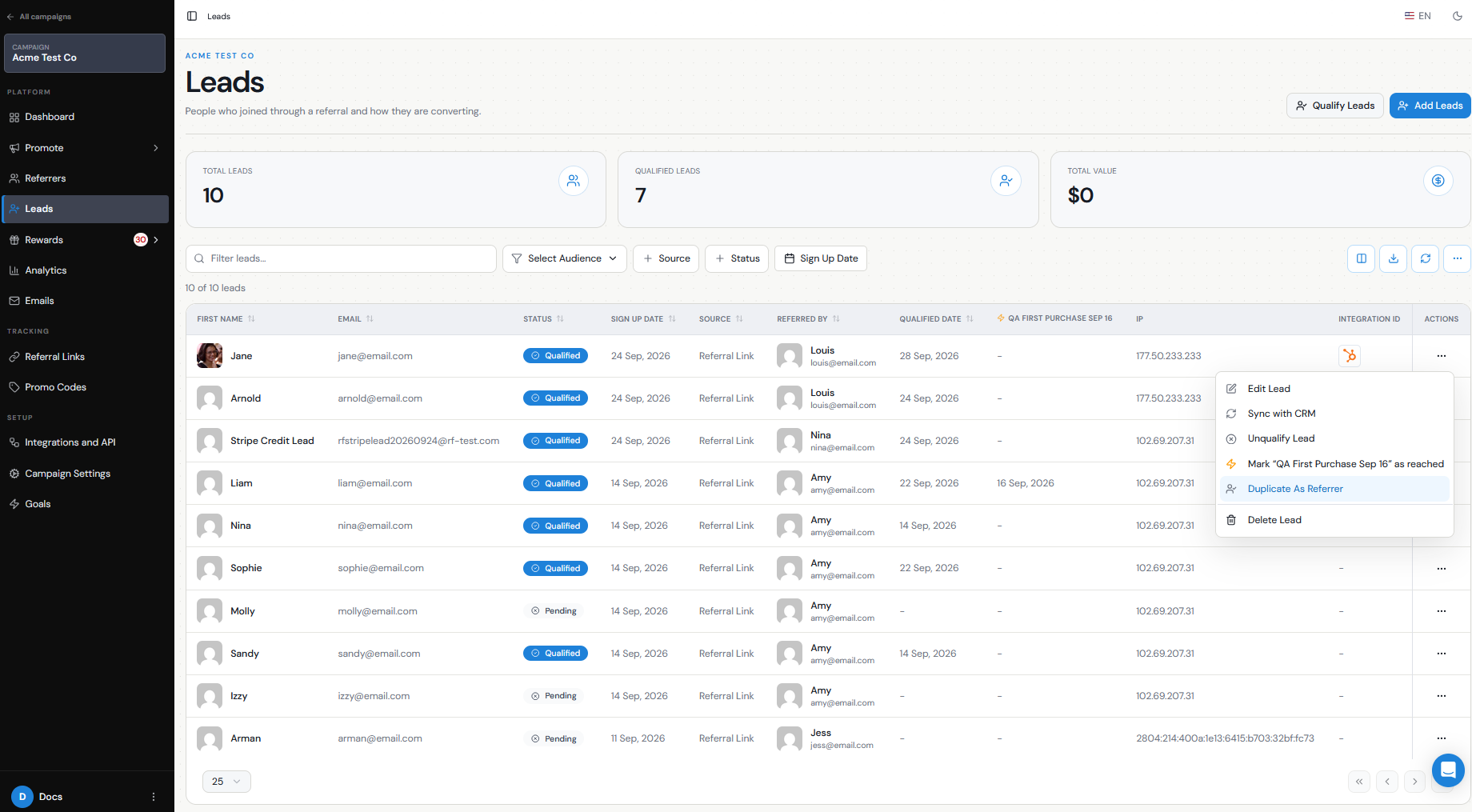
If the person already exists in the Leads section, you can create their Referrer record directly from their existing Lead.
This is often the quickest option because you are starting from the person's existing Lead record.
Step 1
Let them sign up as a Referrer
Step 2
Add them as a Referrer
Step 3
Duplicate the Lead as a Referrer
Step 4
Go to Leads.
Step 5
Find the person you want to make a Referrer.
Step 6
Open the Actions menu.
Step 7
Select Duplicate As Referrer.
Step 8
Complete the process to add them as a Referrer.
What happens to the original Lead?
Using Duplicate As Referrer does not replace the person's Lead record.
Their existing Lead record remains in the campaign so you can continue tracking:
Referral Factory also creates them as a Referrer so they can receive their own Referral Link and start referring new Leads.
This means the same person can participate on both sides of the referral journey: first as someone who was referred, and later as someone who refers others.
- Who originally referred them.
- Whether they are Pending or Qualified.
- Their original referral activity.
Which option should I use?
Use the Branded Referrer Portal when you want the customer to actively sign themselves up to participate.
Use Add Referrer when your team wants to enroll someone manually.
Use Duplicate As Referrer when the person is already visible in your Leads list and you want to quickly turn that existing Lead into a Referrer without entering their information again.
All three methods ultimately allow the person to become a Referrer and receive their own unique Referral Link.