
Need help applying this to your account?
Contact support and we will keep this article attached to your request.
You can use n8n to automatically mark a Referral Factory Lead as converted when a specific action happens in another system.
In Referral Factory, marking a Lead as converted means changing their status from Pending to Qualified. The native Referral Factory node in n8n includes a Qualify User action, so you can do this directly without building a custom API request.
How n8n can automatically qualify a Referral Factory Lead
Start your n8n workflow with the app or system where the conversion happens.
For example, you might qualify a Lead when:
Then:
Your workflow could look like this:
CRM Deal becomes Closed Won → n8n → Referral Factory Qualify User
Or:
Customer completes payment → n8n → Referral Factory Qualify User
- A Deal reaches a successful stage in your CRM
- A customer completes a payment
- An order is completed
- A specific form is submitted
- Your own application sends a conversion event
- Create a new workflow in n8n.
- Add the trigger node for the system where the conversion happens.
- Configure the trigger to run when your conversion condition is met.
- Add another node and search for Referral Factory.
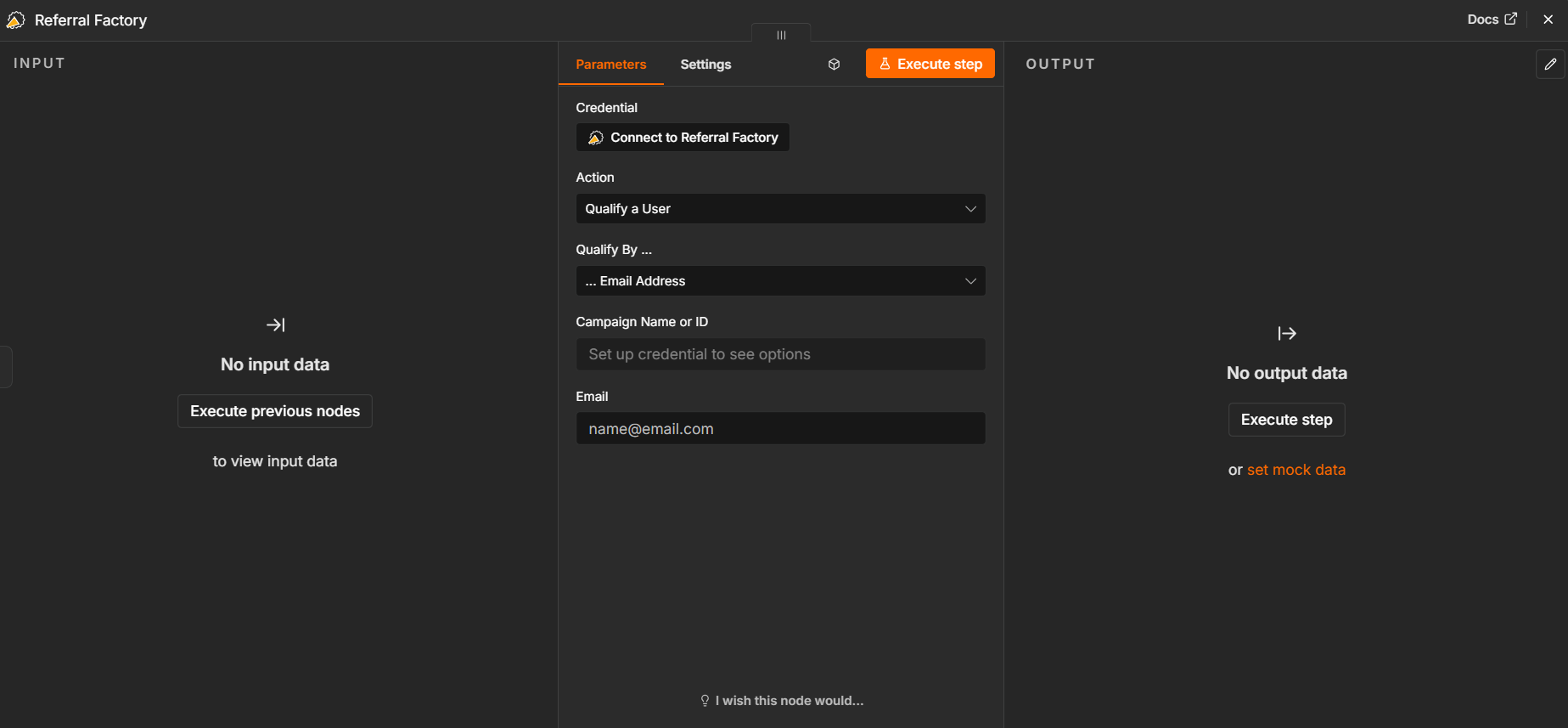
- Select the Qualify User action.
- Connect your Referral Factory account using your API Key when prompted.
- Choose how n8n should identify the Referral Factory Lead: Email Address, Referral Code, or Coupon Code.
- Map the corresponding value from your trigger node.
- Select the correct Referral Factory campaign.
- Test the workflow and confirm that the Lead changes from Pending to Qualified.
- Activate the workflow.
Which record/object and field/stage is monitored
The first node in your n8n workflow determines what event should count as a conversion.
If your conversion happens in a CRM, choose the record or object that contains the conversion information and configure the trigger around the field, status, or stage your business uses to identify a successful customer.
For example:
Deal/Opportunity → Stage changes to Closed Won
or:
Contact → Lifecycle Stage changes to Customer
If your conversion happens outside your CRM, the trigger could instead monitor something such as a successful payment, completed order, new spreadsheet row, or event received through a webhook.
The important part is that the trigger represents the action your business considers a successful referral. Referral Factory does not decide which CRM field or stage should count as converted in this workflow — you define that condition in n8n.
Mapping/identifier requirements
The Qualify User action supports three ways to identify the Referral Factory Lead:
Map the identifier from your trigger node to the matching field in the Referral Factory Qualify User action.
For example:
CRM Contact Email → Referral Factory Email Address
You must also select the correct Referral Factory campaign so the qualification is applied to the correct Lead.
The Lead must already exist in Referral Factory. The Qualify User action qualifies an existing Lead; it does not create a new one.
- Email Address — use this when the conversion source contains the Lead's email address. This is the most common option.
- Referral Code — use this when your system stores the Lead's referral code.
- Coupon Code — use this when the conversion is linked to a coupon code used by the Lead.
Timing
Qualification happens when the trigger condition in your n8n workflow is met and the workflow reaches the Referral Factory Qualify User action.
For example:
Lead joins Referral Factory → Deal is created in CRM → Deal later becomes Closed Won → n8n runs → Lead becomes Qualified in Referral Factory
This means you can qualify Leads at the point that makes sense for your business rather than when they first submit their details.
Once the workflow is active, n8n can process new qualifying events automatically.
Duplicate rules
The Qualify User action is used to update an existing Referral Factory Lead, not to create another Lead.
Make sure the identifier passed from n8n belongs to the correct Lead and that the correct campaign is selected.
If your source system can send the same conversion event more than once, configure your n8n trigger or workflow logic so that only the events you want to use for qualification continue to the Qualify User step.
When using email as the identifier, selecting the correct campaign is especially important when the same email address may exist across different campaigns.
Reward implications
Qualification can also affect rewards.
If your campaign has an active Reward Rule that is triggered when a referral qualifies, changing the Lead from Pending to Qualified causes Referral Factory to evaluate that Reward Rule.
Depending on your reward configuration, the reward can then appear as Due for review or be issued automatically if Auto Issue Rewards is enabled.
Qualifying a Lead and issuing a reward are therefore separate steps. A Lead can be Qualified while the associated reward is still waiting to be issued.
Testing
Before activating the workflow:
If the Lead is not qualified, check the n8n execution to confirm that the trigger ran successfully. Then verify the Referral Factory connection, campaign selection, identifier mapping, and that the Lead already exists in the selected campaign.
- Create a test Lead in your Referral Factory campaign and confirm that the Lead is Pending.
- Make sure the test Lead has the identifier you plan to use, such as an email address, referral code, or coupon code.
- In n8n, create the trigger that represents your conversion event.
- Add the Referral Factory Qualify User action.
- Connect your Referral Factory account using your API Key.
- Select the identification method you want to use.
- Map the identifier from the trigger node.
- Select the correct Referral Factory campaign.
- Trigger the conversion event in your source system.
- Run the workflow and confirm that the test Lead changes from Pending to Qualified in Referral Factory.
- If the campaign has a qualification-based Reward Rule, confirm that the expected reward is also created.
- Activate the workflow once the complete process works as expected.