
Need help applying this to your account?
Contact support and we will keep this article attached to your request.
Yes. You can build referral programs in different languages with Referral Factory. Each campaign has its own language setting, and the customer-facing copy on your referral pages and referral program emails can be edited to match that language.
Can I run a referral program in more than one language?
Yes, but each campaign uses one language at a time.
If you want to offer the same referral program in multiple languages, create a separate campaign for each language. For example, you could have one campaign in English, another in Spanish, and another in French.
Each campaign can have its own translated pages, emails, and campaign settings, so each audience gets a complete referral journey in their language.
We currently support these campaign languages:
- Arabic
- Armenian
- Bangla
- Chinese
- Danish
- Dutch
- English
- Finnish
- French
- German
- Greek
- Hebrew
- Hindi
- Hungarian
- Italian
- Japanese
- Korean
- Malay
- Norwegian
- Polish
- Portuguese
- Russian
- Spanish
- Swedish
- Thai
- Turkish
- Ukrainian
Which parts of the referral journey can I translate?
You can translate the customer-facing content throughout your referral journey.
This includes the copy you add to your:
- Referral Link Page
- Branded Referrer Portal
- Forms, buttons, and calls to action
- Referral program emails
- Other editable customer-facing content in your campaign
When you select a campaign language, we translate the supported system and hard-coded text into that language. You can then edit your own page and email copy to match.
Can referral pages and emails use different languages?
Yes. Your page copy and email content are edited separately, so you can write them in different languages if needed.
However, each campaign has a single Campaign Language setting. This controls the language used for supported system-generated and hard-coded text within that campaign.
If you want the entire referral journey to be consistently available in multiple languages, we recommend creating a separate campaign for each language rather than mixing languages within one campaign.
Can different campaigns use different languages?
Yes. Each campaign can use a different language.
For example, you could run:
- Campaign 1 in English
- Campaign 2 in Spanish
- Campaign 3 in Portuguese
Each campaign can have its own translated page copy, email content, and settings. This is the recommended way to run the same referral program for audiences who speak different languages.
How do I manage custom translated copy?
Start by setting the language for the campaign:
Step 1
Go to Campaign Settings.
Step 2
Under Campaign Basics, select the language you want to use.
Step 3
Save your changes.
Step 4
Open your referral pages and replace the editable copy with your translated content.
Step 5
Open your email templates and add the translated subject lines and email copy.
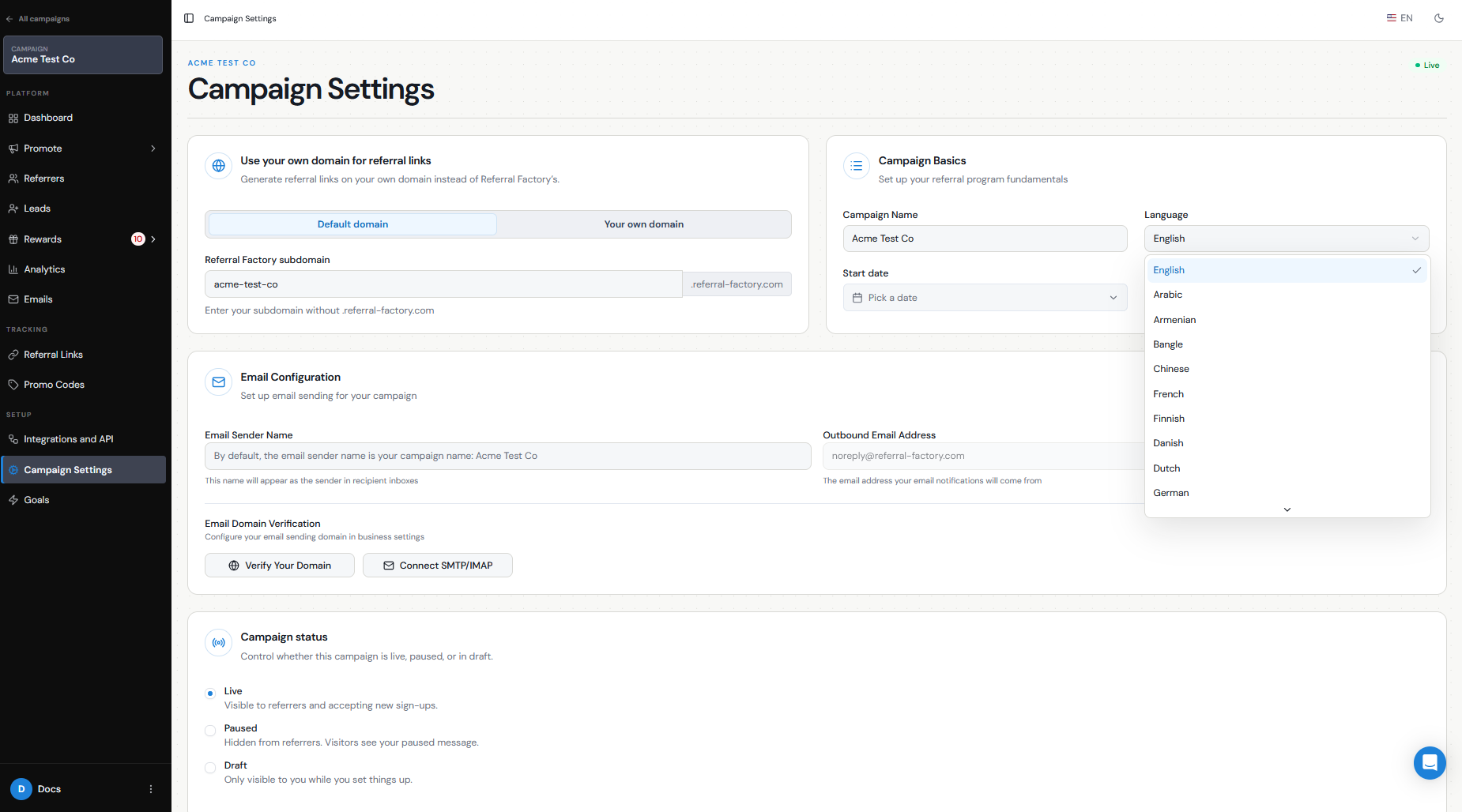
Selecting the campaign language translates the supported system and hard-coded text, but your custom copy is still managed by you. This means text you write for offers, headings, instructions, buttons, emails, and other custom content should be translated and edited in the relevant builder.
If you are running the program in several languages, create one campaign for each language and manage the translated copy separately in each campaign.