
Read this page as a quick path: scan the headings, use the step blocks, and escalate if the expected result does not happen.
Need help applying this to your account?
Contact support and we will keep this article attached to your request.
When a new referrer joins your campaign by signing up for a referral link, you can automatically create a corresponding contact in Intercom. This is configured separately from the lead sync.
Before you start
Connect Intercom in Campaign Settings → Integrations and API → CRM tab. See How to connect Intercom to Referral Factory for full instructions.
Step 1: Go to the Referrers tab
On the Intercom integration panel, select the Referrers tab. This tab controls what happens every time a new direct user joins your campaign.
Step 2: Choose an action
Under “When referrer joins campaign”, choose one of:
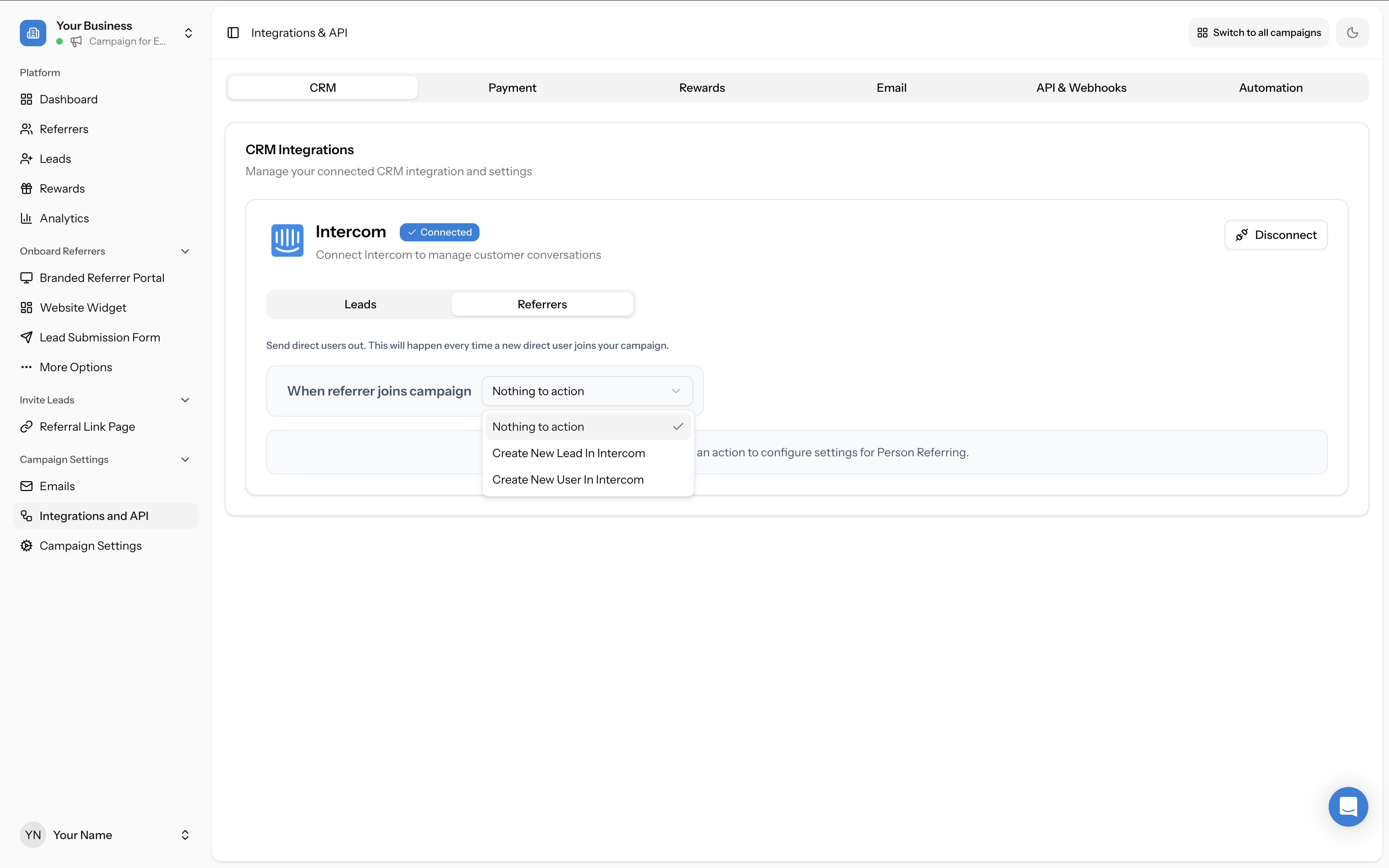
- Nothing to action — No contact will be created in Intercom
- Create New Lead In Intercom — Creates a new lead record in Intercom
- Create New User In Intercom — Creates a new user record in Intercom
Step 3: Map your fields
Map the Referral Factory referrer fields to Intercom fields, the same way you would for leads. The Email field is required. We recommend mapping a field for the referrer’s referral link if you plan to distribute referral links via Intercom.
Step 4: Handle duplicate contacts
Choose what happens when a matching contact already exists in Intercom — either skip duplicates or update the existing contact.