
Read this page as a quick path: scan the headings, use the step blocks, and escalate if the expected result does not happen.
Need help applying this to your account?
Contact support and we will keep this article attached to your request.
A custom domain lets you host your referral program on your own branded URL (e.g.
refer.yourbrand.com) instead of the default Referral Factory domain.How to set it up
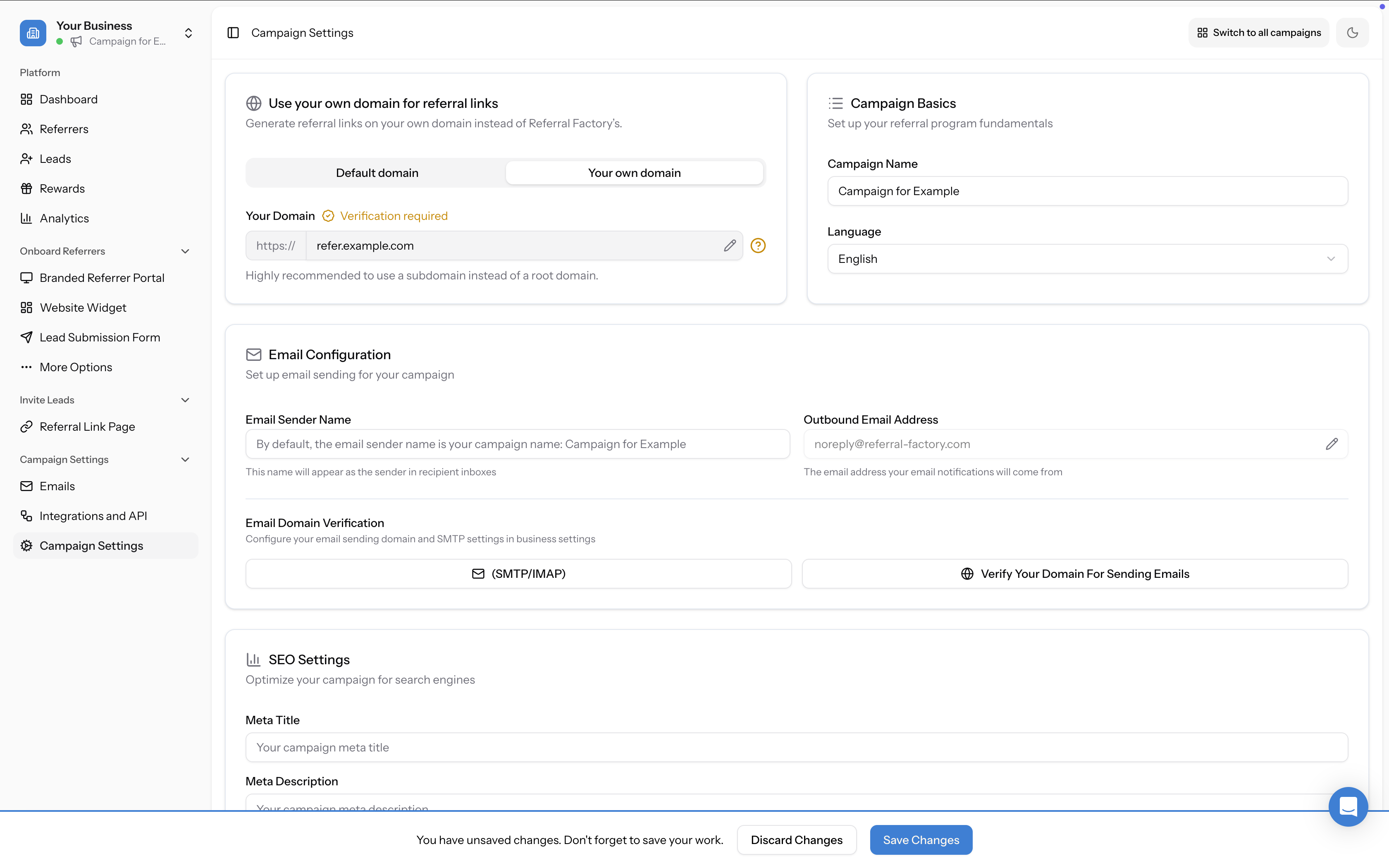
- Open Campaign Settings from the left sidebar (under Campaign Settings)
- At the top of the page, find the Use your own domain for referral links section
- Switch to the Your own domain tab
- Enter your subdomain in the domain field (e.g.
refer.yourdomain.com) - Click Configure — this opens a DNS Setup Instructions modal with step-by-step guides for your DNS provider
- In your DNS settings, add the CNAME record shown in the instructions:
- Host/Name: your subdomain (e.g.
refer.yourdomain.com) - Value/Points to:
redirect.referral-factory.com - Save your DNS changes and wait for propagation (usually 5–30 minutes, but can take up to 48 hours)
- Once verified, your referral links will use your custom domain
Platform-specific DNS guides
Referral Factory provides step-by-step CNAME setup instructions for the most common DNS providers:
- Cloudflare — set Proxy status to DNS only (not proxied)
- GoDaddy — add via My Products → DNS
- Namecheap — add via Domain List → Manage → Advanced DNS
- AWS Route 53 — add via Hosted zones → Create record
- Google Domains — add via DNS → Custom resource records → Manage custom records
- Other providers — generic instructions are included for any provider not listed
Important: use a subdomain, not your root domain
A very common setup error is entering your homepage domain (e.g.
yourdomain.com) instead of a subdomain (e.g. refer.yourdomain.com). The custom domain feature requires a subdomain. The setup screen notes this: "Highly recommended to use a subdomain instead of a root domain."Can I use different subdomains for different campaigns?
No. You can only have one custom domain per account. All campaigns under your account share the same custom domain.
What happens if I change my subdomain later?
Old links will still work. The old and new subdomains act as a mirror — so if someone uses a link with the old subdomain, it will still resolve correctly. All new links generated in your account will use the updated subdomain.
What about the default option?
If you don't use a custom domain, your referral links use a Referral Factory subdomain in the format
yourbusiness.referral-factory.com. You can customise the subdomain part in the Default domain tab of the same settings section.This is separate from your email sending domain
Setting up a custom referral link domain does not change where campaign emails come from. Those are two separate features. See: What's the difference between a referral link domain and an email sending domain?